Generate captions, optimize content, and enhance with custom images for maximum engagement.
46M visits/mo-10%#3 Image & Design

CLI tool for installing and managing reusable agent skills from a public skills pack
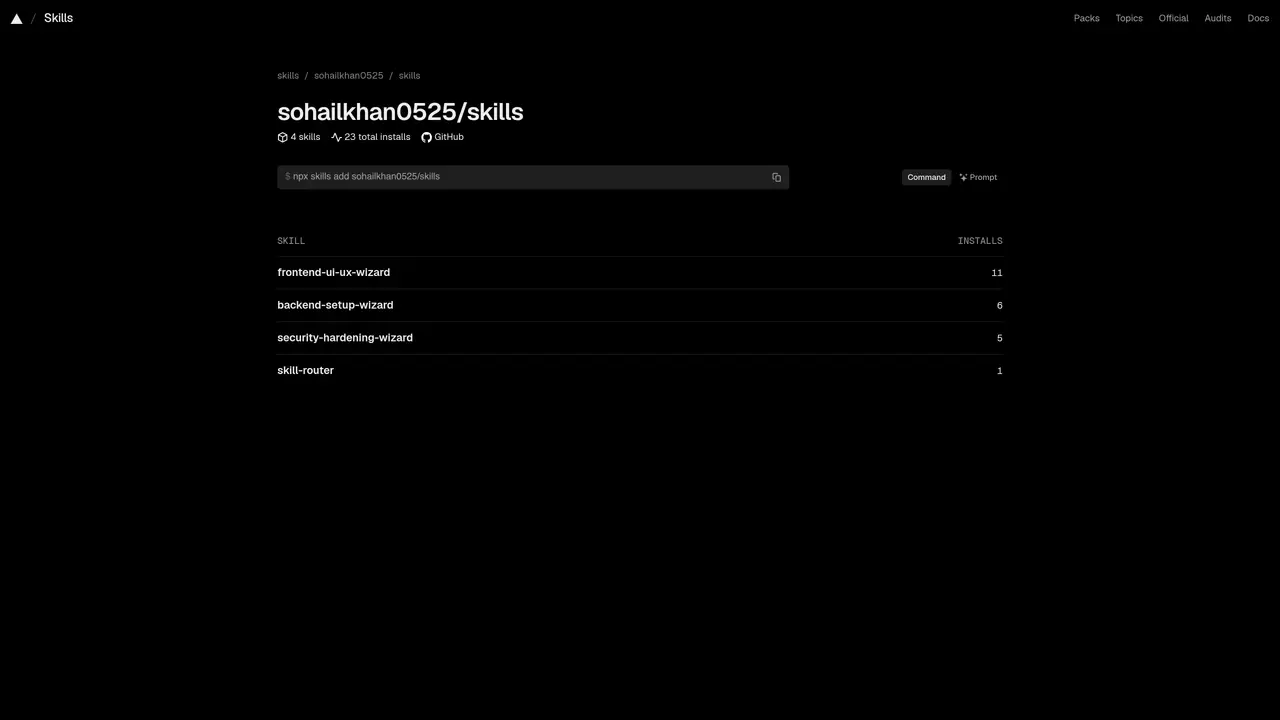
skills is a command-line utility that allows users to install and manage reusable agent skills from a public skills pack hosted on GitHub. The tool provides a structured way to add, browse, and organize skills for AI agents, with support for both official and community-contributed packs. It integrates with various AI development environments and agents, enabling developers to extend agent capabilities without building features from scratch. The skills are categorized by topics such as frontend, backend, security, and databases, making it easier to find relevant tools for specific tasks. The CLI command ‘npx skills add sohailkhan0525/skills’ demonstrates how skills can be installed directly from a GitHub repository. The project emphasizes open-source collaboration and provides documentation for customization, API usage, and project details.
Skills is a command-line utility designed to install and manage reusable agent skills from a public skills pack hosted on GitHub. It provides a structured way to add, browse, and organize skills for AI agents, supporting both official and community-contributed packs.
Skills is designed for developers and teams working with AI agents who want to extend their capabilities without building features from scratch. It is particularly useful for those who prefer a CLI-based workflow and open-source collaboration.
Skills can be installed and used via the command line using the command 'npx skills add sohailkhan0525/skills'. This installs the skills pack directly from GitHub, allowing users to start adding and managing skills immediately.
Skills are categorized by topics such as frontend, backend, security, databases, React, Next.js, design, mobile, agent workflows, testing, and marketing. This categorization makes it easier to find relevant tools for specific tasks.
Yes, Skills integrates with various AI development environments and agents, including Claude Code, Cursor, Codex, GitHub Copilot, Windsurf, Gemini Cline, AMP, Antigravity, and OpenClaw. This allows users to extend agent capabilities across different platforms.
Yes, Skills is an open-source project hosted on GitHub. Users can contribute to the skills pack, customize skills, and access documentation for API usage and project details.
skills.sh · third-party estimates from Similarweb
Last 4 months · grows by one month every month
Share of visits by channel
Share of visits · estimated visits
Other countries: 50.8%
How people reach this site from other AI tools
21K a month · 1% of all visits
Automation & Agents · Sep 2026
Traffic figures are third-party estimates, good for scale and trends; they can differ from a company's own numbers. Updated monthly.
We use essential cookies to run aitoolnavio™, and optional cookies to analyze traffic and measure our marketing. You choose what we use — optional cookies stay off unless you turn them on. See our Privacy Policy.
One short email a week: fresh tools worth trying, honest takes and the updates that actually matter. No spam, unsubscribe any time.
Generate captions, optimize content, and enhance with custom images for maximum engagement.
Build conversational forms, capture rich responses, and automate follow-ups with AI-powered surveys and workflows.
Automate code, research, and documents using agents.
AI-powered IDE for autonomous coding tasks and agentic development workflows
Source, match, and manage talent with predictive analytics for effortless recruiting.
Automate workflow, optimize operations, and detect potential issues with this efficient AI-driven solution.
Transforms thoughts into actions, enhancing productivity and efficiency.
AI Recruitment engine to hire top global talent
All-in-one team productivity platform combining chat, docs, video meetings, workflows, and AI tools in one place.
Personal assistant that coordinates tasks across apps and devices via text or call
AI automation and agent-building platform with 3,000+ app integrations
AI job search copilot that matches roles to skills, optimizes resumes for ATS, generates cover letters, and autofills applications with real-time insights.
Matched on what this tool does — grouped by the job you would be replacing.
matches CLI tool for installing skills · Browsing and filtering skills by topics · Support for official and community packs
Unified MCP gateway connecting AI clients to apps, skills and knowledge
Directory for discovering and installing MCP servers for AI agents
matches Integration with AI agents like Claude Code and Cursor · Customizable agent workflows
Self-hosted platform for managing a fleet of AI agents with task delegation
Multi-agent orchestration with skill routing, parallel execution, and memory-driven coordination
Open-source framework to build, orchestrate, and scale custom AI agents with tools, memory, and multi-agent systems.