

Cloud accounting software that automates bookkeeping, invoicing, and financial reporting for small and growing businesses.
36M visits/mo+0.9%#4 Business & Marketing
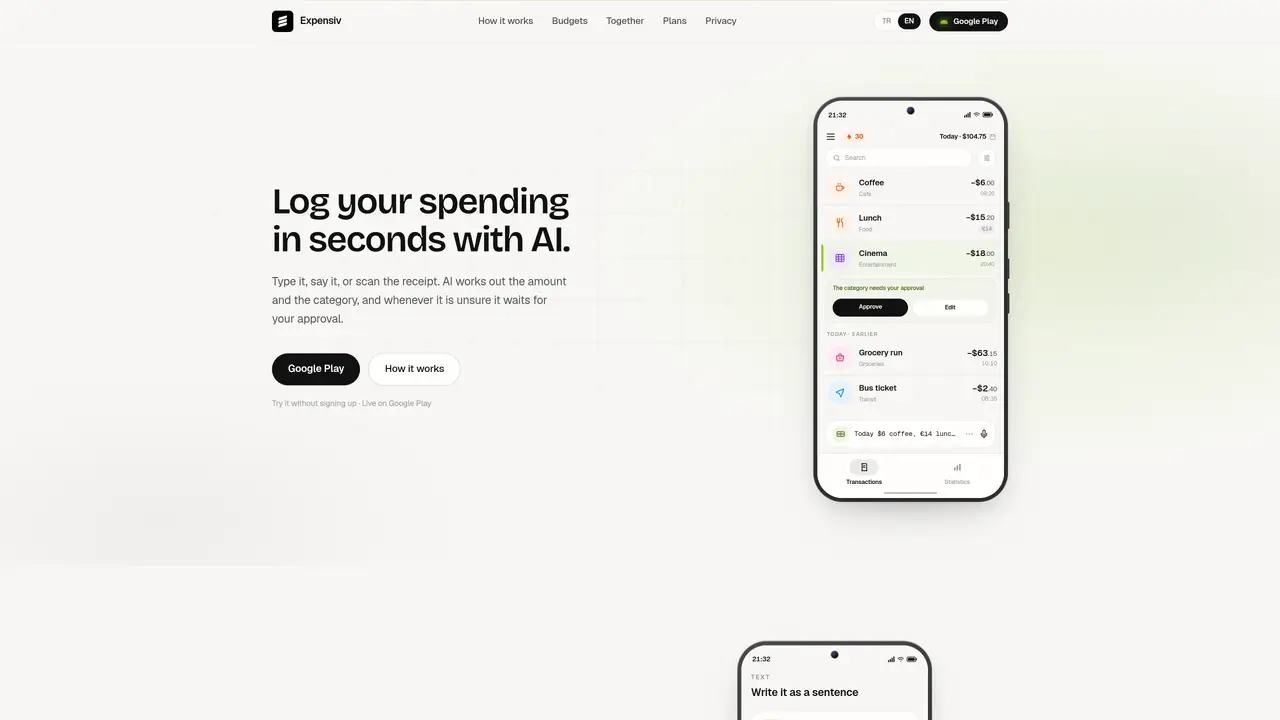
Expensiv is a mobile application that records personal and shared expenses through multiple input methods including typing, voice commands, receipt scanning, or uploading bank statements. The app uses artificial intelligence to automatically detect amounts and categories, but defers uncertain entries for user approval. Users can set daily, weekly, monthly, or per-category budget limits and tag expenses by need, want, gift, or investment. The app provides spending statistics, unusual spending alerts, and a logging streak counter. A shared balance feature allows couples to track joint expenses while keeping personal entries private. Pro features include managing events, subscriptions, installment plans, and personal debts within the same interface.
Expensiv is a mobile app that logs personal and shared expenses through text, voice, receipt scanning, or bank statement uploads. It uses AI to automatically categorize and convert amounts while flagging uncertain entries for user approval.
The app suits individuals tracking personal spending, couples managing joint expenses, or anyone organizing shared events, subscriptions, installments, or debts within a single interface.
Download the app from Google Play, create an account, and begin logging expenses by typing, speaking, scanning receipts, or uploading bank statements. Shared features require an invite code to connect with another user.
Yes, the app handles over 70 currencies, allowing users to log expenses in different currencies within the same entry while converting summaries for statistics.
Users can set daily, weekly, monthly, or per-category budget limits, tag expenses as needs, wants, gifts, or investments, and receive alerts for unusual spending or budget overruns.
Pro features extend beyond daily logging to include managing events, subscriptions, installment plans, and personal debts, alongside advanced budgeting and approval controls.
We use essential cookies to run aitoolnavio™, and optional cookies to analyze traffic and measure our marketing. You choose what we use — optional cookies stay off unless you turn them on. See our Privacy Policy.
One short email a week: fresh tools worth trying, honest takes and the updates that actually matter. No spam, unsubscribe any time.
Cloud accounting software that automates bookkeeping, invoicing, and financial reporting for small and growing businesses.
AI-powered budgeting companion that auto-categorizes spending, forecasts expenses, and offers conversational guidance within YNAB’s trusted zero-based system.
A bookkeeping automation platform that captures receipts, invoices, and statements, extracts data, and syncs to accounting software for SMBs and accounting firms.
Send money globally, track payments, and save with competitive rates and low fees.
AI market intelligence platform that turns natural-language queries into analyst-grade insights with real-time monitoring and AI-generated summaries.
Revolutionize planning: Connect, model, and forecast across all business areas.
AI-powered real estate platform for finding deals, analyzing properties, and building investor workflows with nationwide data and predictive analytics.
AI-powered terminal for researching global stocks with financial data, AI summaries, KPIs, filings, and portfolio dashboards.
Trendspider is a sophisticated all-in-one market research and trading software designed to enhance the trading strategies of investors and traders.
Develop, backtest, and analyze trading strategies with drag-and-drop builder, extensive data sources, and real-time market data.
Stock market data API delivering real-time prices, fundamentals, and news for financial modeling and trading applications.
Zocks is an AI assistant for financial advisors that automates meeting notes, client emails, forms, and CRM updates.
Matched on what this tool does — grouped by the job you would be replacing.
matches Text and voice expense logging · Receipt scanning and bank statement upload
AI receipt scanner and expense tracker that extracts receipt data, auto-categorizes spend, matches bank transactions, and exports tax-ready reports.
An AI bookkeeping assistant that extracts receipt, invoice, and bank statement data, categorizes expenses, detects duplicates, and exports to CSV/Excel for small businesses and finance teams.
Expense manager with AI receipt scanner for iOS and Android
matches AI-powered amount and category detection · Budget limits (daily, weekly, monthly, per-category) · Unusual spending alerts
matches Shared balance for couples
AI-powered personal finance coach and budget tracker with real-time transaction analysis
AI-powered budgeting, expense tracking, debt planning and financial coaching app
AI-powered budget coach and expense tracker with plain-language insights
AI-powered personal finance and household management tool