Cloud platform for web scraping, browser automation, and AI data extraction with 20,000+ pre-built tools and scalable cloud runs.
4M visits/mo-5%#13 Automation & Agents

An AI bookkeeping assistant that extracts receipt, invoice, and bank statement data, categorizes expenses, detects duplicates, and exports to CSV/Excel for small businesses and finance teams.
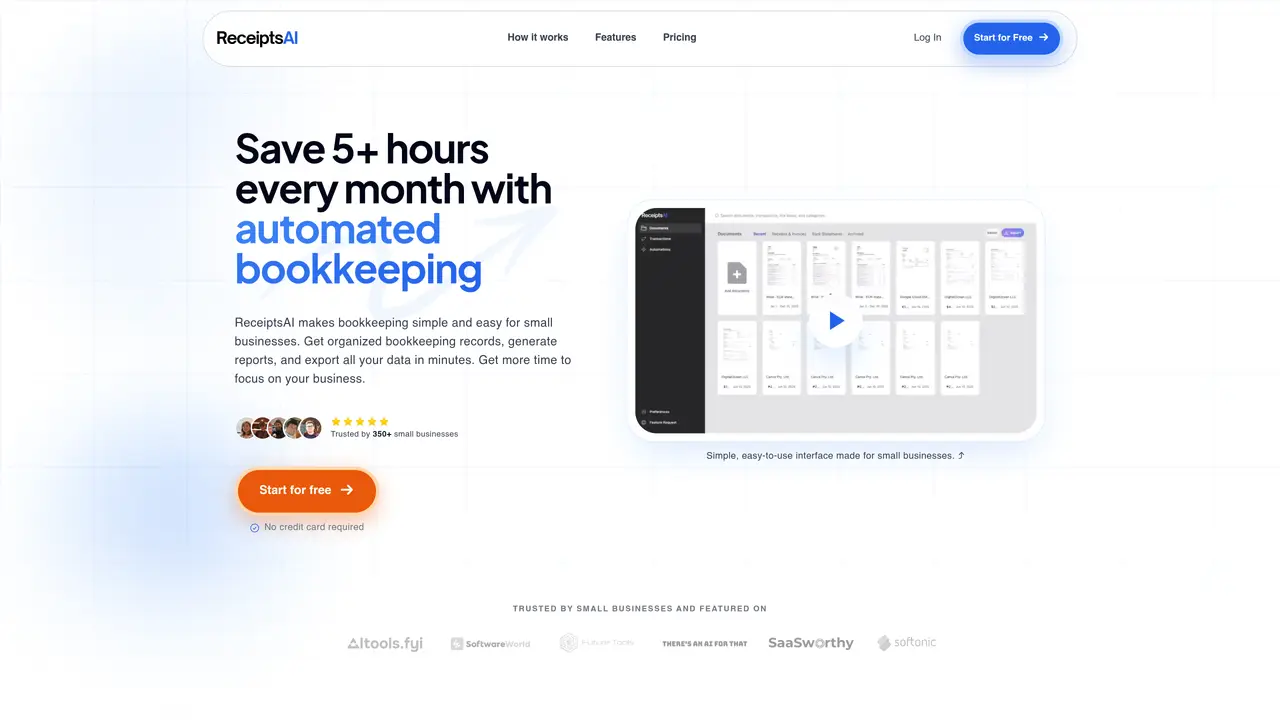
ReceiptsAI is an AI-powered bookkeeping assistant designed for small businesses, bookkeepers, and finance teams. It converts receipts, invoices, and bank statements into structured expense data through AI data extraction from images and PDFs, including multi-page documents. The tool captures key fields such as merchant/vendor names, dates, amounts, tax information, and transaction details from statements. Expense categorization is supported with both basic and custom categories, and up to 20 custom rules can be applied depending on the plan. It includes features for organizing and cleaning up documents, such as automatic duplicate detection, custom renaming, and folder-style organization. Collaboration is enabled through team invites via email or phone number (US and Canada), and data can be exported to CSV or Excel. ReceiptsAI also integrates with popular accounting software like QuickBooks and Xero, making it suitable for streamlining financial workflows. The tool supports multiple currencies, including USD, EUR, GBP, and CAD, and handles both physical and digital paperwork in a unified workflow.
ReceiptsAI automates bookkeeping by extracting key data from receipts, invoices, and bank statements using AI, then organizing and categorizing the information for easy reporting and export.
The tool is designed for small businesses, freelancers, bookkeepers, and finance teams looking to streamline financial record-keeping and reduce manual data entry.
ReceiptsAI follows a privacy-first approach, redacting sensitive information before processing and allowing users to disconnect connected accounts at any time. Personal emails are ignored and not stored.
Yes, ReceiptsAI integrates with popular accounting platforms like QuickBooks and Xero, enabling seamless data transfer for streamlined financial workflows.
Yes, the tool supports multiple currencies, including USD, EUR, GBP, and CAD, with automatic detection and conversion for international transactions.
Users can start by uploading documents directly or connecting their email inbox to automatically capture and process receipts, invoices, and statements.
receiptsai.com · third-party estimates from Similarweb
Last 4 months · grows by one month every month
Share of visits · estimated visits
Other countries: 34.8%
Coding & Development · Sep 2026
Traffic figures are third-party estimates, good for scale and trends; they can differ from a company's own numbers. Updated monthly.
We use essential cookies to run aitoolnavio™, and optional cookies to analyze traffic and measure our marketing. You choose what we use — optional cookies stay off unless you turn them on. See our Privacy Policy.
One short email a week: fresh tools worth trying, honest takes and the updates that actually matter. No spam, unsubscribe any time.
Cloud platform for web scraping, browser automation, and AI data extraction with 20,000+ pre-built tools and scalable cloud runs.
AI web crawler that extracts clean web data into JSON or markdown for developers and marketers.
Labelbox is an enterprise-grade data labeling platform designed to help organizations create, manage, and deploy AI applications.
Real-time AI search and crawling API for developers and AI teams to extract and summarize web data for agents and research workflows.
Enterprise-grade proxy networks, web scrapers, and ready-to-use datasets for reliable web data collection.
Map, analyze, and visualize geospatial data effortlessly while securely tracking real-time locations.
Open-source analytics platform to build interactive dashboards, automate data prep, and enforce enterprise-grade security.
Converts scanned documents and images into editable, searchable formats with AI-powered OCR and data extraction.
Open-source AI document parser that converts PDFs, images, and documents into structured Markdown or JSON for AI workflows.
Streamlines AI data retrieval for efficient processing.
Automate data extraction, capture data from images and text, streamline data entry processes with easy-to-use tools and APIs.
Web scraping and data extraction API that simplifies gathering data from websites with features like JavaScript rendering and geotargeting.
Matched on what this tool does — grouped by the job you would be replacing.
matches AI data extraction from images and PDFs (including multi-page documents) · Handles both physical and digital receipts, invoices, and bank statements · AI invoice and receipt processing for accounting teams that captures documents from email, extracts key fields with OCR
AI invoice and receipt processing for accounting teams that captures documents from email, extracts key fields with OCR, and exports structured data.
AI-powered extraction of bank statements, invoices and receipts into structured data
Extracts financial data from invoices, receipts and bank statements (including scanned PDFs) into Excel, JSON or XML without templates.
AI-powered invoice extraction and processing from email inboxes
matches Automatic categorization with basic and custom categories · Duplicate detection and document organization · Team collaboration via email or phone number invites
matches Exports to CSV or Excel and integrations with QuickBooks and Xero · Automatic categorization with basic and custom categories · AI-powered bookkeeping and finance assistant for startups, automating accounting, expense tracking, and tax support with real-time insights
AI-powered expense management platform that automates tracking, categorization, and reporting of business expenses with real-time credit card integration.
AI-powered bookkeeping and finance assistant for startups, automating accounting, expense tracking, and tax support with real-time insights.
Streamline receipt management with AI: Extract, categorize, analyze expenses effortlessly.
AI-powered bookkeeping app for small businesses that auto-categorizes transactions, matches receipts, and generates reports via chat.
Cloud accounting software that automates bookkeeping, invoicing, and financial reporting for small and growing businesses.
A bookkeeping automation platform that captures receipts, invoices, and statements, extracts data, and syncs to accounting software for SMBs and accounting firms.