Cloud accounting software that automates bookkeeping, invoicing, and financial reporting for small and growing businesses.
36M visits/mo+0.9%#4 Business & Marketing

AI-powered trade journal that imports screenshots or CSVs to analyze trading performance and psychology
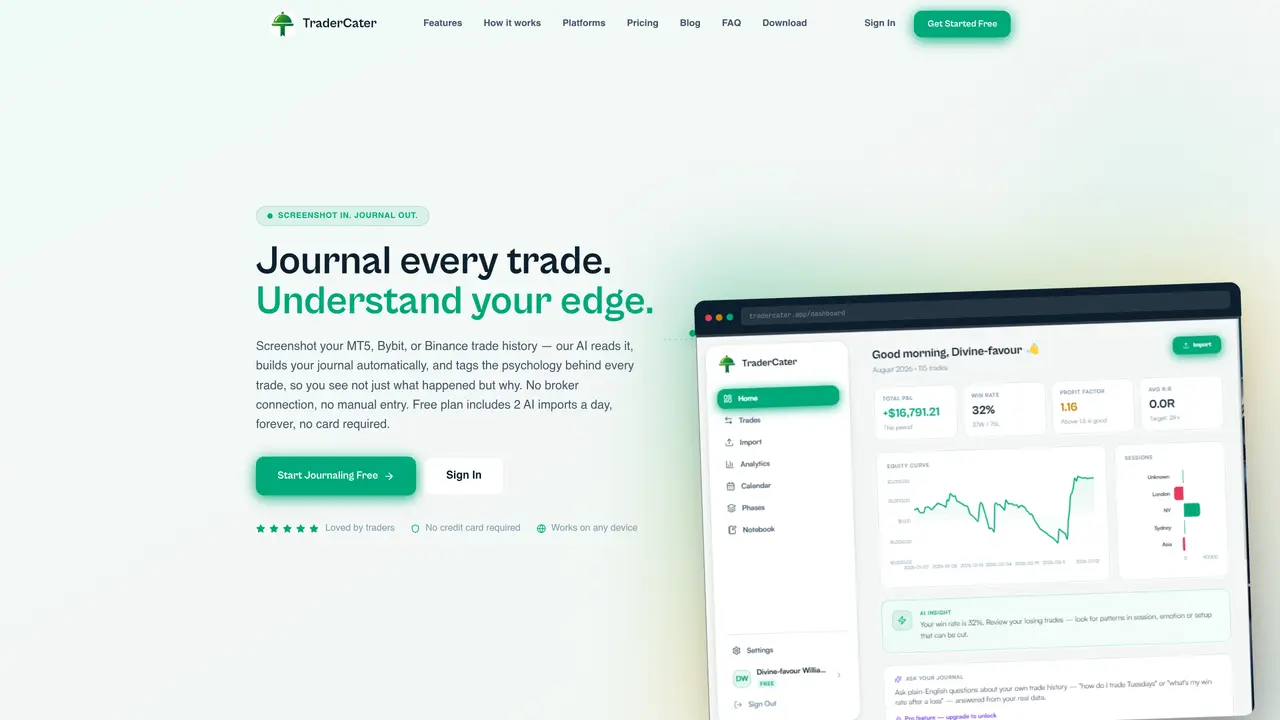
TraderCater automates the process of trade journaling by extracting trade data directly from screenshots or CSV files, eliminating the need for manual entry. The platform supports imports from popular trading platforms such as MT5, Bybit, and Binance, enabling seamless integration with existing workflows. Using AI, TraderCater tags trade psychology insights, calculates key performance metrics like win rate and profit factor, and generates visualizations such as heatmaps and equity curves to highlight trading patterns. The tool includes an Ask Your Journal feature that allows users to query their trading data in plain English, making it easier to identify strengths and weaknesses. MFE/MAE analysis helps traders assess how price movements deviate from their entries, providing deeper insights into trade execution. All trade data is stored securely with encryption to ensure privacy and compliance. Designed for serious traders, TraderCater emphasizes data-driven refinement of trading strategies rather than relying on error-prone spreadsheets. Users can track different trading phases separately, maintain structured trading plans, and export detailed reports for further analysis or review.
TraderCater automates trade journaling by extracting trade data from screenshots or CSV files, such as MT5, Bybit, or Binance trade histories, and builds structured journals without manual entry. The AI reads the data, tags trade psychology, calculates metrics like win rate and profit factor, and visualizes performance through heatmaps and equity curves.
The tool is designed for serious traders aiming to refine their trading edge through data-driven insights rather than spreadsheets. It supports traders who want to track performance, analyze patterns, and maintain trading plans without manual data entry.
No, TraderCater does not require broker API connections. Users can import trade data by uploading screenshots or CSV files, making it accessible for any broker or platform.
Key features include screenshot and CSV imports, deep analytics with metrics like win rate and profit factor, P&L heatmap calendars, psychology tracking, plain-English trade queries via Ask Your Journal, MFE/MAE analysis, secure encrypted storage, and separate tracking for trading phases or prop firm challenges.
Ask Your Journal allows users to type plain-English questions about their trading data, such as 'how do I trade Fridays?' or 'what’s my win rate after a loss?' The AI answers these questions using the user’s actual trade history, providing insights grounded in their own data.
Yes, TraderCater stores trade data securely with encrypted storage. The platform uses Supabase with row-level security to ensure that trade journals remain private and inaccessible to others.
We use essential cookies to run aitoolnavio™, and optional cookies to analyze traffic and measure our marketing. You choose what we use — optional cookies stay off unless you turn them on. See our Privacy Policy.
One short email a week: fresh tools worth trying, honest takes and the updates that actually matter. No spam, unsubscribe any time.
Cloud accounting software that automates bookkeeping, invoicing, and financial reporting for small and growing businesses.
AI-powered budgeting companion that auto-categorizes spending, forecasts expenses, and offers conversational guidance within YNAB’s trusted zero-based system.
A bookkeeping automation platform that captures receipts, invoices, and statements, extracts data, and syncs to accounting software for SMBs and accounting firms.
Send money globally, track payments, and save with competitive rates and low fees.
AI market intelligence platform that turns natural-language queries into analyst-grade insights with real-time monitoring and AI-generated summaries.
Revolutionize planning: Connect, model, and forecast across all business areas.
AI-powered real estate platform for finding deals, analyzing properties, and building investor workflows with nationwide data and predictive analytics.
AI-powered terminal for researching global stocks with financial data, AI summaries, KPIs, filings, and portfolio dashboards.
Trendspider is a sophisticated all-in-one market research and trading software designed to enhance the trading strategies of investors and traders.
Develop, backtest, and analyze trading strategies with drag-and-drop builder, extensive data sources, and real-time market data.
Stock market data API delivering real-time prices, fundamentals, and news for financial modeling and trading applications.
Zocks is an AI assistant for financial advisors that automates meeting notes, client emails, forms, and CRM updates.
Matched on what this tool does — grouped by the job you would be replacing.
matches Deep analytics with win rate, profit factor, and session breakdown · P&L heatmap calendar for daily performance visualization · MFE/MAE analysis for price movement assessment
AI-powered trading journal that tracks trades, rules and emotions to spot discipline leaks
AI-powered trading journal and analytics platform for institutional traders
AI-powered trading journal that detects behavioral patterns and quantifies their cost
All-in-one AI trading journal and backtester for manual and automated strategies
matches Psychology tracking with emotion and plan adherence tags · Ask Your Journal for AI-powered plain-English queries · Trading phases for prop firm tracking and separate evaluations
Crypto trading journal with AI-powered insights and automated broker sync
AI-powered trading journal for Indian traders to log trades and receive data-driven insights