Automate job postings, track candidates, streamline interviews and offers, and review candidates efficiently.
38M visits/mo+9.6%#3 Business & Marketing

Local job-search dashboard that scans boards, scores postings against a CV and tracks applications
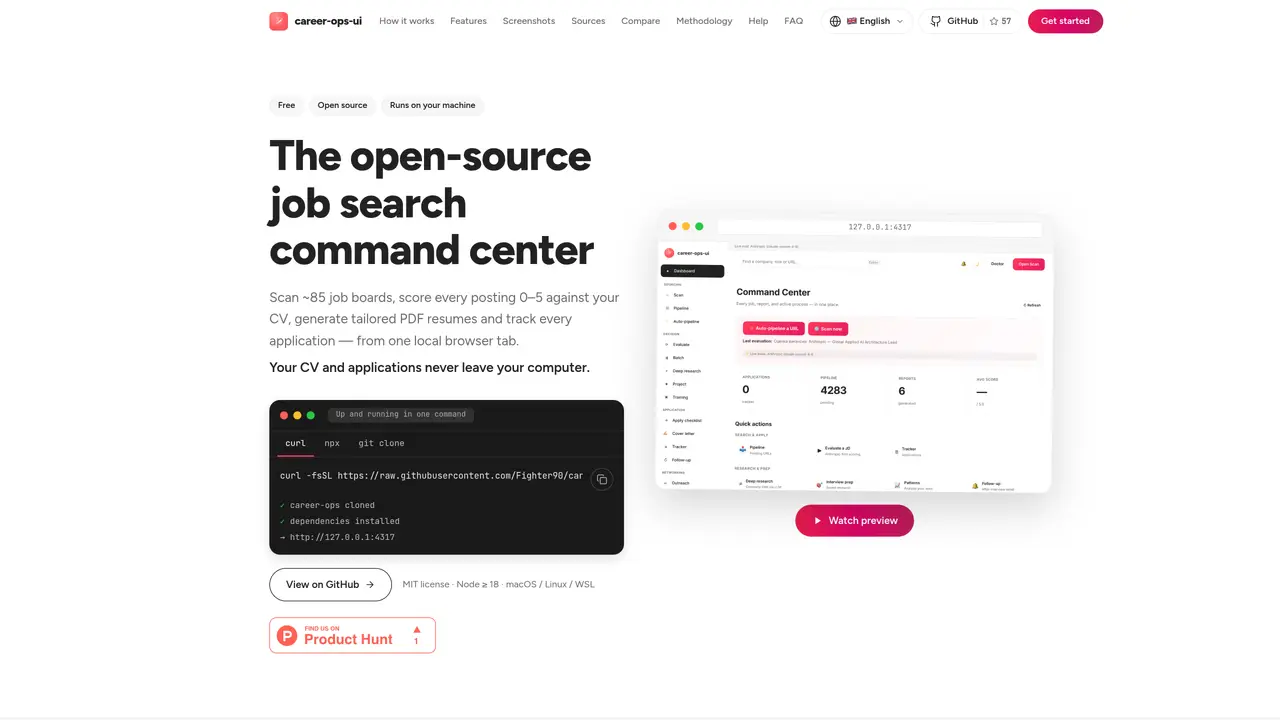
career-ops-ui is a free, open-source desktop application designed to streamline the job search process by consolidating multiple workflows into a single, locally hosted browser interface. The tool scans over 85 job boards and applicant-tracking systems to aggregate job postings, automatically deduplicating results to present a clean, organized list of opportunities. Each job posting is evaluated against the user’s uploaded CV, with scores assigned across five key dimensions plus a holistic global score, helping users quickly identify the most relevant roles. Users can generate tailored resumes and cover letters in PDF or DOCX formats, customized to highlight the most compelling qualifications for each application. The application includes a built-in tracker to monitor every job application, recording statuses, responses, and follow-up reminders to ensure no opportunity is overlooked. All data is stored locally on the user’s machine, ensuring privacy and security with no reliance on cloud accounts, telemetry, or automated submissions. The tool is launched via a local server bound to 127.0.0.1, requiring Node.js 18 or higher to operate. Compatible with macOS, Linux, and Windows Subsystem for Linux, career-ops-ui provides a privacy-focused alternative to traditional job search platforms.
career-ops-ui is a free, open-source desktop application that consolidates job search workflows into a single local browser tab. It scans approximately 85 job boards and applicant-tracking systems, deduplicates results, and scores each posting against the user’s uploaded CV.
The tool is designed for job seekers who want a centralized, private, and efficient way to manage their job search, including scanning job postings, evaluating fit, generating tailored resumes and cover letters, and tracking applications.
It scores each job posting from 0 to 5 against the user’s CV across five dimensions plus a holistic global score, providing a written report that explains the evaluation line by line.
No, the application runs entirely on the user’s machine with a local server bound to 127.0.0.1. All data remains on the user’s device, and no cloud accounts, telemetry, or auto-submissions are involved.
The tool requires Node.js 18 or higher and runs on macOS, Linux, or Windows Subsystem for Linux. It supports 17 languages, including right-to-left scripts like Arabic.
Yes, career-ops-ui supports 18 AI providers, including Anthropic, OpenAI, Gemini, and Mistral, or users can bring their own API key. It also offers a keyless copy-the-prompt mode for use with any AI assistant.
cvstart.org · third-party estimates from Similarweb
Share of visits by channel
Business & Marketing · Sep 2026
Traffic figures are third-party estimates, good for scale and trends; they can differ from a company's own numbers. Updated monthly.
We use essential cookies to run aitoolnavio™, and optional cookies to analyze traffic and measure our marketing. You choose what we use — optional cookies stay off unless you turn them on. See our Privacy Policy.
One short email a week: fresh tools worth trying, honest takes and the updates that actually matter. No spam, unsubscribe any time.
Automate job postings, track candidates, streamline interviews and offers, and review candidates efficiently.
Automate job postings, track applicants, and streamline hiring with an intuitive HCM platform for talent acquisition.
Post custom job postings, track applicants in real time, and use powerful analytics to monitor recruitment performance.
Source, match, and manage talent with predictive analytics for effortless recruiting.
AI Recruitment engine to hire top global talent
Payroll, HR, benefits, and compliance platform for small businesses
Streamline hiring, monitor job performance, and choose flexible pricing plans.
AI-powered employment operating system for managing HR, payroll, hiring, onboarding, compliance, and employee workflows in one platform.
AI-powered platform automates job applications and interview prep.
AI-powered resume optimizer that aligns resumes with job descriptions to improve ATS compatibility and job search success.
Verify customer identity, automate compliance checks, reduce costs, and manage customer data securely while ensuring data privacy.
Manage employee data, track performance and satisfaction for enhanced productivity.
Matched on what this tool does — grouped by the job you would be replacing.
matches Scans ~85 job boards and ATS platforms directly · Tracks application statuses, notes, and follow-ups · Provides funnel analytics and rejection-pattern analysis
Track job postings, analyze resumes and job postings, and identify missing resume elements with AI technology.
Tracks job applications with a Kanban board and provides AI tools for resumes and cover letters
AI-powered job search agent that tailors applications and tracks pipelines
AI-powered job search assistant that finds roles, tailors applications and tracks progress
matches AI-powered fit scoring (0–5) against uploaded CV · Generates tailored PDF/DOCX resumes and cover letters
matches Includes company research briefs and interview prep tools · Offers a mock-interview mode with feedback
matches Supports 18 AI providers or keyless copy-the-prompt mode
AI-powered platform that builds tailored resumes, matches job descriptions, and tracks applications for job seekers.
AI-powered career assistant that generates resumes, cover letters, tracks applications, and prepares for interviews.
AI-powered resume builder and job search platform that tailors ATS-optimized resumes, cover letters, and interview prep from job URLs.
AI-powered career platform for resume building, job matching and interview prep
An AI interview assistant for job seekers that runs live mock sessions, delivers real-time talking points, and prepares users for consulting, product, and coding interviews.
AI-powered interview preparation platform that tailors CVs and simulates real interviews
AI-powered tool that auto-applies to fresh job postings with tailored resumes and cover letters
Automates job applications by tailoring resumes and cover letters and submitting them directly