

Automate job postings, track candidates, streamline interviews and offers, and review candidates efficiently.
38M visits/mo+9.6%#3 Business & Marketing
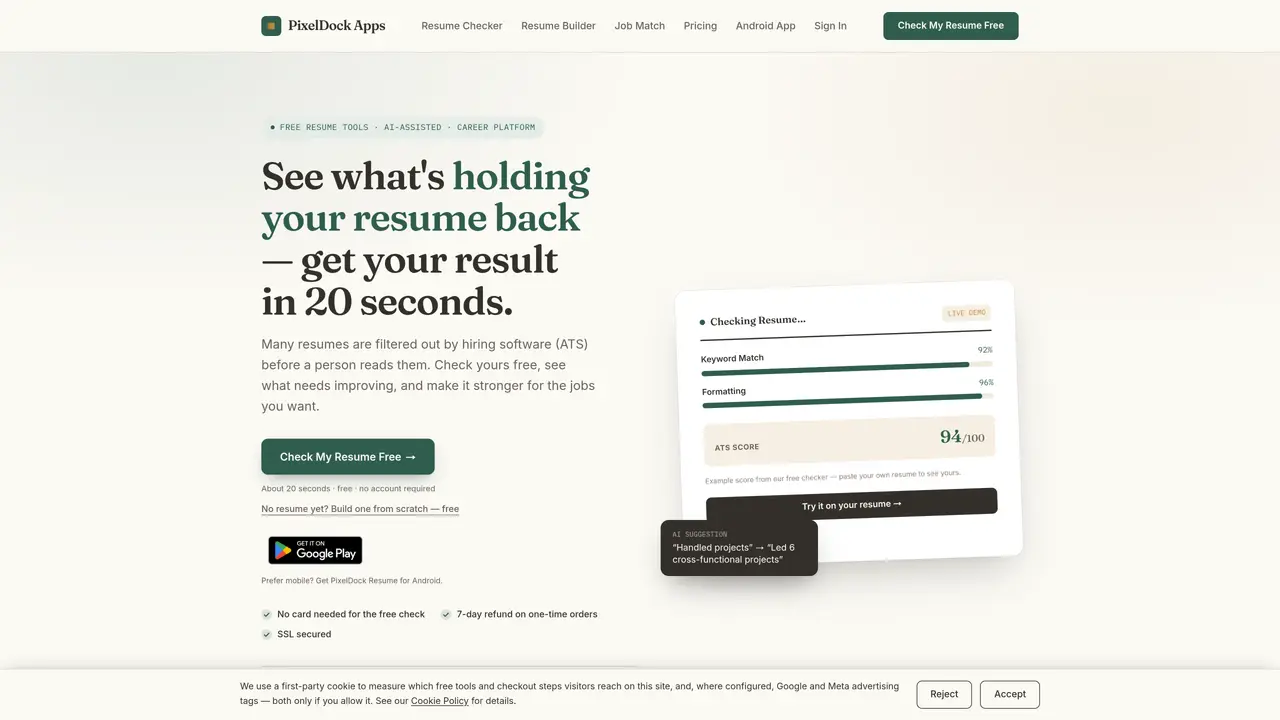
PixelDock Resume provides a suite of tools to help job seekers analyze, build and optimize resumes for Applicant Tracking Systems. The core Resume Checker uploads a resume and returns an ATS score plus a breakdown of formatting, keyword and structure issues in about 20 seconds. A Resume Builder lets users create new resumes from scratch with AI-assisted suggestions. The Job Match tool compares a resume against a job description to show fit percentage and highlights gaps. All three core tools are free to use without an account or payment card. One-time AI Resume Fix rewrites a resume to emphasize achievements and include role-relevant keywords, delivering a downloadable PDF in 15–20 seconds. A subscription plan called Job Search Pro offers monthly resume tailoring sessions and version history. The service emphasizes data privacy, stating that resumes are not stored except in optional follow-up features and that no personal data is sold.
The core tools—Resume Checker, Resume Builder, Job Match, and Job Posting Analyzer—are free to use without requiring an account or payment card. One-time and subscription options are available for additional features.
No account is required for the four free tools. Some account-based features, like the application tracker, reminders, or resume version history, require signing in, but account creation itself is free.
Privacy varies by tool. The Job Posting Analyzer never leaves your browser. The Resume Checker does not store personal data unless you opt into follow-up features, and the Resume Builder does not store resume text at all. PixelDock states it never sells user data.
Start with the free Resume Checker to quickly assess your resume’s ATS readiness. Use Job Match to compare it against a specific job posting or the Resume Builder if you need to create a new resume from scratch.
The Resume Checker delivers results in about 20 seconds, providing an ATS score and a breakdown of formatting, keyword, and structure issues.
The AI Resume Fix tool rewrites your resume to emphasize achievements and include role-relevant keywords, delivering a downloadable PDF in approximately 15–20 seconds.
pixeldockapps.com · third-party estimates from Similarweb
Share of visits by channel
Share of visits · estimated visits
How people reach this site from other AI tools
22 a month · 1.9% of all visits
Business & Marketing · Sep 2026
Traffic figures are third-party estimates, good for scale and trends; they can differ from a company's own numbers. Updated monthly.
We use essential cookies to run aitoolnavio™, and optional cookies to analyze traffic and measure our marketing. You choose what we use — optional cookies stay off unless you turn them on. See our Privacy Policy.
One short email a week: fresh tools worth trying, honest takes and the updates that actually matter. No spam, unsubscribe any time.
Automate job postings, track candidates, streamline interviews and offers, and review candidates efficiently.
Automate job postings, track applicants, and streamline hiring with an intuitive HCM platform for talent acquisition.
Post custom job postings, track applicants in real time, and use powerful analytics to monitor recruitment performance.
Source, match, and manage talent with predictive analytics for effortless recruiting.
AI Recruitment engine to hire top global talent
Payroll, HR, benefits, and compliance platform for small businesses
Streamline hiring, monitor job performance, and choose flexible pricing plans.
AI-powered employment operating system for managing HR, payroll, hiring, onboarding, compliance, and employee workflows in one platform.
AI-powered platform automates job applications and interview prep.
AI-powered resume optimizer that aligns resumes with job descriptions to improve ATS compatibility and job search success.
Verify customer identity, automate compliance checks, reduce costs, and manage customer data securely while ensuring data privacy.
Manage employee data, track performance and satisfaction for enhanced productivity.
Matched on what this tool does — grouped by the job you would be replacing.
matches ATS score and issue breakdown · ATS compatibility scoring · Keyword optimization suggestions
AI-powered resume builder and CV maker with ATS optimization
AI-powered resume builder that optimizes documents for applicant tracking systems
AI-powered resume tailoring and ATS optimization tool
AI-powered resume builder with job-tailoring and translation
matches Resume builder with AI suggestions · AI-powered resume analysis · AI resume generation from scratch
matches Job description matching · Job description keyword analysis · Semantic keyword matching and synonym detection
AI-powered resume builder with ATS optimization and cover letter generation
Create tailored, professional resumes with AI assistance.
AI-powered resume builder that optimizes documents for applicant tracking systems
Free online AI-powered resume builder with ATS-friendly templates
AI-powered resume builder, cover letter generator and portfolio creator with ATS optimization
AI-powered resume reviewer that optimizes resumes for recruiters and ATS
AI-powered resume builder and ATS score checker that tailors resumes to job descriptions
AI-powered resume builder that tailors documents to job descriptions