
Automate job postings, track candidates, streamline interviews and offers, and review candidates efficiently.
38M visits/mo+9.6%#3 Business & Marketing

AI-powered Chrome extension that matches LinkedIn profiles to job descriptions automatically
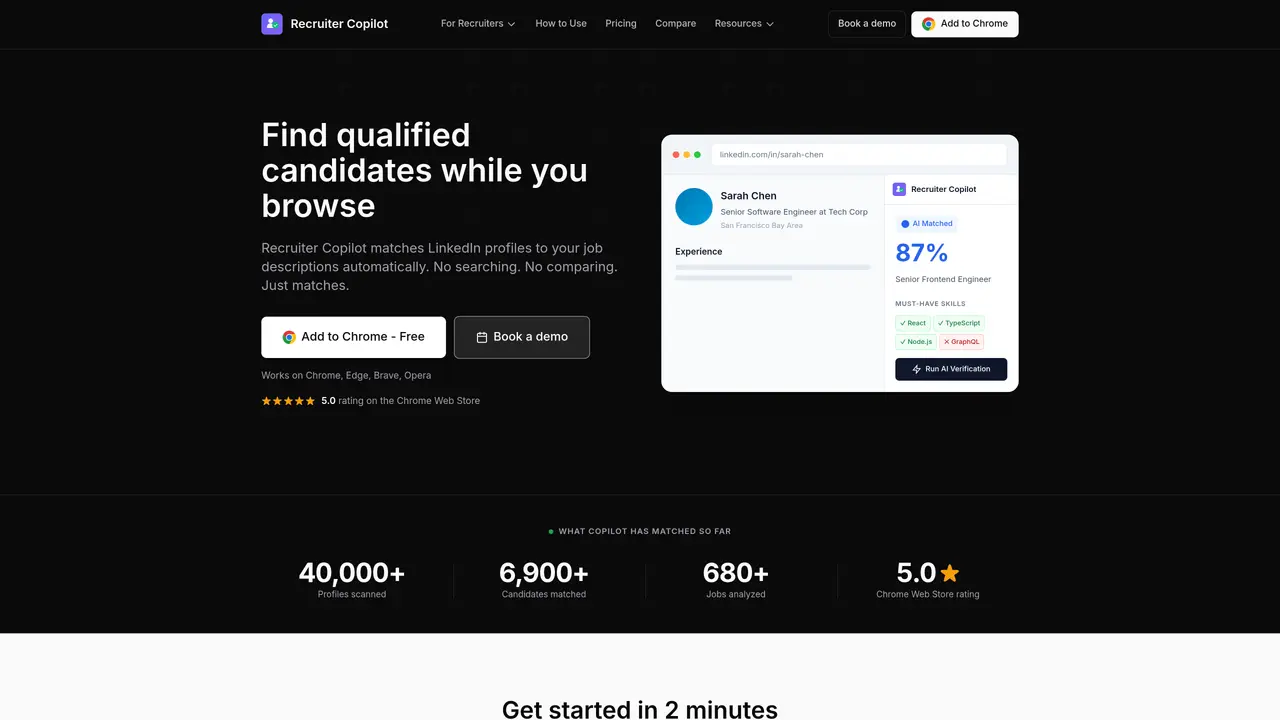
Recruiter Copilot is a free Chrome extension that uses AI to instantly match LinkedIn profiles against a user’s job description. As recruiters browse LinkedIn profiles, the tool displays a 0-100% match score in real time, highlighting which required skills are present, missing, or optional. It provides a color-coded skill breakdown and a one-click AI verification that assesses experience alignment, strengths, and gaps. The extension extracts job requirements from pasted or uploaded descriptions and requires no additional steps beyond normal LinkedIn browsing. It supports multiple Chromium-based browsers and operates entirely within the browser, ensuring privacy by keeping data local. The free tier includes limited analyses and verifications, while a Pro version offers unlimited access for a monthly fee. The tool is designed for recruiters, sourcers, and hiring managers who need to quickly evaluate candidate suitability without leaving LinkedIn.
Recruiter Copilot is a free Chrome extension that uses AI to automatically match LinkedIn profiles against a user’s job description. It displays real-time match scores, color-coded skill breakdowns, and experience assessments without requiring additional steps beyond normal LinkedIn browsing.
Users paste a job description into the tool, then browse LinkedIn profiles as usual. The AI performs semantic matching to compare each profile against the job requirements, showing match scores, green for matched skills, red for missing skills, and amber for nice-to-haves.
Yes, the free tier includes unlimited LinkedIn profile matching, instant match scores, skill breakdowns, and experience assessment. A Pro version is available for additional features, but no credit card is required to use the free tier.
Recruiter Copilot works on Chrome, Microsoft Edge, Brave, Opera, Vivaldi, Arc, and any other Chromium-based browser. It can be installed directly from the Chrome Web Store.
LinkedIn Recruiter focuses on advanced search filters and InMail credits for sourcing candidates, while Recruiter Copilot provides AI-powered match scoring and skill gap analysis for profiles you view. They address different needs and can complement each other.
Install the extension from the Chrome Web Store, paste or upload a job description, and start browsing LinkedIn profiles. The tool will display match scores and skill breakdowns in real time as you view profiles.
We use essential cookies to run aitoolnavio™, and optional cookies to analyze traffic and measure our marketing. You choose what we use — optional cookies stay off unless you turn them on. See our Privacy Policy.
One short email a week: fresh tools worth trying, honest takes and the updates that actually matter. No spam, unsubscribe any time.
Automate job postings, track candidates, streamline interviews and offers, and review candidates efficiently.
Automate job postings, track applicants, and streamline hiring with an intuitive HCM platform for talent acquisition.
Post custom job postings, track applicants in real time, and use powerful analytics to monitor recruitment performance.
Source, match, and manage talent with predictive analytics for effortless recruiting.
AI Recruitment engine to hire top global talent
Payroll, HR, benefits, and compliance platform for small businesses
Streamline hiring, monitor job performance, and choose flexible pricing plans.
AI-powered employment operating system for managing HR, payroll, hiring, onboarding, compliance, and employee workflows in one platform.
AI-powered platform automates job applications and interview prep.
AI-powered resume optimizer that aligns resumes with job descriptions to improve ATS compatibility and job search success.
Verify customer identity, automate compliance checks, reduce costs, and manage customer data securely while ensuring data privacy.
Manage employee data, track performance and satisfaction for enhanced productivity.
Matched on what this tool does — grouped by the job you would be replacing.
matches Instant match scores against job descriptions · Color-coded skill breakdown (green/red/amber) · One-click AI verification for experience assessment
AI-powered job-matching platform for candidates with recruiter tracking and application tools
Chrome extension that generates personalized LinkedIn messages from viewed profiles
AI-powered job search tool that curates verified live listings with tailored cover letters
AI-powered job search assistant that filters roles and submits tailored applications
matches ATS compatibility scoring · Keyword matching for job descriptions · Semantic keyword matching and synonym detection
AI-powered resume optimizer that aligns resumes with job descriptions to improve ATS compatibility and job search success.
Free AI-powered ATS resume checker and optimizer that scores resumes against job descriptions
AI-powered resume reviewer that optimizes resumes for recruiters and ATS
AI-powered resume optimizer for ATS compatibility and interview rate improvement