An AI chat platform for roleplaying, storytelling, and learning by chatting with millions of user-created AI characters.
151M visits/mo-5.5%#2 Chatbots & Assistants

Create AI models on Mac, have natural conversations, and gain real-time insights.
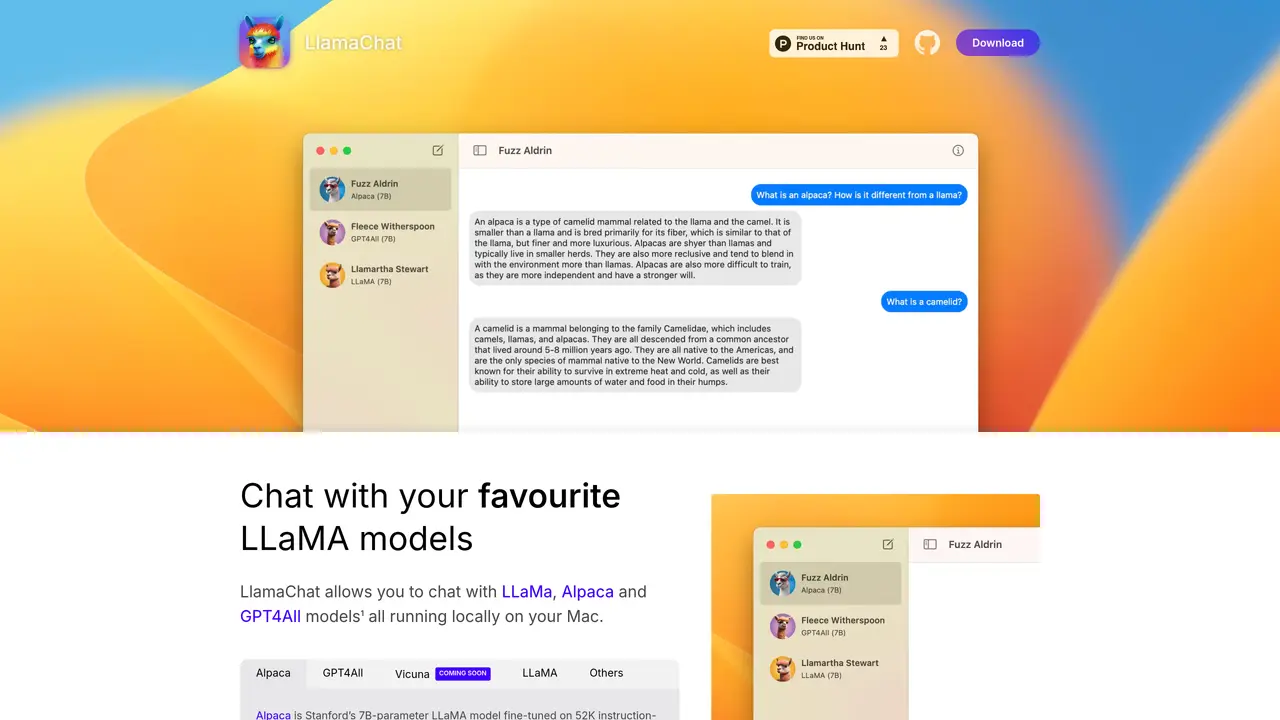
LlamaChat is a desktop application designed to enable local, offline conversations with a variety of open-source AI models, including LLaMa, Alpaca, and GPT4All. The tool provides a streamlined interface for interacting with these models without requiring any additional software installations, making it accessible to users who prefer to keep their data private and avoid cloud-based dependencies. Developed with a focus on ease of use, LlamaChat offers an intuitive chat environment where users can engage in natural, real-time dialogue with AI models, receiving responses tailored to their queries. The application supports models fine-tuned for instruction-following, such as Alpaca, which is derived from OpenAI’s Text-Davinci-003 and further refined using 52K demonstrations from Stanford. It is particularly well-suited for developers, educators, researchers, and businesses seeking a straightforward way to experiment with or deploy AI models locally. LlamaChat emphasizes privacy and control, allowing users to run models entirely on their own hardware while maintaining a seamless and responsive chat experience. The tool is ideal for prototyping, learning, or integrating AI capabilities into workflows without relying on external services.
LlamaChat supports local chat with LLaMA, Alpaca, and GPT4All models on macOS. Alpaca is a 7B-parameter LLaMA model fine-tuned by Stanford for instruction-following, enabling a chatbot-like experience.
No, LlamaChat is a standalone application that runs locally on your Mac without requiring additional software installations.
Download LlamaChat for macOS from the official website or via Homebrew, then import compatible model files to begin chatting. The tool requires macOS 13 and is compatible with both Intel and Apple Silicon processors.
Yes, LlamaChat is 100% free and fully open-source, with no proprietary components or hidden costs.
Yes, LlamaChat can import raw PyTorch model checkpoints or pre-converted .ggml model files, provided you comply with the respective model providers' terms.
LlamaChat is designed for developers, businesses, educators, and anyone seeking a simple, local interface to interact with AI models without complex setup.
llamachat.app · third-party estimates from Similarweb
Last 4 months · grows by one month every month
Share of visits · estimated visits
Chatbots & Assistants · Sep 2026
Traffic figures are third-party estimates, good for scale and trends; they can differ from a company's own numbers. Updated monthly.
We use essential cookies to run aitoolnavio™, and optional cookies to analyze traffic and measure our marketing. You choose what we use — optional cookies stay off unless you turn them on. See our Privacy Policy.
One short email a week: fresh tools worth trying, honest takes and the updates that actually matter. No spam, unsubscribe any time.
An AI chat platform for roleplaying, storytelling, and learning by chatting with millions of user-created AI characters.
Create and interact with AI companions and virtual characters using GPT-4o on Chub AI's platform.
Create stunning visuals, access image recognition and processing, and express creatively with natural language processing.
Create fully customizable AI companions with persistent memory, selfies, and live voice calls.
Practice conversing with AI, improve pronunciation, and learn a new language in an immersive, safe environment.
Train, customize, optimize, and deploy models easily for powerful AI projects.
AI-powered tarot readings and personalized interpretations for self-reflection and guidance.
Quickly narrow searches by category, control results by country or language, and find relevant, accurate results with ease.
Chat with AI friends, mentors, and characters on the world's largest conversational AI platform for entertainment.
Generate presentations, create interactive slideshows, and customize with themes, fonts, and colors.
Trendspider is a sophisticated all-in-one market research and trading software designed to enhance the trading strategies of investors and traders.
An AI chat platform for immersive, personalized interactions with virtual companions, including image generation.
Matched on what this tool does — grouped by the job you would be replacing.
Paid placement · similar tools from listings that support aitoolnavio™
Instant lead response for home-service pros: your phone rings on every new lead, plus 14 days of follow-up
matches Create AI models locally on Mac · Engage in natural conversations with AI models · Gain insights from AI conversations in real-time
matches Create AI models locally on Mac
Run open-source chatbots locally on your PC without internet, keeping conversations private and offline.
Open-source desktop AI chat app that runs local LLMs offline or connects to cloud providers via API keys.
Runs private AI models entirely on a user’s Mac without cloud dependency
Free Mac app that lets users build a small language model from scratch without coding or math experience.
Build sophisticated models easily with minimal code, intuitive interface, and pre-trained models for fast implementation.