Build Discord bots with words, not code
551K visits/mo-4.7%#65 Chatbots & Assistants

Build multilingual website chatbots from documents in minutes with no-code AI.
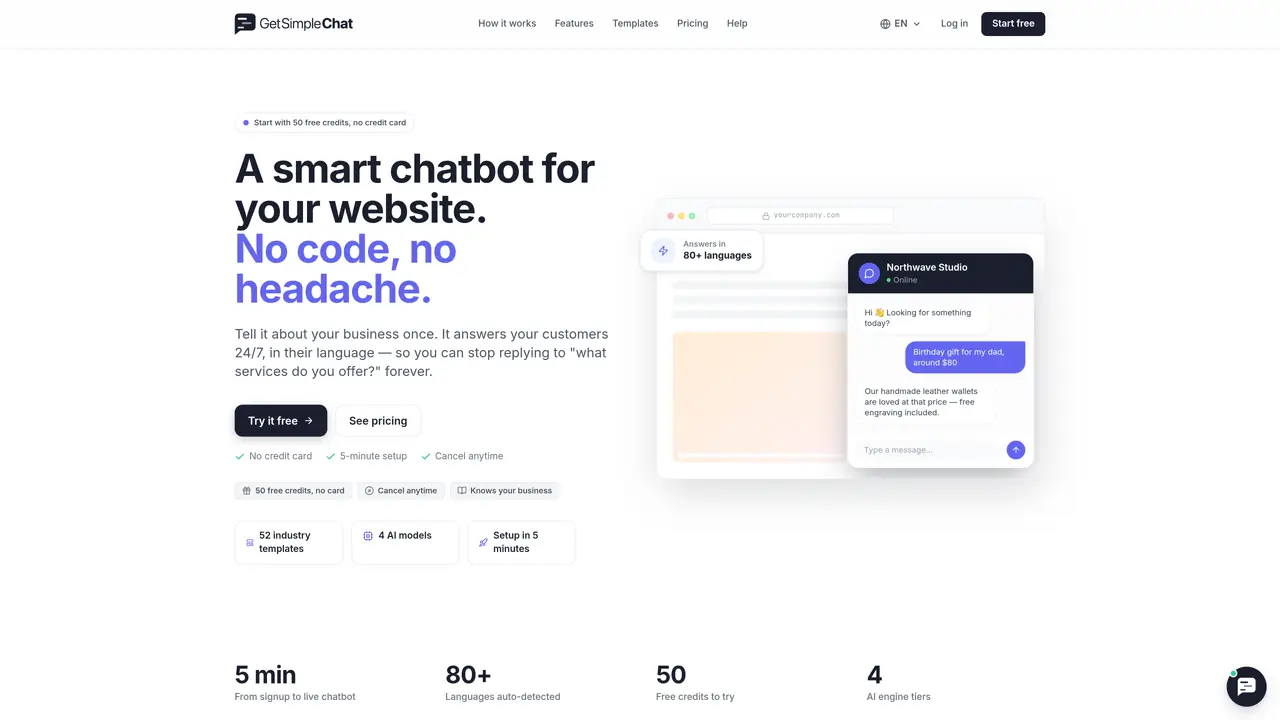
Simple Chat is a no-code AI chatbot builder designed for websites. It trains on your uploaded documents or provided text and deploys instantly with a single embed snippet. The AI parses your business information and templates to answer customer questions around the clock. It auto-detects and replies in over 80 languages, ensuring global accessibility. When it cannot resolve a query, the system can collect leads or seamlessly transfer the conversation to a human agent. Setup takes approximately five minutes, making it accessible for users without technical expertise. The tool is ideal for businesses seeking scalable, multilingual customer support solutions. It eliminates the need for complex coding or external integrations, streamlining deployment and maintenance.
No technical knowledge is required. Users paste their business information, copy a one-line embed snippet, and the chatbot goes live.
The chatbot pauses, but your settings and conversations remain intact. Upgrading to a paid plan resumes functionality.
Yes. It automatically detects the visitor's language and replies in the same one across 80+ supported languages.
PDFs, Word documents, Excel spreadsheets, and CSV files are supported for training the chatbot.
It collects the question for review and offers a 'Talk to a human' button to transfer the conversation to a live agent.
Yes, all paid plans include up to three chatbots per month.
getsimplechat.com · third-party estimates from Similarweb
Traffic figures are third-party estimates, good for scale and trends; they can differ from a company's own numbers. Updated monthly.
We use essential cookies to run aitoolnavio™, and optional cookies to analyze traffic and measure our marketing. You choose what we use — optional cookies stay off unless you turn them on. See our Privacy Policy.
One short email a week: fresh tools worth trying, honest takes and the updates that actually matter. No spam, unsubscribe any time.
Build Discord bots with words, not code
No-code platform to build and deploy custom chatbots for Discord, Telegram, and Cici without coding skills.
Unified, customizable interface for AI-powered conversations
Create custom dialogs, deploy bots to multiple channels, and leverage NLP and ML for understanding user inputs.
Create personalized GPT models, deploy to websites and chatbots, and unlock powerful possibilities with OpenAI's LLMs and GPT.
Automate customer support, capture leads, and promote offers with personalized chatbot conversations.
Unified interface for chatting with multiple AI models and building web apps from prompts
Build no-code chatbots for Facebook, Instagram, and WhatsApp to automate conversations and customer interactions.
No-code AI chatbot builder for websites and WhatsApp with drag-and-drop simplicity.
Build no-code AI chatbots and agents for WhatsApp, web, Instagram, Facebook, Telegram, MS Teams and more.
Create custom chatbot templates, track conversions with dynamic prompts, and optimize campaigns with detailed analytics.
No-code platform to build AI chatbots, CRM, and multichannel messaging with built-in automation and payments.
Matched on what this tool does — grouped by the job you would be replacing.
matches No-code chatbot builder for websites · Instant deployment with a single embed snippet · Approximately five-minute setup time
Automate customer support, capture leads, and promote offers with personalized chatbot conversations.
No-code chatbot platform for automating customer interactions effortlessly.
Build and deploy AI chatbots for websites with no-code customization and intent-aware dialogues.
No-code AI chatbot builder that trains assistants on websites, Notion, PDFs, and Google Drive for support, lead capture, and visitor engagement.
matches Auto-detects and replies in 80+ languages · Lead collection and human handoff capabilities · Parses business information and templates
matches Trains on uploaded documents or provided text · 24/7 customer support with AI responses
Build no-code AI chatbots and agents for WhatsApp, web, Instagram, Facebook, Telegram, MS Teams and more.
Transform your website with AI-driven, multilingual, 24/7 chatbot support.
Build GPT-based support agents trained on internal data for 24/7 customer service, HR assistance, and lead capture with seamless human handoff.
Web-based AI customer service chatbot for businesses that answers questions in 95 languages and trains on URLs or files.
Build custom, knowledge-based chatbots that auto-update from your business content without coding.
Build custom chatbots without coding by uploading data and instructions to Droxy.
An AI customer support platform that deploys website agents trained on internal content to automate 24/7 customer conversations and escalate to humans.