

AI-powered video messaging tool that records, shares, and manages video messages with AI-generated titles, summaries, and tasks.
16M visits/mo-3.4%#5 Chatbots & Assistants
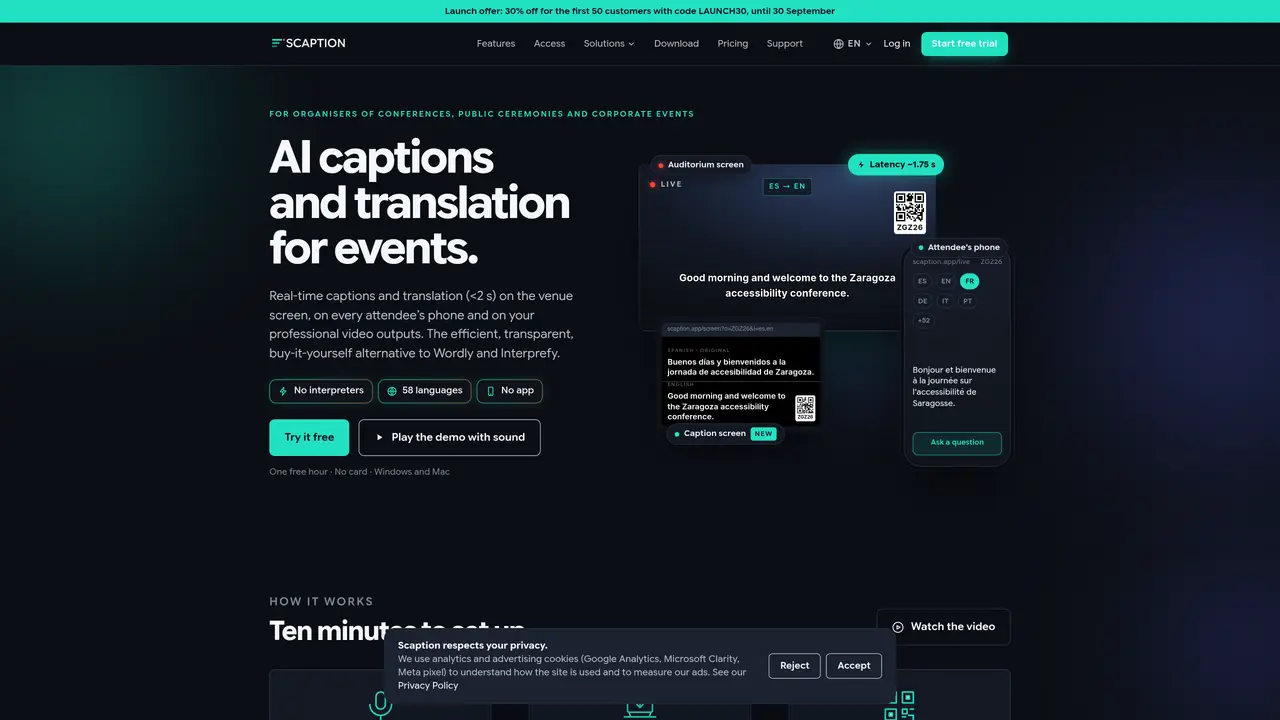
SCAPTION provides real-time AI-generated captions and translation for conferences, ceremonies, corporate events, and hybrid gatherings. It displays original or translated captions on venue screens, attendees’ phones, and professional video outputs with latency under 2 seconds. Organizers use a laptop running SCAPTION software to process audio from a USB microphone, Zoom, Teams, or other sources, then stream captions to any display via HDMI or NDI. Attendees access content by scanning a QR code and selecting their preferred language without downloading an app or creating an account. The system supports live audience interaction, including questions, voting, and moderation, with results displayed in real time. Captions and translations are available in 58 languages, and event summaries can be exported after sessions. The tool integrates with OBS Studio, vMix, TriCaster, and other production software, offering a single solution for accessibility and multilingual participation.
SCAPTION provides real-time AI-generated captions and translation for events such as conferences, ceremonies, and corporate gatherings. It displays original or translated captions on venue screens, attendees’ phones, and professional video outputs with low latency.
The tool is designed for event organizers, including those in conferences, government, universities, AV production, corporate settings, training, worship, and associations. It supports accessibility and multilingual participation for diverse audiences.
Attendees can ask questions, vote, and participate in real time using their phones without downloading an app or creating an account. Moderators control what appears on screen, and results are displayed instantly.
SCAPTION supports 58 languages for captions and translations, allowing attendees to select their preferred language for following along or interacting.
Setup takes about ten minutes. Connect a laptop running SCAPTION to a USB microphone, Zoom, Teams, or other audio source, then stream captions to displays via HDMI or NDI. Attendees scan a QR code to access captions and participate.
Yes, SCAPTION integrates with OBS Studio, vMix, TriCaster, and other production software, allowing captions to be included in professional video outputs.
scaption.app · third-party estimates from Similarweb
Last 2 months · grows by one month every month
Share of visits by channel
Share of visits · estimated visits
Chatbots & Assistants · Sep 2026
Traffic figures are third-party estimates, good for scale and trends; they can differ from a company's own numbers. Updated monthly.
We use essential cookies to run aitoolnavio™, and optional cookies to analyze traffic and measure our marketing. You choose what we use — optional cookies stay off unless you turn them on. See our Privacy Policy.
One short email a week: fresh tools worth trying, honest takes and the updates that actually matter. No spam, unsubscribe any time.
AI-powered video messaging tool that records, shares, and manages video messages with AI-generated titles, summaries, and tasks.
Hardware device that records conversations and converts them into searchable transcripts, summaries, and notes.
Automate transcription, generate summaries, identify speakers, and timestamps for video-conferencing conversations.
AI-powered meeting recorder and summarizer that captures, transcribes, and generates actionable insights from conversations.
Automatically record, transcribe, take notes, and create summaries with key insights during meetings.
Transforms audio/video to summarized text, instantly, across platforms.
Automatically transcribe meetings, create summaries, and securely store audio files in a searchable format.
Automatically turn meetings into searchable notes and tasks.
Wearable AI device that captures conversations and meetings, then auto-generates transcripts, summaries, action items, mind maps, and searchable notes.
Record, transcribe, and share key insights from virtual trainings, online meetings, and content creation.
Record, transcribe, and summarize online meetings from Google Meet and Zoom with AI, then share insights across collaboration tools.
Transform audio/video to text with precision, supporting 1500+ platforms, enriched by AI features.
Matched on what this tool does — grouped by the job you would be replacing.
matches Real-time AI captions and translation · Live audience questions and voting · QR code access for attendees
Real-time speech translation with live captions and voice for Mac audio, meetings and calls
AI-powered video conferencing with real-time translation and AI agent assistance
AI-native video meetings with live transcription, recaps, and translation built in.
Real-time AI translation for church services delivered via phone browser