Scales efficient language processing with open-source accessibility.
357M visits/mo+1%#2 Coding & Development

OpenAI-compatible gateway for routing, budgeting and monitoring AI model traffic
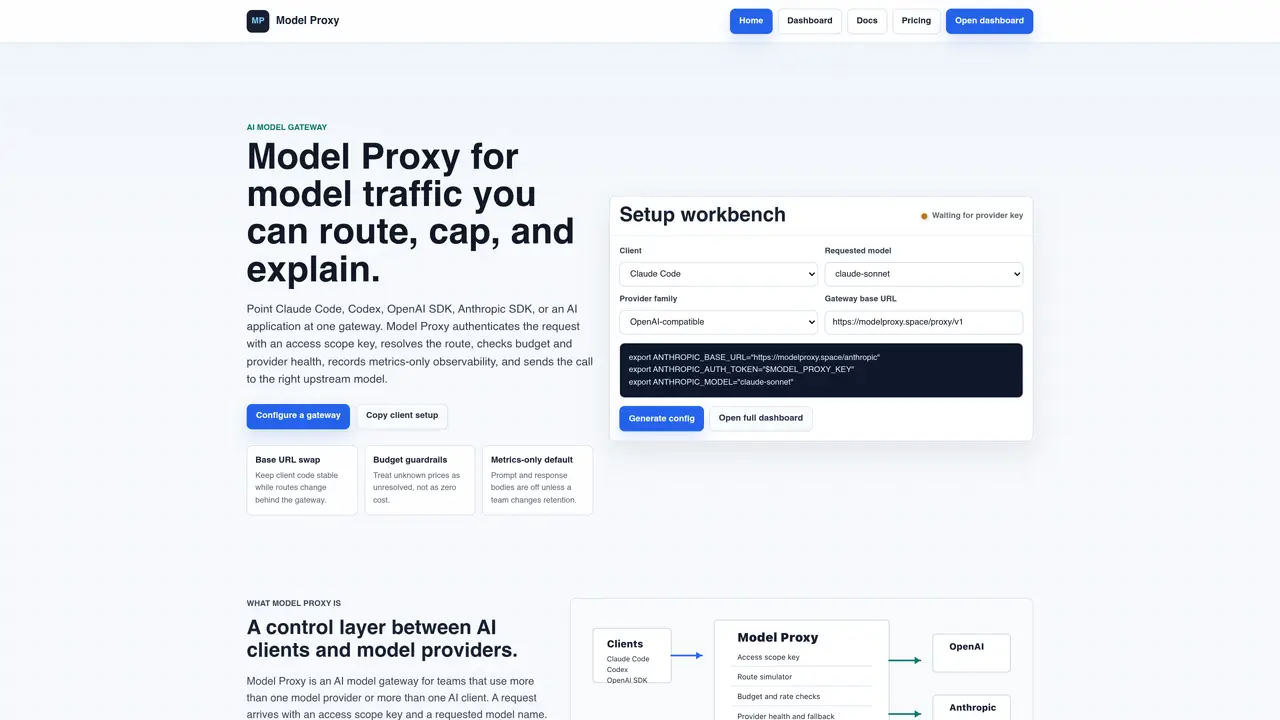
Model Proxy acts as a control layer between AI clients and model providers, routing requests to the appropriate upstream model while enforcing budget, rate, and health policies. Teams configure a gateway with provider profiles, model aliases, and access scope keys, then point existing AI clients such as Claude Code, Codex, OpenAI SDK, or Anthropic SDK to the gateway’s base URL. The gateway resolves the requested model alias to an enabled provider, checks budgets and provider health, and records metadata for monitoring without storing prompt or response bodies by default. Operators use the console to simulate routes, probe provider capabilities, and manage access keys before production traffic. The tool supports chat, streaming, tool use, embeddings, and search bridges, with fallback and kill-switch controls for production incidents. Configuration is generated per client, allowing stable client code while routing decisions change behind the gateway.
Model Proxy is an AI model gateway that acts as a control layer between AI clients and model providers. It routes requests to the appropriate upstream model while enforcing budget, rate, and health policies. The tool authenticates requests with access scope keys, resolves model aliases to enabled providers, and records metadata for monitoring without storing prompt or response bodies by default.
Model Proxy is designed for teams that use multiple AI model providers or multiple AI clients. It is particularly useful for organizations that need centralized control over routing, budgeting, and observability across different entry points such as Claude Code, Codex, OpenAI SDK, or Anthropic SDK.
Model Proxy enforces budget and rate rules in the request path before dispatching to the upstream provider. It checks provider health, known pricing, requests per minute (RPM), tokens per minute (TPM), monthly budgets, and retention rules. If any check is unresolved, the tool stops the request with a clear status rather than sending traffic to an incorrect provider.
Yes, Model Proxy allows teams to rotate upstream provider credentials, change fallbacks, test cheaper routes, or stop a failing provider without editing every application. Clients only need to point to the gateway’s base URL, while routing decisions are managed centrally in the gateway.
Model Proxy records request metadata for monitoring, including which client sent the request, the access scope key used, the resolved route, provider health, cost status, latency, and failure boundaries. By default, it does not store prompt or response bodies unless explicitly configured otherwise.
To get started, generate client-specific configuration from the Model Proxy console, create provider profiles with base URLs and known prices, map public model aliases to providers, and run the route simulator to test configurations before production. Access scope keys are generated only after these steps are completed.
We use essential cookies to run aitoolnavio™, and optional cookies to analyze traffic and measure our marketing. You choose what we use — optional cookies stay off unless you turn them on. See our Privacy Policy.
One short email a week: fresh tools worth trying, honest takes and the updates that actually matter. No spam, unsubscribe any time.
Scales efficient language processing with open-source accessibility.
Collaboration and version control platform for software development and AI model hosting.
Tesla’s AI stack powers Full Self-Driving, Optimus humanoid robots, and real-world autonomy with neural networks, custom hardware, and Dojo-scale training.
Integrates AI into Airtable to analyze data, summarize insights, draft content, and automate workflows without prior AI experience.
AI-powered website builder that generates a professional site in under a minute and includes tools for content, SEO, and analytics.
Unified platform to access and switch between hundreds of AI models like ChatGPT, Claude, and Gemini via a single API.
xAI builds Grok frontier AI models for reasoning, coding, voice, images, video, enterprise workflows, and developer APIs.
Meta AI enhances machine learning, NLP, and computer vision capabilities.
Crowdsourced platform for blind, side-by-side AI model comparisons with a public leaderboard.
Customize, deploy, and control AI models securely.
Independent benchmarks comparing AI models on quality, speed, and cost across multiple capabilities.
Chat, build, and explore with open AI models.
Matched on what this tool does — grouped by the job you would be replacing.
matches Gateway base URL for stable client configuration · Access scope keys for authentication and scoping · Budget guardrails with unknown-price blocking
Enterprise AI gateway for routing, governance and scaling AI model requests
Enterprise LLM gateway providing a single API key for multiple AI model providers
Open-source gateway that routes, governs and observes every AI request across providers
Unified gateway providing a single API key and endpoint for multiple AI models