Scales efficient language processing with open-source accessibility.
357M visits/mo+1%#2 Coding & Development

Runs private large language models locally on CPUs with an OpenAI-compatible endpoint
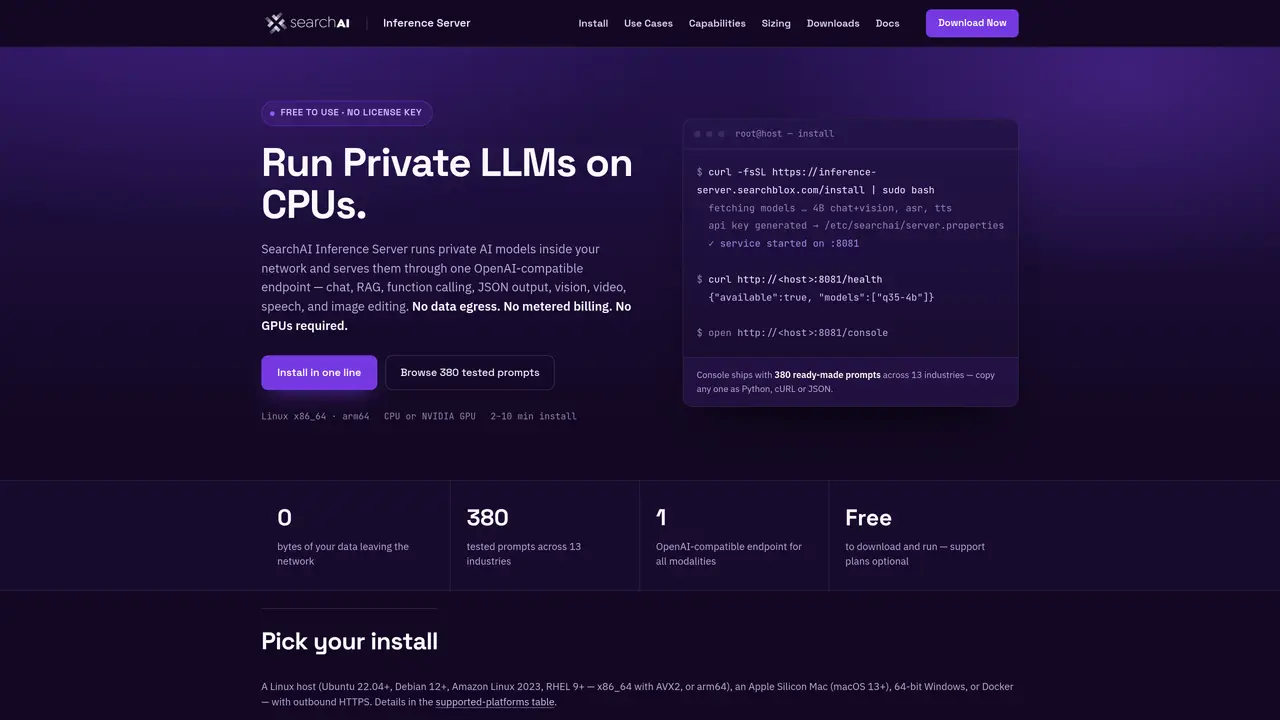
SearchAI Inference Server enables private deployment of large language models within a local network, eliminating the need for cloud-based inference or GPU acceleration. The tool serves models through a single OpenAI-compatible endpoint supporting chat, retrieval-augmented generation (RAG), function calling, JSON output, vision, video, speech, and image editing capabilities. It operates without data egress, metered billing, or GPU requirements, making it suitable for on-premises, air-gapped, regulated, and edge environments. Installation is streamlined via a one-line command across supported platforms including Linux x86_64, arm64, macOS (Apple Silicon), 64-bit Windows, and Docker. The server includes a built-in console with 380 tested prompts across 13 industries, a model workbench for comparison and optimization, and auditable features such as HTTPS, Bearer-key authentication, and deterministic outputs. It supports a catalog of models ranging from 0.8B to 35B parameters, with options for CPU-only or optional GPU acceleration for specific workloads.
SearchAI Inference Server is a tool for deploying large language models privately within a local network, serving them through a single OpenAI-compatible endpoint. It supports capabilities such as chat, retrieval-augmented generation (RAG), function calling, JSON output, vision, video, speech, and image editing without requiring cloud-based inference or GPU acceleration.
The tool is designed for on-premises, air-gapped, regulated, and edge environments, making it ideal for organizations prioritizing data privacy, compliance, or low-latency requirements. It supports deployment across Linux, macOS, Windows, and Docker.
Installation is streamlined via a one-line command across supported platforms, including Linux x86_64, arm64, macOS (Apple Silicon), 64-bit Windows, and Docker. The process includes fetching models, generating an API key, and starting the service automatically.
No, the tool can run fully on CPU, though GPU acceleration is optional for specific workloads such as long open-ended generation or handling very large models and high concurrency. GPU support is available via a one-flag add-on.
The server supports a catalog of models ranging from 0.8B to 35B parameters, including text-only, multimodal, and mixture-of-experts models. Models can be downloaded and deployed directly from the built-in console.
Yes, the tool includes a model workbench that allows side-by-side comparison with any external OpenAI-compatible endpoint, enabling users to evaluate and optimize prompts and outputs.
We use essential cookies to run aitoolnavio™, and optional cookies to analyze traffic and measure our marketing. You choose what we use — optional cookies stay off unless you turn them on. See our Privacy Policy.
One short email a week: fresh tools worth trying, honest takes and the updates that actually matter. No spam, unsubscribe any time.
Scales efficient language processing with open-source accessibility.
Collaboration and version control platform for software development and AI model hosting.
Tesla’s AI stack powers Full Self-Driving, Optimus humanoid robots, and real-world autonomy with neural networks, custom hardware, and Dojo-scale training.
Integrates AI into Airtable to analyze data, summarize insights, draft content, and automate workflows without prior AI experience.
AI-powered website builder that generates a professional site in under a minute and includes tools for content, SEO, and analytics.
Unified platform to access and switch between hundreds of AI models like ChatGPT, Claude, and Gemini via a single API.
xAI builds Grok frontier AI models for reasoning, coding, voice, images, video, enterprise workflows, and developer APIs.
Meta AI enhances machine learning, NLP, and computer vision capabilities.
Crowdsourced platform for blind, side-by-side AI model comparisons with a public leaderboard.
Customize, deploy, and control AI models securely.
Independent benchmarks comparing AI models on quality, speed, and cost across multiple capabilities.
Chat, build, and explore with open AI models.
Matched on what this tool does — grouped by the job you would be replacing.
matches OpenAI-compatible endpoint for chat, RAG, and function calling · Cluster-ready with model-aware routing and load balancing · Auditable by design with HTTPS, Bearer-key auth, and deterministic outputs
Windows application for running private local AI models fully offline
A hybrid AI agent platform that runs locally on Intel AI PCs, keeping data private while enabling agentic workflows.
Generate customized text outputs in multiple languages quickly and efficiently.
matches Multimodal support including vision, video, speech, and image editing · OpenAI-compatible endpoint for chat, RAG, and function calling
Unified platform to train, fine-tune, and serve open models with OpenAI-compatible APIs, multi-model routing, and elastic capacity for production-scale AI workloads.
Unified API gateway and marketplace for accessing multiple AI model providers through a single interface
Unified API gateway for Chinese AI models including chat, image, video, voice and 3D
Unified API gateway for accessing multiple large language models with usage-based billing