
Turn spreadsheets into custom business apps without writing code using this no-code platform.
21M visits/mo+0.1%#15 Coding & Development
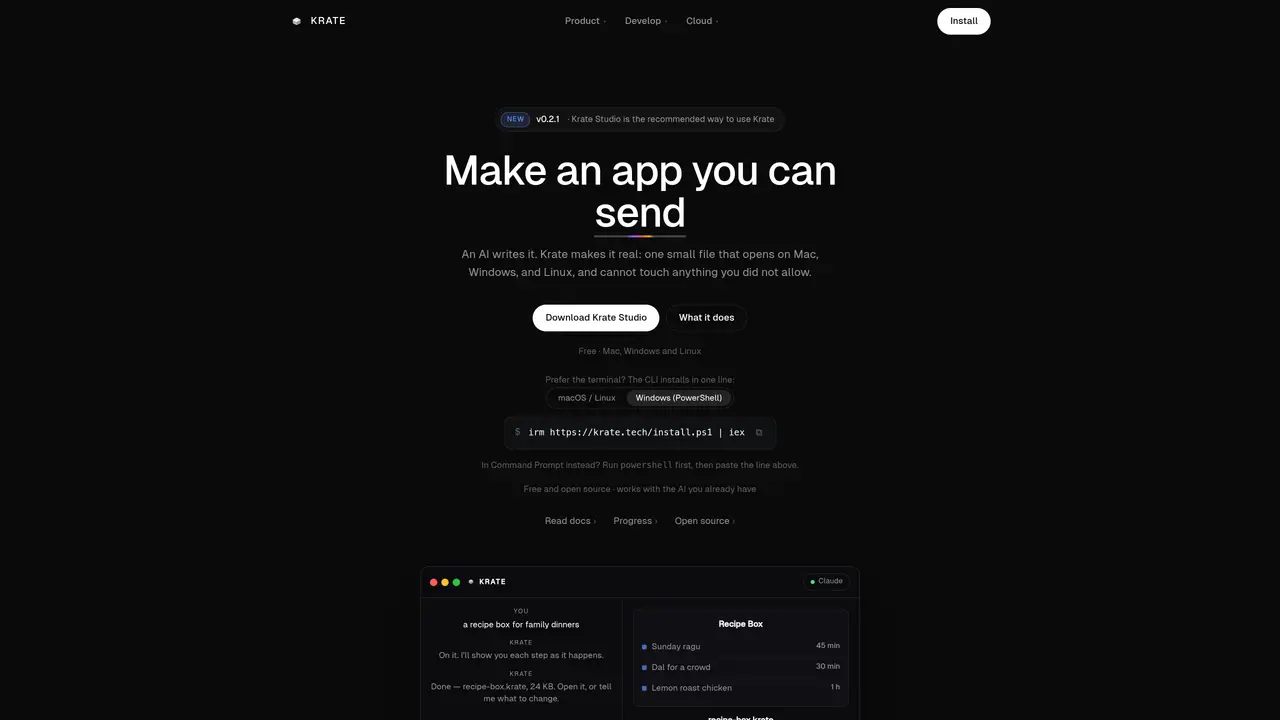
Krate converts plain-language descriptions into native desktop applications that run on Mac, Windows, and Linux. Users describe the desired app in a sentence or two, and Krate’s workflow writes the code, compiles it, checks its safety, and packages it into a single file typically 15–60 KB in size. The resulting file opens by double-click with no installer or runtime, and it runs in a sandbox that restricts access to files, network, or hardware unless explicitly permitted. Krate integrates with existing AI services such as Claude, Codex, Gemini, Copilot, or Grok, and can incorporate screenshots or design references to refine the output. The tool provides a CLI for local use and a cloud service for publishing apps as shareable links that others can run with a one-line install if they lack Krate. Each app is accompanied by verifiable reports confirming its build, import safety, runtime behavior, and visual output, enabling trust without requiring an account or telemetry.
Krate converts plain-language descriptions into native desktop applications that run on Mac, Windows, and Linux. Users describe the desired app in a sentence or two, and Krate’s workflow writes the code, compiles it, checks its safety, and packages it into a single file.
Krate is designed for anyone who wants to create and share small desktop applications without needing to write code or set up complex development environments. It suits developers, designers, and non-technical users alike.
Krate compiles the app, checks its safety, and packages it into a single file that runs in a sandbox. The sandbox restricts access to files, network, or hardware unless explicitly permitted, and the user must approve any requested permissions before the app can use them.
Yes, Krate integrates with existing AI services such as Claude, Codex, Gemini, Copilot, or Grok. Users can leverage the AI service they already use to generate the app code within Krate Studio.
Krate is typically used for creating small, shareable desktop applications like tools, games, notes apps, or utilities. These apps can be sent to others as a single file that opens without an installer or runtime.
Recipients can run the app by double-clicking the file, which opens it in a sandbox. The app cannot access anything unless explicitly permitted, and the recipient must approve any requested permissions before the app can use them.
We use essential cookies to run aitoolnavio™, and optional cookies to analyze traffic and measure our marketing. You choose what we use — optional cookies stay off unless you turn them on. See our Privacy Policy.
One short email a week: fresh tools worth trying, honest takes and the updates that actually matter. No spam, unsubscribe any time.
Turn spreadsheets into custom business apps without writing code using this no-code platform.
Transform ideas into fully functional applications with Lovable, a groundbreaking AI tool.
Explore and test Google’s experimental AI tools and prototypes before they become products.
Build full applications swiftly without coding expertise.
Build scalable apps with AI-driven tools.
AI-native builder that turns prompts into full-stack web apps, syncs to GitHub, and deploys to Vercel in seconds with visual editing.
Create AI-powered applications, customize features, build & test rapidly with intuitive UI.
AI-powered visual platform that turns prompts or images into mobile and web apps with drag-and-drop simplicity.
Turn natural language into full-stack apps, SaaS products, and websites without coding using an AI-powered no-code builder.
AI-powered app builder that turns data into functional web apps without coding.
Low-code platform accelerates enterprise app development with AI.
Rork turns app ideas into fully functional mobile apps for iOS, Android, and web in minutes using AI, no coding required.
Matched on what this tool does — grouped by the job you would be replacing.
matches Converts plain-language descriptions into native apps · Compiles and packages apps into single portable files
Transform ideas into fully functional applications with Lovable, a groundbreaking AI tool.
Turns a single prompt into a native desktop app for Mac, Windows, and Linux
matches Sandboxes apps by default with explicit permission prompts · Generates verifiable reports for build, import, and runtime checks
Generates verifiable project passports for AI-built software handover
Analyzes open-source package behavior during installation to block malicious dependencies in CI pipelines