

AI-powered website builder that generates a professional site in under a minute and includes tools for content, SEO, and analytics.
52M visits/mo+0.7%#4 Coding & Development
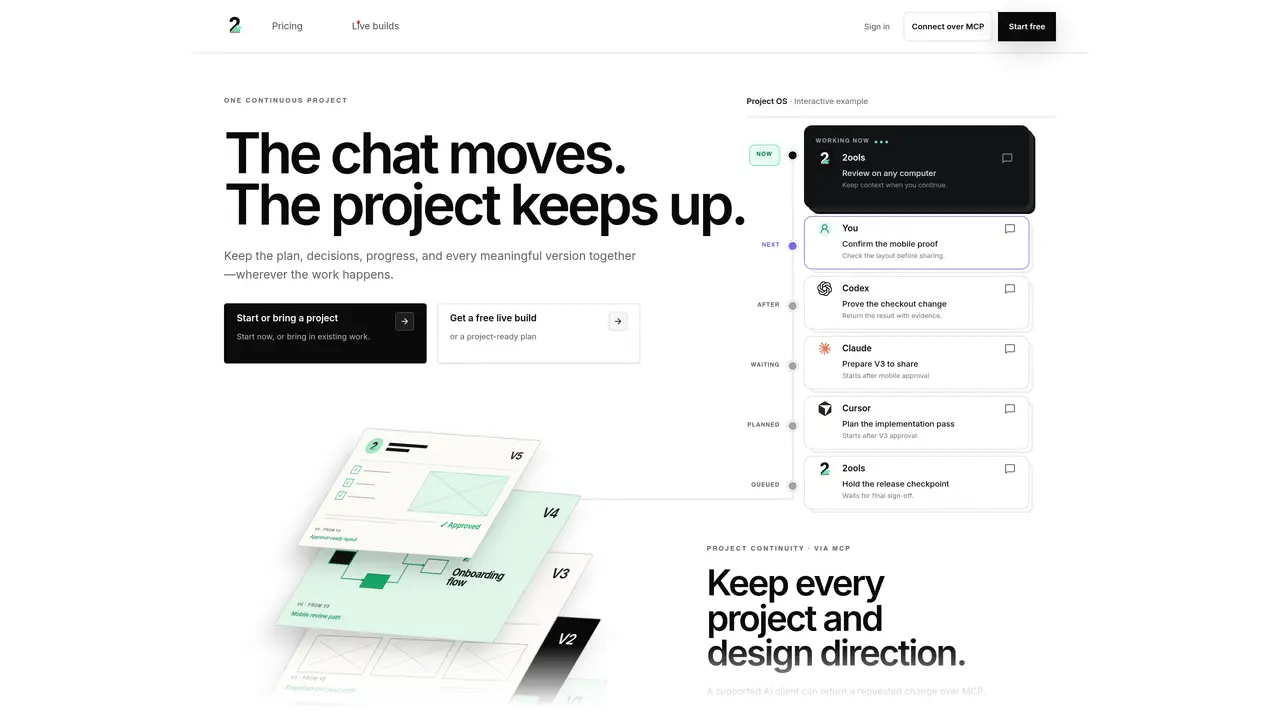
2ools provides a persistent workspace that keeps AI-assisted development projects in sync across different AI tools and sessions. It records decisions, versions, and evidence so work can continue from the latest checkpoint regardless of which AI client is used. Projects retain their full history, including plans, code changes, and approvals, allowing teams to review, remix, or restore earlier states without re-explaining context. Users can start or import projects, receive live builds, and share reviewable links that require no account to open. The system supports switching between AI models mid-project while preserving task context, preventing the loss of progress that typically occurs when changing tools. Work is organized into projects with versioned sheets that capture each iteration’s rationale and outcomes. The platform integrates via MCP to connect approved AI clients, enabling inspection of changes, saving work, and sharing progress directly from the chat interface.
2ools is a persistent workspace that keeps AI-assisted development projects in sync across different AI tools and sessions. It records decisions, versions, and evidence so work can continue from the latest checkpoint regardless of which AI client is used.
2ools is designed for developers, designers, and teams who use multiple AI tools for building products and want to maintain continuity in their projects without losing context or progress when switching between tools.
2ools uses MCP to connect approved AI clients, enabling the system to save each version with its decisions and evidence. This allows users to switch between AI models mid-project while preserving task context and preventing loss of progress.
Yes, you can start a project in 2ools and open it in your preferred AI tool to continue working. The project retains its full history, including plans, code changes, and approvals, so you can pick up where you left off.
Yes, 2ools offers a Team plan with shared administration and collaboration features, allowing multiple users to work on the same project and share progress.
You can start for free by creating an account on the 2ools website. The free plan allows you to use the Core MCP loop with limited capacity, while Pro and Team plans offer more features and collaboration options.
We use essential cookies to run aitoolnavio™, and optional cookies to analyze traffic and measure our marketing. You choose what we use — optional cookies stay off unless you turn them on. See our Privacy Policy.
One short email a week: fresh tools worth trying, honest takes and the updates that actually matter. No spam, unsubscribe any time.
AI-powered website builder that generates a professional site in under a minute and includes tools for content, SEO, and analytics.
AI-powered coding platform that uses agents to plan, write, and test software with real-time feedback and verifiable artifacts.
Automate code, research, and documents using agents.
AI-powered code assistant that generates, reviews, optimizes, and debugs code with natural language prompts and editor integrations.
AI assistant for safe, reliable productivity with code, collaboration, and integrations.
AI-powered IDE for autonomous coding tasks and agentic development workflows
Privacy-focused AI chatbot that generates uncensored text, code, images, and translations without storing conversations or requiring an account.
A free web-based AI chatbot and agent for writing, coding, research, and content creation with multilingual support.
Write & run code in 50+ languages, auto-complete with AI, and code faster with an intuitive interface.
An IDE that automates legacy-to-modern code migration using autonomous coding agents.
AI models that return typed decisions with calibrated confidence for software automation
Practice coding challenges, improve technical skills, get detailed explanations, compare performance with peers.
Matched on what this tool does — grouped by the job you would be replacing.
matches Versioned project workspace for AI-assisted development with continuous context · Continuous project history with versioned sheets · Live build generation and sharing
Shared workspace for organizing AI production shots, versions and decisions
A shared workspace for storing and organizing AI-generated content as durable pages
Shared AI workspace for teams to collaborate with persistent context
AI-powered workspace for creating, editing and sharing live documents, decks and spreadsheets as web links
matches Cross-AI context preservation via MCP · Project continuity across AI switches
Shared memory layer for AI agents to maintain context across sessions
Preserves planning context in a shareable link for coding agents
Preserves and restores the state of AI-assisted work across sessions
Persistent workspace for AI-assisted tasks and projects