

Generate content, correct spelling, suggest synonyms to enhance writing.
173M visits/mo+0.1%#1 Productivity & Office
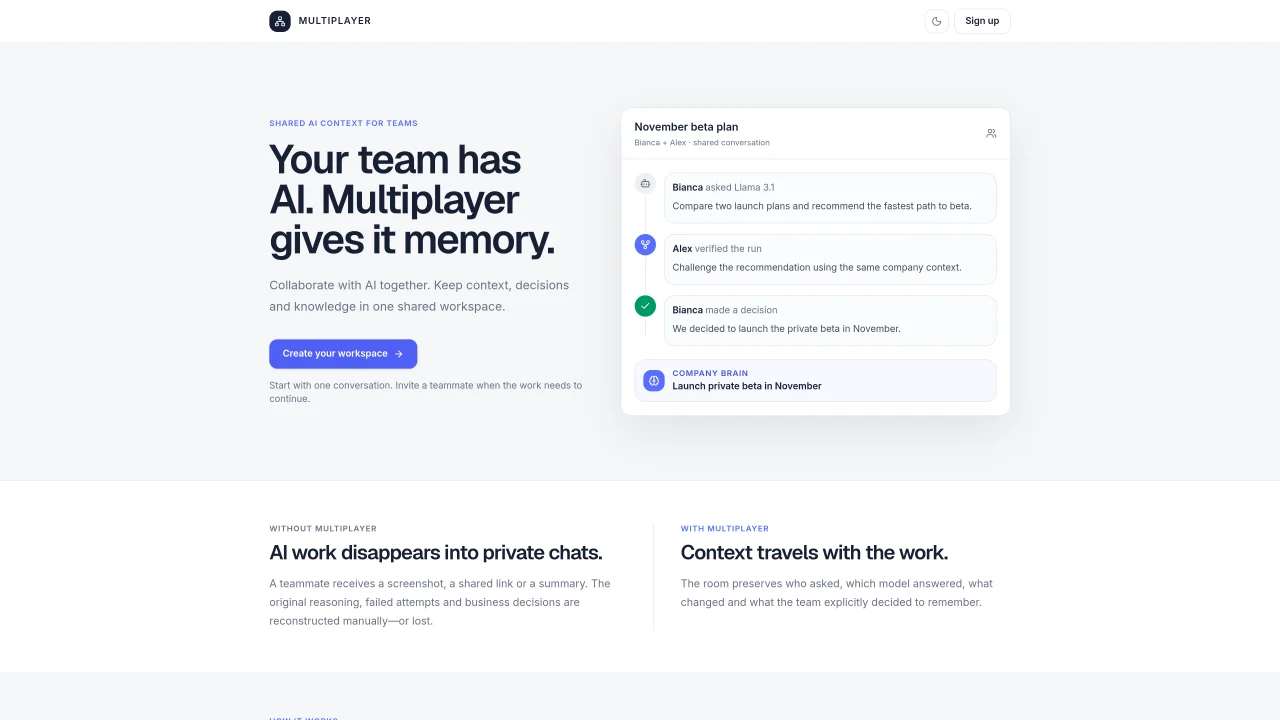
Multiplayer provides a shared workspace where teams can collaborate with AI while preserving context, decisions, and knowledge in one place. It allows multiple users to work together on AI conversations, maintaining a record of who asked what, which model responded, what was changed, and what the team decided to remember. The tool enables teams to start with a single conversation and invite teammates as needed, ensuring continuity without losing reasoning or context. Workspaces include a Company Brain feature to save explicit decisions, goals, preferences, and tasks, preventing the need to rebuild team AI context repeatedly. Users can continue, fork, verify, comment, and review shared AI work while keeping the original lineage intact. The platform is designed to prevent AI work from disappearing into private chats by preserving the full reasoning and business decisions in a shared record.
Multiplayer provides a shared workspace where teams can collaborate with AI while preserving context, decisions, and knowledge in one place. It maintains a record of who asked what, which model responded, what was changed, and what the team decided to remember.
Multiplayer is designed for teams that use AI and need to maintain continuity in their work. It suits groups that want to collaborate on AI conversations without losing reasoning or context.
Multiplayer preserves context by keeping a shared record from prompt to decision. It tracks who asked, which model answered, what changed, and what the team explicitly decided to remember in a Company Brain feature.
Yes, you can start with one conversation and invite teammates as needed. This ensures continuity without losing reasoning or context, allowing the work to continue seamlessly.
The Company Brain feature allows teams to save explicit decisions, goals, preferences, and tasks. This prevents the need to rebuild team AI context repeatedly and keeps important information centralized.
To get started, create a workspace and begin the first shared conversation. You can then invite teammates to collaborate and continue the work together.
We use essential cookies to run Aitoolnavio, and optional cookies to analyze traffic and measure our marketing. You choose what we use — optional cookies stay off unless you turn them on. See our Privacy Policy.
One short email a week: fresh tools worth trying, honest takes and the updates that actually matter. No spam, unsubscribe any time.
Generate content, correct spelling, suggest synonyms to enhance writing.
Unify customer data, automate workflows, and scale experiences with Einstein AI, Copilot, and Data Cloud in one CRM platform.
Create customizable tables, databases, and spreadsheets, share data securely with team members.
Cloud accounting software that automates bookkeeping, invoicing, and financial reporting for small and growing businesses.
Transforms thoughts into actions, enhancing productivity and efficiency.
AI assistant for safe, reliable productivity with code, collaboration, and integrations.
Automate code, research, and documents using agents.
Record lectures, create tutorials, and securely share videos with teams.
Revolutionize travel with AI-driven personalized itinerary planning.
Easy-to-use CRM platform that automates lead capturing, prioritizes tasks, and provides sales pipeline analytics for businesses of all sizes.
All-in-one team productivity platform combining chat, docs, video meetings, workflows, and AI tools in one place.
AI travel planner that builds personalized itineraries from your preferences, travel dates, and reservations for vacations, road trips, and more.
Matched on what this tool does — grouped by the job you would be replacing.
matches Shared AI workspaces for teams · Invite-based team collaboration · Persistent memory of team AI interactions
Collaborative workspace where teams and AI agents work together in shared rooms
Shared workspace for teams and AI agents to capture decisions and turn them into reusable skills
A shared chat workspace where AI agents with persistent memory initiate conversations and collaborate with humans in real time.
Collaborative workspace that unifies teams, AI models and agents in shared sessions
matches Company Brain for storing decisions and context · Preserves conversation lineage and reasoning · Tracks who asked, which model answered, and changes
matches Supports forking and reviewing AI work
AI platform that tracks goals, automates reviews, and aligns teams across tools
Centralized private memory for AI projects to maintain continuity across different assistants
Hires dedicated AI employees that integrate with existing business tools
Persistent memory layer for AI coding agents with provenance tracking
A shared workspace for storing and organizing AI-generated content as durable pages
Versioned project workspace for AI-assisted development with continuous context