
OpenAI builds and deploys advanced AI models like GPT-4o for autonomous agents and workflows.

Catenary
$19Starting price
0Popularity
About Catenary
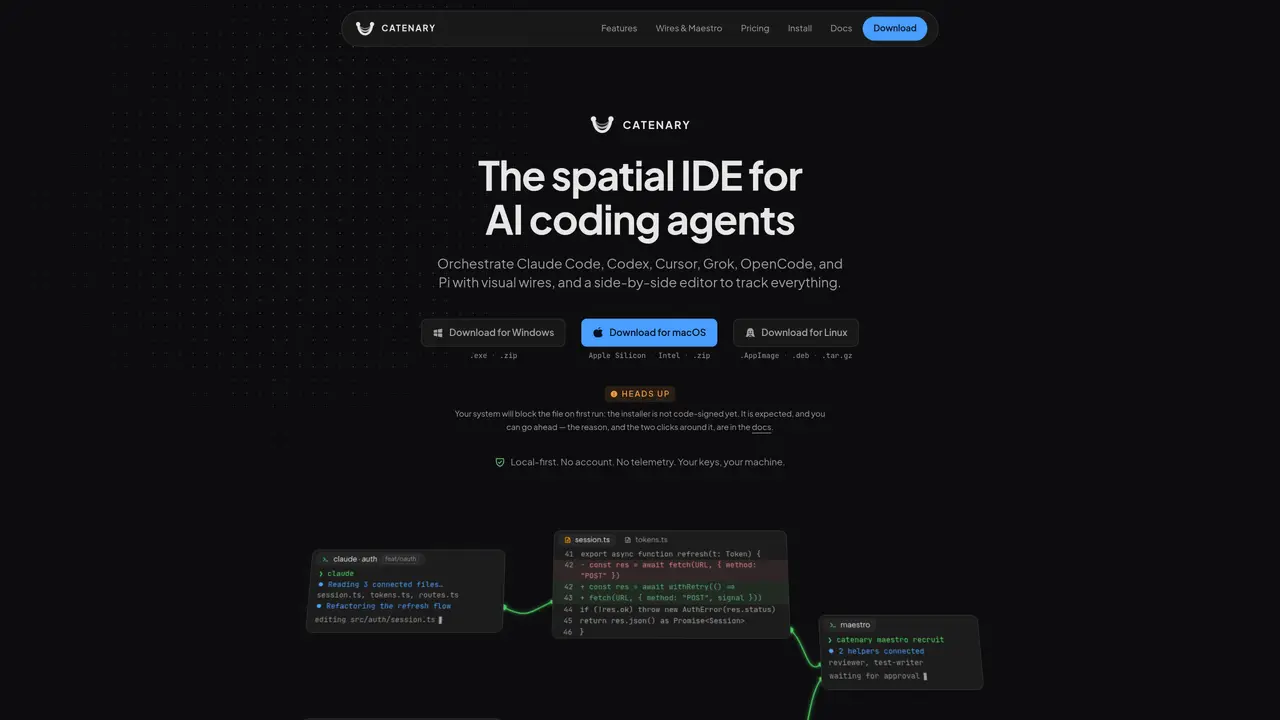
Catenary provides a spatial interface where multiple AI coding agents can operate simultaneously on an infinite canvas. Each agent runs in an isolated worktree with its own branch, allowing parallel experimentation without affecting the main codebase. The tool supports agents such as Claude Code, Codex, Cursor, Grok, OpenCode, and Pi, displayed alongside terminals, Monaco editors, and browsers. Changes made by agents are shown in real-time with side-by-side diffs, enabling users to review modifications before accepting them. Context can be routed between agents using visual wires, with options to relay automatically or require manual approval. Maestro Mode allows one agent to recruit and coordinate a team of up to five additional agents, with each action requiring human approval. The application is local-first, does not require an account, and does not send code or prompts to external servers. It operates entirely on the user’s machine with no telemetry or analytics.
Key features
- Infinite canvas for organizing agents and tools
- Side-by-side diffs in Monaco editor
- 1-click worktrees and branches
- Context wiring with automatic or manual relay
- Maestro Mode for team coordination
- Git-aware file tree
- Parallel git worktrees
- Terminal and browser integration
Use cases
- Parallel experimentation with multiple AI agents
- Code refactoring with real-time review
- Team coordination via Maestro Mode
Pros
- Supports multiple AI coding agents simultaneously
- Isolated worktrees and branches prevent interference with main codebase
- Real-time diffs for reviewing agent changes
- Visual context wiring between agents
- Local-first with no telemetry or external code transmission
Cons
- Installer is not code-signed, triggering system security warnings
- No cloud sync or cross-device functionality
- Limited to desktop platforms (Windows, macOS, Linux)
- Maestro Mode requires manual approval for each action
Frequently asked questions about Catenary
What is Catenary and what does it do?
Catenary is a spatial IDE designed for orchestrating multiple AI coding agents on an infinite canvas. It allows users to run agents like Claude Code, Codex, or Grok in isolated worktrees, enabling parallel experimentation without affecting the main codebase.
Who is Catenary designed for?
Catenary is designed for developers who want to leverage AI coding agents for tasks such as refactoring, testing, or reviewing code while maintaining full control over the process. It suits users who need to manage multiple agents and projects simultaneously.
Does Catenary require an account or send data to external servers?
No, Catenary is local-first and does not require an account. It does not send source code, prompts, or file contents to external servers, operating entirely on the user’s machine with no telemetry or analytics.
How does Maestro Mode work in Catenary?
Maestro Mode allows one agent to recruit and coordinate a team of up to five additional agents. Each action taken by the team requires human approval before changes are applied, ensuring the user remains in control of the process.
Can I use Catenary with agents like Cursor or Pi?
Yes, Catenary supports multiple AI coding agents, including Cursor, Pi, Claude Code, Codex, Grok, and OpenCode, which can be orchestrated on the same canvas.
How do I get started with Catenary?
Users can download Catenary for Windows, macOS, or Linux from the official website. The tool operates locally and does not require an account, making it straightforward to install and use.