AI-powered website builder that generates a professional site in under a minute and includes tools for content, SEO, and analytics.
52M visits/mo+0.7%#4 Coding & Development

Browser-based AI coding assistant that reads, edits and commits to GitHub repos
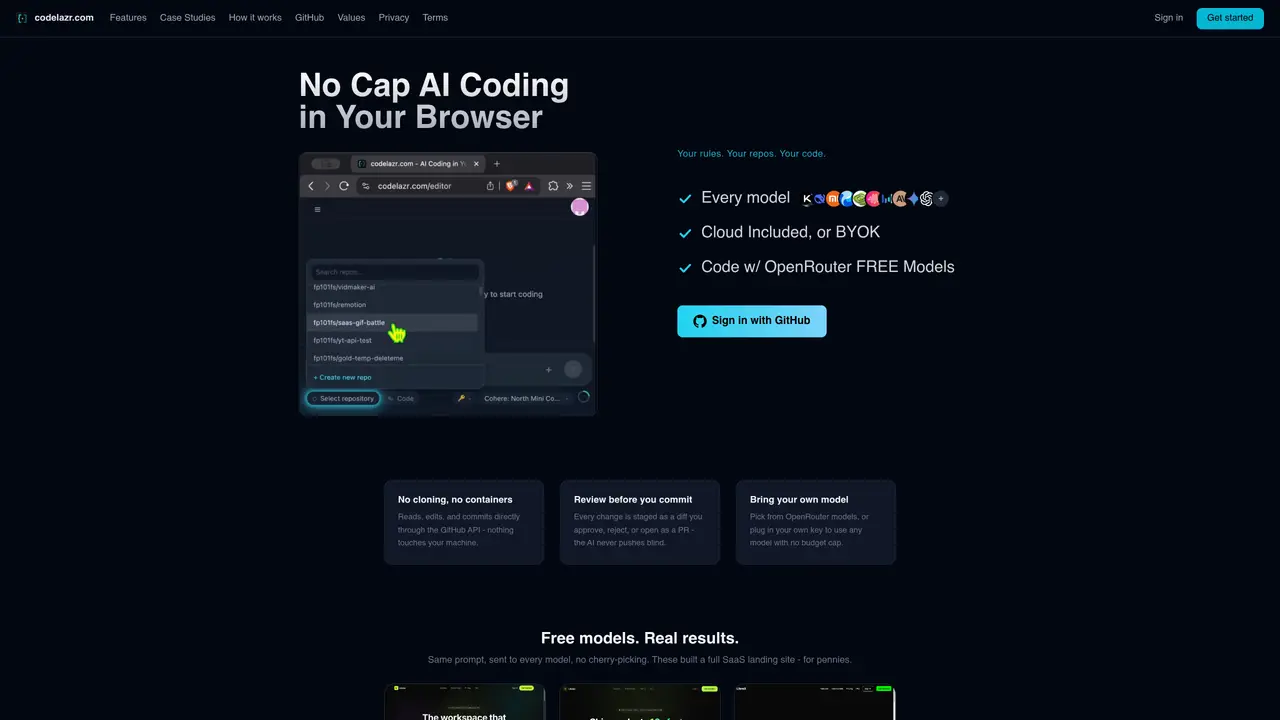
codelazr is a browser-based AI coding assistant that integrates directly with GitHub repositories. It reads, edits, and commits code through the GitHub API without requiring local cloning or containers. Every AI-generated change is presented as a diff for review, allowing users to approve, reject, or convert suggestions into pull requests. The tool supports multiple AI models via OpenRouter or custom API keys, enabling users to select models based on cost and performance. It operates entirely in the browser, eliminating the need for installation while providing desktop-level editing capabilities. Users can work from any device, including mobile phones, maintaining the same editor and repository access. The platform emphasizes transparency in model performance and cost, displaying real-time pricing and retry mechanisms for failed operations. It is designed for developers who want to prototype, debug, or build features using AI assistance without local setup overhead.
codelazr is a browser-based AI coding assistant that integrates with GitHub repositories. It reads, edits, and commits code directly through the GitHub API without requiring local cloning or containers. Every AI-generated change is presented as a diff for review before being committed or converted into a pull request.
codelazr is designed for developers who want to prototype, debug, or build features using AI assistance without the overhead of local setup. It suits users who need to work from any device, including mobile phones, while maintaining access to their repositories and editor capabilities.
Yes, codelazr supports multiple AI models via OpenRouter or custom API keys. Users can select models based on cost and performance, and the platform displays real-time pricing and retry mechanisms for failed operations.
codelazr offers a free tier with no card required, including free models and a small budget for paid models. Paid plans provide a monthly AI budget across supported models, with options for Pro and Max tiers. Users can manage or cancel their budget anytime from the Usage page.
Yes, codelazr operates entirely in the browser, allowing users to work from any device, including mobile phones. The same editor and repository access are maintained across devices, providing full desktop-level editing capabilities.
To get started, sign in with GitHub and begin using codelazr directly in your browser. No installation or local setup is required. Users can start with free models or bring their own OpenRouter key for additional model options.
We use essential cookies to run aitoolnavio™, and optional cookies to analyze traffic and measure our marketing. You choose what we use — optional cookies stay off unless you turn them on. See our Privacy Policy.
One short email a week: fresh tools worth trying, honest takes and the updates that actually matter. No spam, unsubscribe any time.
AI-powered website builder that generates a professional site in under a minute and includes tools for content, SEO, and analytics.
AI-powered coding platform that uses agents to plan, write, and test software with real-time feedback and verifiable artifacts.
Automate code, research, and documents using agents.
AI-powered code assistant that generates, reviews, optimizes, and debugs code with natural language prompts and editor integrations.
AI assistant for safe, reliable productivity with code, collaboration, and integrations.
AI-powered IDE for autonomous coding tasks and agentic development workflows
Privacy-focused AI chatbot that generates uncensored text, code, images, and translations without storing conversations or requiring an account.
A free web-based AI chatbot and agent for writing, coding, research, and content creation with multilingual support.
Write & run code in 50+ languages, auto-complete with AI, and code faster with an intuitive interface.
An IDE that automates legacy-to-modern code migration using autonomous coding agents.
AI models that return typed decisions with calibrated confidence for software automation
Practice coding challenges, improve technical skills, get detailed explanations, compare performance with peers.
Matched on what this tool does — grouped by the job you would be replacing.
matches Browser-based editor · GitHub API integration · Diff-based change review
Collaboration and version control platform for software development and AI model hosting.
Run and manage remote AI coding agents from any device with real-time sync and a clean UI.
Cloud-based integrated development environment with AI coding assistant and live collaboration
Git MCP server that integrates Git repositories with Cursor, Claude Desktop, and Windsurf via the Model Context Protocol.
matches Multi-model AI support · OpenRouter model selection · Custom API key support
Edit code, docs, diagrams with inspectable AI changes.
macOS desktop app that builds structured AI prompts from local code repos for developers, with file selection, token estimates, and diff-based edits.
Desktop workspace for running AI agents on local files and code
A macOS app that coordinates multiple AI coding agents in parallel