
Generate captions, optimize content, and enhance with custom images for maximum engagement.
46M visits/mo-10%#3 Image & Design
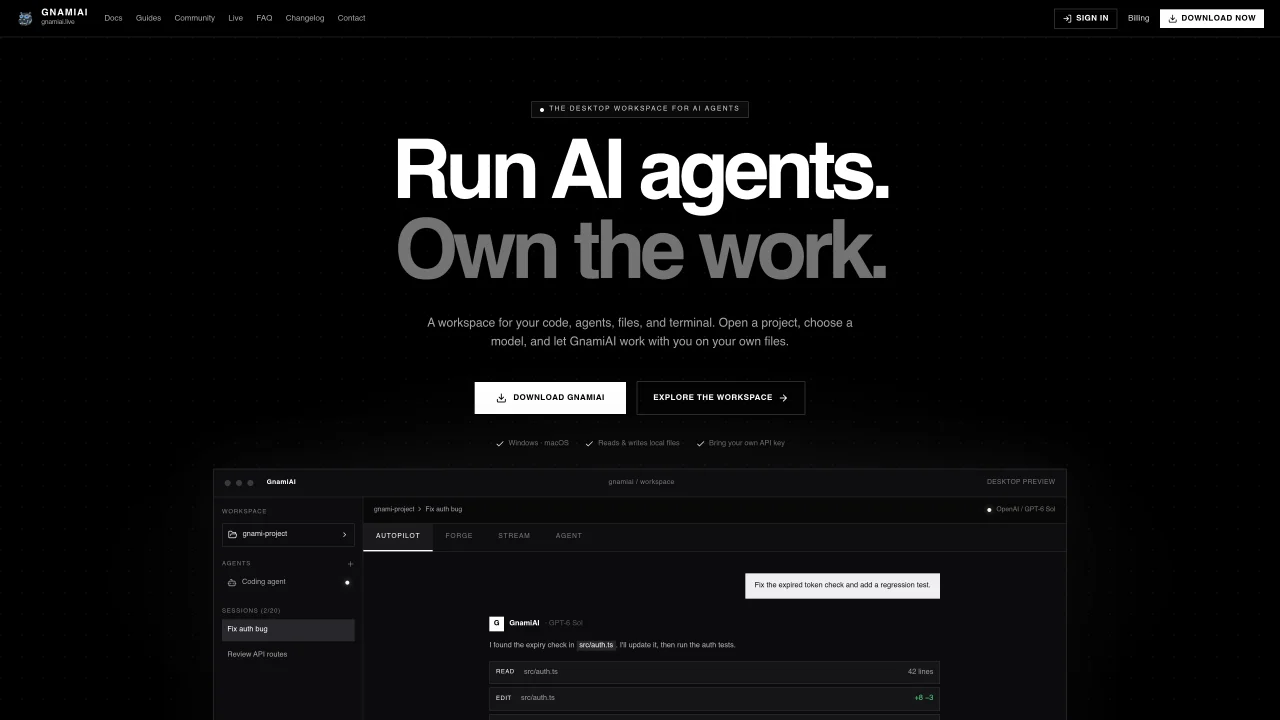
GnamiAI provides a desktop workspace where AI agents can read, edit, and execute tasks on local files and codebases. Users open a project, select a model, and allow the agent to work alongside them. The tool supports four modes: Autopilot for task automation with safety checks, Forge for direct file editing with syntax highlighting, Stream for running shell commands in the workspace, and Agent for creating persistent agents with custom briefs and memory. It integrates with various AI models through user-provided API keys and operates locally with permission control. The workspace includes features like session tracking, memory limits, and rollback capabilities for non-destructive changes. It is available as a desktop application for Windows and macOS, with a Linux build in progress.
GnamiAI is a desktop workspace that enables AI agents to read, edit, and execute tasks on local files and codebases. It allows users to open a project, select an AI model, and collaborate with an agent on their own files.
GnamiAI is designed for developers who want to integrate AI agents directly into their workflows. It suits users who prefer local file access, model flexibility, and non-destructive task execution.
GnamiAI operates on a simple paid model via PayPal. The Pro plan includes all features, local file access, and cloud sandbox credits. Users can subscribe monthly or purchase a limited lifetime deal.
Yes, GnamiAI supports integration with any AI model accessible via user-provided API keys. Users can swap models at any time without restrictions.
GnamiAI is available as a desktop application for Windows and macOS. A Linux build is currently in progress.
Download the GnamiAI desktop application for your operating system, open a project, and provide your AI model's API key. The workspace guides users through selecting a mode and assigning tasks to the agent.
We use essential cookies to run aitoolnavio™, and optional cookies to analyze traffic and measure our marketing. You choose what we use — optional cookies stay off unless you turn them on. See our Privacy Policy.
One short email a week: fresh tools worth trying, honest takes and the updates that actually matter. No spam, unsubscribe any time.
Generate captions, optimize content, and enhance with custom images for maximum engagement.
Build conversational forms, capture rich responses, and automate follow-ups with AI-powered surveys and workflows.
Automate code, research, and documents using agents.
AI-powered IDE for autonomous coding tasks and agentic development workflows
Source, match, and manage talent with predictive analytics for effortless recruiting.
Automate workflow, optimize operations, and detect potential issues with this efficient AI-driven solution.
Transforms thoughts into actions, enhancing productivity and efficiency.
AI Recruitment engine to hire top global talent
All-in-one team productivity platform combining chat, docs, video meetings, workflows, and AI tools in one place.
Personal assistant that coordinates tasks across apps and devices via text or call
AI automation and agent-building platform with 3,000+ app integrations
AI job search copilot that matches roles to skills, optimizes resumes for ATS, generates cover letters, and autofills applications with real-time insights.
Matched on what this tool does — grouped by the job you would be replacing.
matches Reads and writes local files · Syntax-highlighted file editing · Session and memory tracking
Desktop AI workspace with isolated agents for local document analysis and code editing
Local desktop app that consolidates multiple coding agents into one window
Desktop workspace for coding agents like Codex and Claude Code
Local AI assistant that coordinates desktop apps and files without cloud uploads
matches Runs shell commands in workspace · Model switching at any time
matches Cloud session synchronization
AI agent that reads, edits and organizes files and runs commands on desktop
Cloud-hosted AI agent with shell, files and app integrations
Keyboard-driven manager for running and reviewing multiple AI coding agents in parallel
Terminal-based AI coding agent that reads, edits and runs code with user-controlled permissions
Collaboration and version control platform for software development and AI model hosting.
Private cloud computer for AI agents to collaborate on coding and research tasks