
Privacy-focused AI chatbot that generates uncensored text, code, images, and translations without storing conversations or requiring an account.
20M visits/mo+18.6%#13 Coding & Development
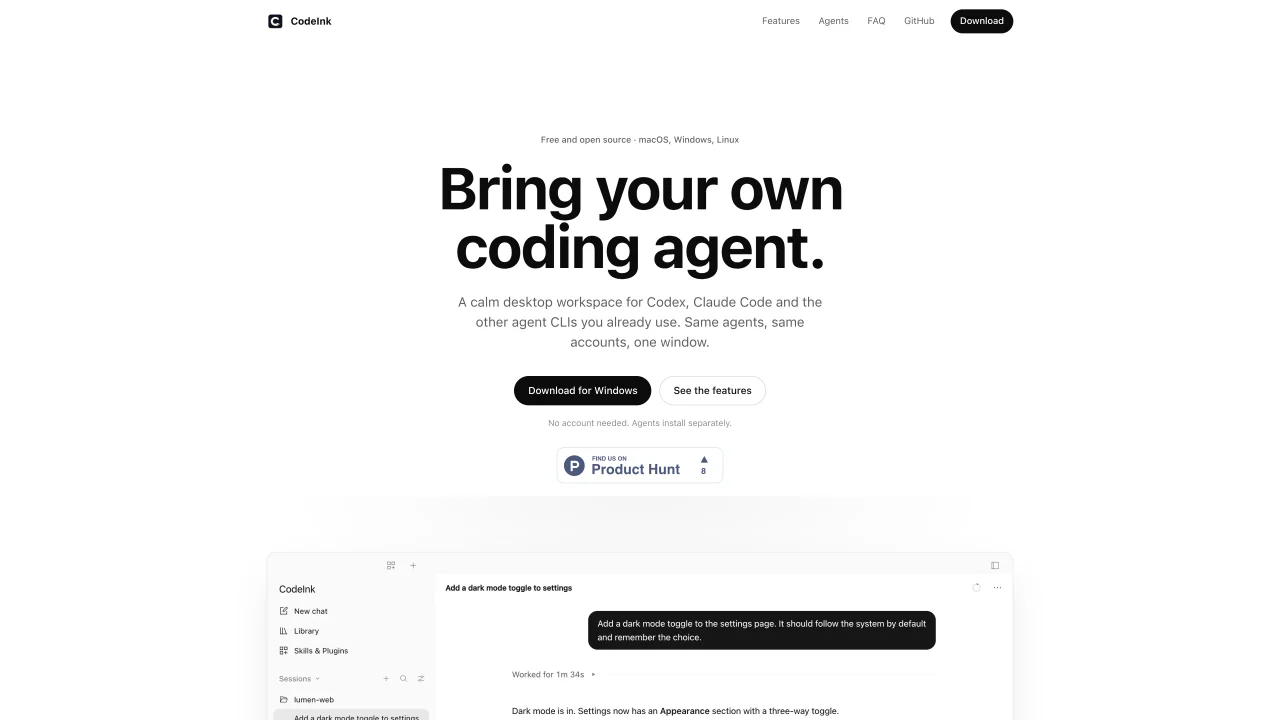
CodeInk provides a desktop workspace for coding agents such as Codex, Claude Code, OpenCode, Pi, Gemini CLI, GitHub Copilot, Cursor, Goose, and 18 others. It functions as a unified window where users can interact with their existing agent CLIs without creating a new account. Sessions are stored locally, and the tool does not collect CLI credentials. Users can control agent actions by reviewing each step before execution or enabling a fast mode when supported. The interface groups chats by project in a sidebar with search and filters, and allows users to manage skills and plugins for each agent. Session and weekly usage limits for agents like Codex and Claude Code are displayed with reset times. The application is free, open source, and available for macOS, Windows, and Linux.
CodeInk is a desktop workspace designed to centralize interactions with coding agents such as Codex, Claude Code, OpenCode, and others. It provides a unified window where users can manage their existing agent CLIs without creating a new account.
CodeInk is suitable for developers who already use coding agents and want a streamlined, local workspace to interact with them. It is ideal for those who prefer to keep their agent accounts and credentials separate from the tool.
CodeInk stores sessions locally and does not collect CLI credentials. Each agent retains its own sign-in and plan, and users can control agent actions by reviewing steps before execution or enabling fast mode when supported.
Yes, CodeInk is free and open source, available for macOS, Windows, and Linux. It does not require a new account and functions as an independent fork of OpenCode.
CodeInk supports a wide range of coding agents, including Codex, Claude Code, OpenCode, Pi, Gemini CLI, GitHub Copilot, Cursor, Goose, and 18 others. Users can choose from the models and reasoning levels each agent reports.
To get started, install the agent you want to use via its own installer, sign in with the agent’s CLI, and then open CodeInk to select the agent and model. Sessions are grouped by project in a sidebar with search and filters.
We use essential cookies to run Aitoolnavio, and optional cookies to analyze traffic and measure our marketing. You choose what we use — optional cookies stay off unless you turn them on. See our Privacy Policy.
One short email a week: fresh tools worth trying, honest takes and the updates that actually matter. No spam, unsubscribe any time.
Privacy-focused AI chatbot that generates uncensored text, code, images, and translations without storing conversations or requiring an account.
AI assistant for safe, reliable productivity with code, collaboration, and integrations.
A free web-based AI chatbot and agent for writing, coding, research, and content creation with multilingual support.
Automate code, research, and documents using agents.
AI-powered coding platform that uses agents to plan, write, and test software with real-time feedback and verifiable artifacts.
AI-powered code assistant that generates, reviews, optimizes, and debugs code with natural language prompts and editor integrations.
AI-powered IDE for autonomous coding tasks and agentic development workflows
AI models that return typed decisions with calibrated confidence for software automation
Write & run code in 50+ languages, auto-complete with AI, and code faster with an intuitive interface.
Practice coding challenges, improve technical skills, get detailed explanations, compare performance with peers.
Professional visual AI engine for node-based image, video, 3D, audio and generative workflows with full control over models and outputs.
An IDE that automates legacy-to-modern code migration using autonomous coding agents.
Matched on what this tool does — grouped by the job you would be replacing.
matches Desktop workspace for coding agents · Project-based chat grouping · Agent skill and plugin management
A shared workspace where humans and AI agents collaborate in real time to plan, code, and manage projects without switching tools.
A desktop workspace that integrates AI agents with sessions, memory and tools
Local desktop app that consolidates multiple coding agents into one window
Local-first desktop workspace for managing multiple AI agents with policy controls
matches Local session storage · Persistent sessions across device closures · Session checkpoints and patch proposals
Private cloud computer for AI agents to collaborate on coding and research tasks
Terminal-based AI agent for coding, data tasks and workflow automation
A coordination layer for multiple AI coding agents working together
Mobile interface for managing terminal-based coding agents on Mac