Generate captions, optimize content, and enhance with custom images for maximum engagement.
46M visits/mo-10%#3 Image & Design

Local-first desktop workspace for managing multiple AI agents with policy controls
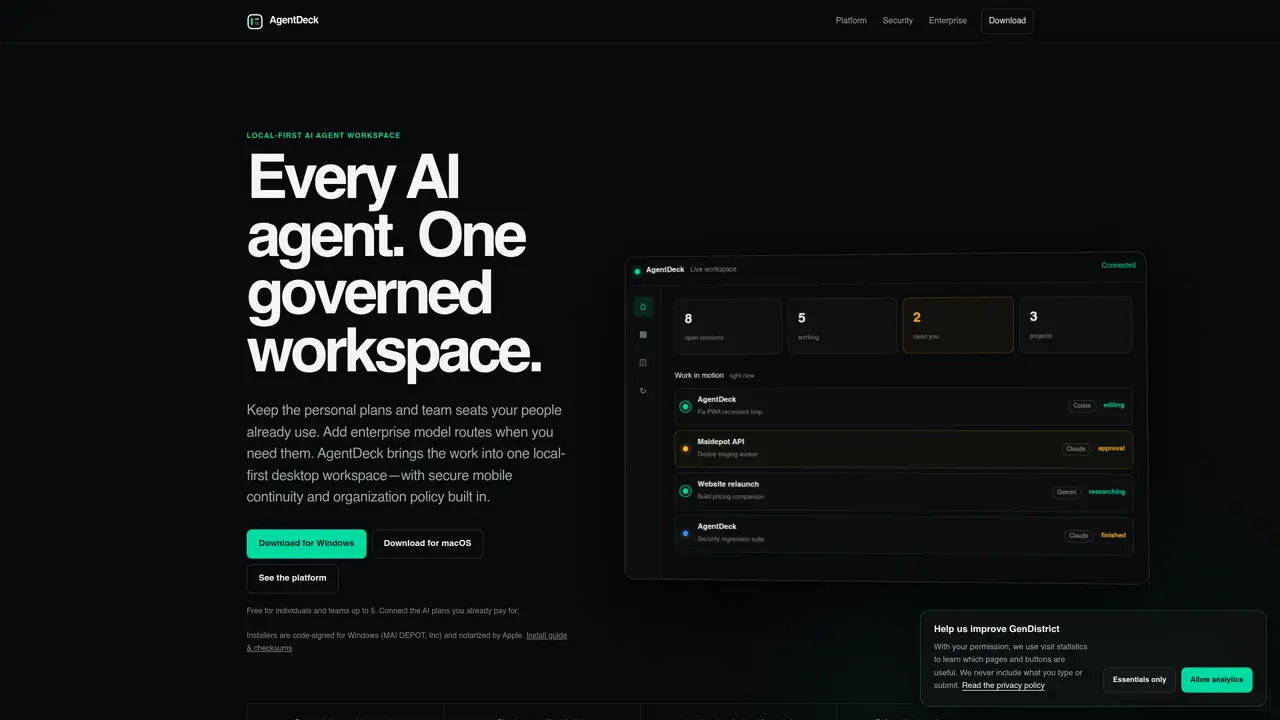
AgentDeck provides a local-first desktop workspace that consolidates multiple AI agents, subscriptions, and company AI servers into a single governed environment. The tool integrates with existing personal and team AI plans while allowing local model execution and private network deployment. Users can connect their signed-in browser via an extension, enabling AI agents to operate within familiar Chrome environments while maintaining approval controls. The platform offers a unified view of AI usage across providers, accounts, devices, and teams, including cost estimates and session tracking. Mobile continuity allows secure remote control of AI workflows from paired phones, with device-to-device encryption protecting connections. Projects are organized into folders with sessions, tools, and approval workflows, supporting both individual and team collaboration up to five members for free. Enterprise features include scoped guest access, audit logging, and time-limited invitations with role-based permissions.
AgentDeck is a local-first desktop workspace that consolidates multiple AI agents, subscriptions, and company AI servers into a single governed environment. It is designed for individuals, teams, and enterprises who want to manage AI workflows across providers, accounts, and devices while maintaining control and security.
AgentDeck allows users to connect their existing personal and team AI plans, including subscriptions and company AI servers, into one unified workspace. It supports local model execution and private network deployment while maintaining the original terms and usage limits of each provider.
Yes, AgentDeck supports team collaboration with features like shared AI usage tracking, role-based permissions, audit logging, and time-limited invitations. Teams of up to five members can collaborate for free, with enterprise features available for larger groups.
AgentDeck provides secure mobile continuity, device-to-device encryption, and approval workflows for AI actions. It also includes audit logging, scoped guest access, and time-limited invitations to ensure that only authorized users can interact with specific sessions or projects.
AgentDeck is available as a downloadable desktop application for Windows and macOS. It also supports secure mobile control via paired phones, allowing users to manage AI workflows remotely while maintaining encrypted connections.
To get started, download the AgentDeck installer for your operating system from the official website, install the application, and follow the setup guide. Connect your existing AI subscriptions or local models, and begin organizing projects, sessions, and approval workflows within the workspace.
We use essential cookies to run aitoolnavio™, and optional cookies to analyze traffic and measure our marketing. You choose what we use — optional cookies stay off unless you turn them on. See our Privacy Policy.
One short email a week: fresh tools worth trying, honest takes and the updates that actually matter. No spam, unsubscribe any time.
Generate captions, optimize content, and enhance with custom images for maximum engagement.
Build conversational forms, capture rich responses, and automate follow-ups with AI-powered surveys and workflows.
Automate code, research, and documents using agents.
AI-powered IDE for autonomous coding tasks and agentic development workflows
Source, match, and manage talent with predictive analytics for effortless recruiting.
Automate workflow, optimize operations, and detect potential issues with this efficient AI-driven solution.
Transforms thoughts into actions, enhancing productivity and efficiency.
AI Recruitment engine to hire top global talent
All-in-one team productivity platform combining chat, docs, video meetings, workflows, and AI tools in one place.
Personal assistant that coordinates tasks across apps and devices via text or call
AI automation and agent-building platform with 3,000+ app integrations
AI job search copilot that matches roles to skills, optimizes resumes for ATS, generates cover letters, and autofills applications with real-time insights.
Matched on what this tool does — grouped by the job you would be replacing.
matches Scoped guest access with time limits · Audit logging for all actions · Policy enforcement without reading conversations
Centralized control plane for managing internal AI agents across teams
Enterprise AI governance platform that detects, masks and audits sensitive data in LLM interactions
Centralized AI governance and runtime enforcement platform for mid-sized companies
Governed workspace that routes, audits and records every AI model interaction for an organization
matches Local model execution via GGUF · Project-based organization with sessions and tools · Mobile continuity for remote control
matches Real-time execution control and monitoring · Spend limits and tool access controls · Remote agent monitoring and kill switches
A desktop workspace that integrates AI agents with sessions, memory and tools
Local workspace for running and supervising AI agents with private control
Local-first desktop workspace for managing multiple AI models and tools in one interface
Desktop workspace for coding agents like Codex and Claude Code
Tracks and attributes AI costs across multiple LLM providers with budget controls
AI workspace layer for deploying and governing agentic teams
Hosted AI workspaces for teams with agents, approvals, and usage tracking
Platform for discovering, creating and managing specialized AI agents in a shared workspace