
Generate captions, optimize content, and enhance with custom images for maximum engagement.
46M visits/mo-10%#3 Image & Design
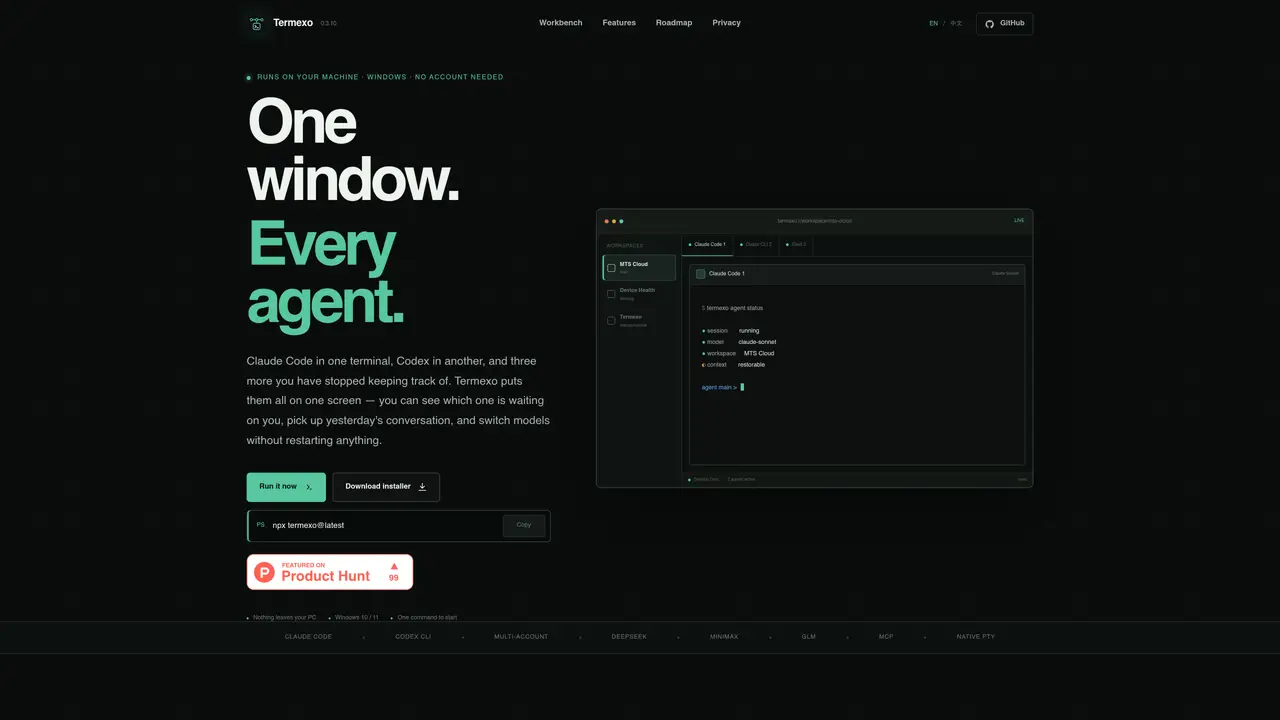
Termexo is a local desktop application for Windows that consolidates multiple coding agents into a single interface. It runs entirely on the user’s machine without requiring an account or cloud login, allowing multiple agents such as Claude Code, Codex CLI, and others to operate simultaneously in separate terminals. The application organizes these terminals into customizable grids that persist across sessions, enabling users to switch between projects and resume previous work exactly as they left it. Termexo provides real-time status indicators for each agent, including when an agent is waiting for input or approval, and sends system notifications to alert users even if the main window is not in focus. It supports model switching between different providers like Anthropic, DeepSeek, MiniMax, and GLM without restarting terminals, and stores API keys securely in Windows Credential Manager. The tool also offers searchable session history, allowing users to reopen past conversations with full context intact.
Termexo is a local desktop application for Windows that consolidates multiple coding agents into a single interface. It runs entirely on the user’s machine, allowing agents like Claude Code and Codex CLI to operate simultaneously in separate terminals organized into customizable grids.
Termexo is designed for developers and teams who work with multiple coding agents and need a unified interface to manage them efficiently. It suits users who prefer local execution and offline operation without requiring cloud logins.
Termexo stores API keys securely in Windows Credential Manager, ensuring they are not exposed in plain text files. The application does not require an account or cloud login, keeping all data and keys local by default.
Yes, Termexo allows switching between different models like Anthropic, DeepSeek, MiniMax, and GLM without restarting terminals. Users can save profiles for different models and switch between them in two clicks.
Termexo currently focuses on local operation, but future versions plan to add optional encrypted remote access features, such as approving tasks from a phone or paired devices, which users can enable or disable as needed.
Users can start Termexo by downloading the installer from the official website or running a command like 'npx termexo@latest'. The application runs on Windows 10 or 11 and requires no account creation or cloud setup.
We use essential cookies to run aitoolnavio™, and optional cookies to analyze traffic and measure our marketing. You choose what we use — optional cookies stay off unless you turn them on. See our Privacy Policy.
One short email a week: fresh tools worth trying, honest takes and the updates that actually matter. No spam, unsubscribe any time.
Generate captions, optimize content, and enhance with custom images for maximum engagement.
Build conversational forms, capture rich responses, and automate follow-ups with AI-powered surveys and workflows.
Automate code, research, and documents using agents.
AI-powered IDE for autonomous coding tasks and agentic development workflows
Source, match, and manage talent with predictive analytics for effortless recruiting.
Automate workflow, optimize operations, and detect potential issues with this efficient AI-driven solution.
Transforms thoughts into actions, enhancing productivity and efficiency.
AI Recruitment engine to hire top global talent
All-in-one team productivity platform combining chat, docs, video meetings, workflows, and AI tools in one place.
Personal assistant that coordinates tasks across apps and devices via text or call
AI automation and agent-building platform with 3,000+ app integrations
AI job search copilot that matches roles to skills, optimizes resumes for ATS, generates cover letters, and autofills applications with real-time insights.
Matched on what this tool does — grouped by the job you would be replacing.
matches Multi-agent terminal management in one window · Customizable grid layouts for terminals · Persistent session resumption across projects
Native macOS application for managing and coordinating coding agents
Native desktop cockpit to run and coordinate multiple AI coding agents on a local machine
Desktop app for multi-agent coding sessions with AI PR review and CI debugging
A coordination layer for multiple AI coding agents working together
matches Multi-agent terminal management in one window · Persistent session resumption across projects · Model switching between different providers
matches Multi-agent terminal management in one window · Persistent session resumption across projects
Centralizes and visualizes AI coding tool configurations, provider keys, and model routing for developers and teams.
Terminal-based AI agent for coding, data tasks and workflow automation
Desktop workspace for running AI agents on local files and code
Desktop workspace for coding agents like Codex and Claude Code
Run and manage remote AI coding agents from any device with real-time sync and a clean UI.
Cloud canvas for running multiple AI coding agents simultaneously