AI-powered website builder that generates a professional site in under a minute and includes tools for content, SEO, and analytics.
52M visits/mo+0.7%#4 Coding & Development

Self-hosted AI database agent that monitors workloads, optimizes slow queries, and builds BI dashboards for Postgres and MySQL.
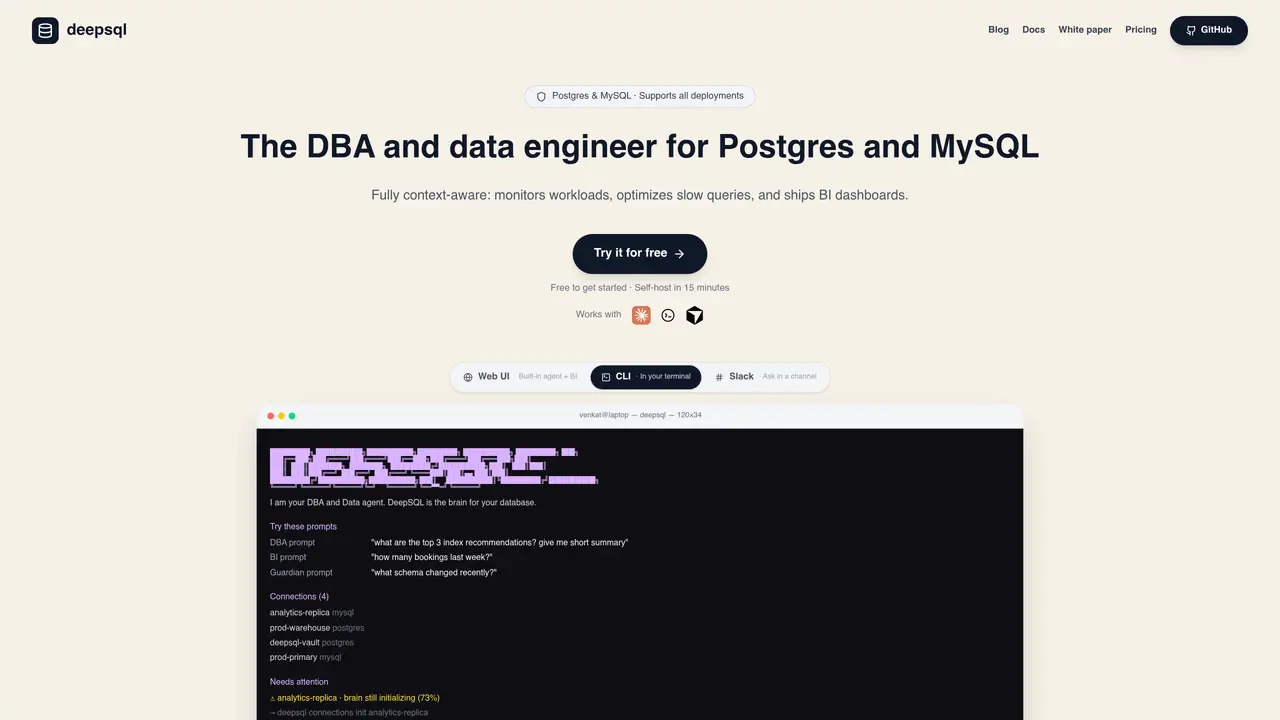
DeepSQL is a self-hostable AI database agent designed to monitor database workloads, optimize slow queries, and generate BI dashboards for Postgres and MySQL. It connects to your database via read-only credentials on a read replica, ensuring no data leaves your infrastructure. The agent learns your schema, indexes slow query logs, and allows you to interact with it through a web UI, terminal, or Slack. It also functions as an MCP server, enabling integration with tools like Claude, Codex, or Cursor for natural language database queries. DeepSQL applies company-specific business rules to calculations, ensuring metrics like MRR or active users are computed according to your team’s definitions. Installation is streamlined with a one-line command, and it includes role-based access, query policies, and audit logs for security and governance. The tool is particularly useful for database administrators, data engineers, backend developers, and data analysts seeking to automate database management and enhance query performance.
DeepSQL is a self-hostable AI agent that acts as a database administrator and data engineer for Postgres and MySQL. It monitors workloads, optimizes slow queries, generates BI dashboards, and allows natural language interactions through multiple interfaces.
DeepSQL is designed for database administrators, data engineers, backend developers, product managers, and executive teams who interact with databases and need automated monitoring, optimization, and BI capabilities.
DeepSQL connects to databases via read-only credentials on a read replica, ensuring no production data leaves your infrastructure. It also includes role-based access control, query policies, and audit logs for governance.
Yes, DeepSQL can be accessed through a web UI, terminal, or Slack. It also functions as an MCP server, enabling integration with tools like Claude, Codex, or Cursor for natural language database queries and schema review.
DeepSQL allows users to teach it company-specific business rules and conventions, such as MRR calculations or active user definitions. These rules are then applied consistently across queries, dashboards, and recommendations.
DeepSQL can be installed with a one-line command and typically self-hosts in about 15 minutes. It requires access to a Postgres or MySQL database via a read replica and read-only credentials for optimal operation.
We use essential cookies to run aitoolnavio™, and optional cookies to analyze traffic and measure our marketing. You choose what we use — optional cookies stay off unless you turn them on. See our Privacy Policy.
One short email a week: fresh tools worth trying, honest takes and the updates that actually matter. No spam, unsubscribe any time.
AI-powered website builder that generates a professional site in under a minute and includes tools for content, SEO, and analytics.
AI-powered coding platform that uses agents to plan, write, and test software with real-time feedback and verifiable artifacts.
Automate code, research, and documents using agents.
AI-powered code assistant that generates, reviews, optimizes, and debugs code with natural language prompts and editor integrations.
AI assistant for safe, reliable productivity with code, collaboration, and integrations.
AI-powered IDE for autonomous coding tasks and agentic development workflows
Privacy-focused AI chatbot that generates uncensored text, code, images, and translations without storing conversations or requiring an account.
A free web-based AI chatbot and agent for writing, coding, research, and content creation with multilingual support.
Write & run code in 50+ languages, auto-complete with AI, and code faster with an intuitive interface.
An IDE that automates legacy-to-modern code migration using autonomous coding agents.
AI models that return typed decisions with calibrated confidence for software automation
Practice coding challenges, improve technical skills, get detailed explanations, compare performance with peers.
Matched on what this tool does — grouped by the job you would be replacing.
matches Monitors database workloads and optimizes slow queries · Generates BI dashboards from your data · Applies company-specific business rules for metric calculations
AI-powered admin panel generator that turns databases into intuitive, interactive interfaces for data management and exploration.
AI-powered analytics layer that turns natural language into governed business insights across tools
An AI database assistant that lets business teams query live data, build dashboards, and trigger alerts without writing SQL.
Self-hosted AI analytics for PostgreSQL, MySQL, MariaDB, or MongoDB with natural language queries
matches Supports natural language database queries · Natural language queries on live data with follow-up support
Converts plain-English questions into SQL queries for PostgreSQL, MySQL, or SQLite
An AI data analysis and visualization tool that lets users query CSV and databases via chat to generate tables, charts, and dashboards without SQL.
Natural-language interface for querying databases and spreadsheets without SQL
AI tool that turns database queries into plain-English insights for SMEs