

AI-powered website builder that generates a professional site in under a minute and includes tools for content, SEO, and analytics.
52M visits/mo+0.7%#4 Coding & Development
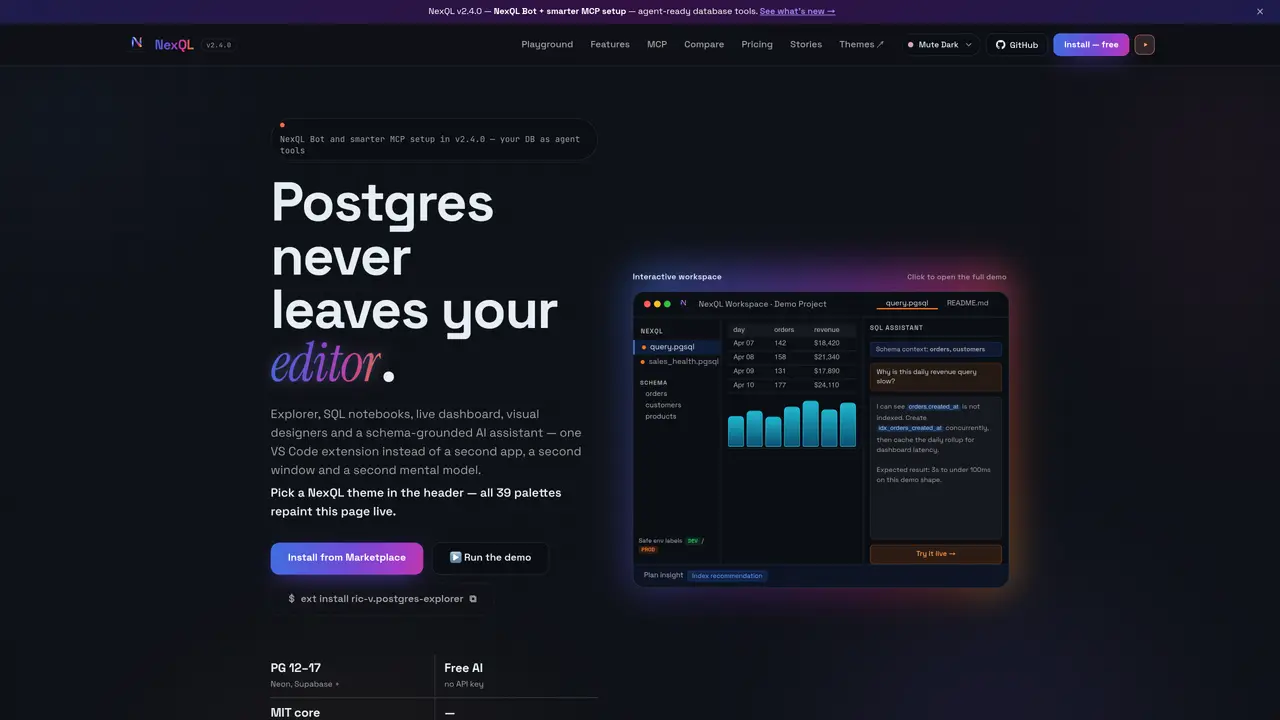
NexQL is a VS Code extension that integrates PostgreSQL workflows into the editor environment. It allows users to connect to PostgreSQL databases, inspect schemas, execute SQL notebooks, and analyze query performance without leaving the IDE. The tool supports schema exploration across 16+ object types, live query execution with results visualization, and AI-assisted SQL generation using schema context. It includes features for query optimization with EXPLAIN analysis and index recommendations, as well as schema design tools with ERD visualization and diff viewers. Environment safety features label connections as DEV, STAGE, or PROD to prevent accidental changes to production systems. Team collaboration is supported through shared SQL notebooks and encrypted cloud sync of connection profiles and context.
NexQL is a VS Code extension that integrates PostgreSQL workflows directly into the editor, allowing users to connect to databases, inspect schemas, execute SQL notebooks, and analyze query performance without leaving VS Code.
NexQL is built for developers, data analysts, and database engineers who work with PostgreSQL and prefer to perform database operations within their IDE rather than switching between tools.
NexQL includes an AI assistant that generates SQL queries based on plain English prompts and schema context, reducing the need for manual query writing and improving productivity.
Yes, NexQL supports team collaboration through shared SQL notebooks and encrypted cloud sync of connection profiles and context, enabling reproducible workflows across teams.
NexQL includes environment safety features that label connections as DEV, STAGE, or PROD, along with read-only modes and risk scoring to prevent accidental changes to production systems.
To get started, install the NexQL extension from the VS Code Marketplace, create a connection to your PostgreSQL database, and open a .pgsql notebook to begin executing queries and exploring schemas.
We use essential cookies to run aitoolnavio™, and optional cookies to analyze traffic and measure our marketing. You choose what we use — optional cookies stay off unless you turn them on. See our Privacy Policy.
One short email a week: fresh tools worth trying, honest takes and the updates that actually matter. No spam, unsubscribe any time.
AI-powered website builder that generates a professional site in under a minute and includes tools for content, SEO, and analytics.
AI-powered coding platform that uses agents to plan, write, and test software with real-time feedback and verifiable artifacts.
Automate code, research, and documents using agents.
AI-powered code assistant that generates, reviews, optimizes, and debugs code with natural language prompts and editor integrations.
AI assistant for safe, reliable productivity with code, collaboration, and integrations.
AI-powered IDE for autonomous coding tasks and agentic development workflows
Privacy-focused AI chatbot that generates uncensored text, code, images, and translations without storing conversations or requiring an account.
A free web-based AI chatbot and agent for writing, coding, research, and content creation with multilingual support.
Write & run code in 50+ languages, auto-complete with AI, and code faster with an intuitive interface.
An IDE that automates legacy-to-modern code migration using autonomous coding agents.
AI models that return typed decisions with calibrated confidence for software automation
Practice coding challenges, improve technical skills, get detailed explanations, compare performance with peers.
Matched on what this tool does — grouped by the job you would be replacing.
matches VS Code extension for running PostgreSQL workflows directly in the editor · SQL notebooks with live execution and chart visualization · Database explorer for schemas, tables, views, and functions
Native macOS database client with an AI co-pilot for querying and exploring databases
Write SQL queries in natural language, convert SQL to code, and generate data visualizations effortlessly.
Collaborative workspace for SQL-based data analysis and visualization
matches AI assistant for plain-English SQL generation · Natural-language interface for querying databases and spreadsheets without SQL · Plain-English question input
matches Schema design tools with ERD diagrams and diff viewer · AI-powered database modeling tool that helps create complex database structures in minutes using natural language conversations with GPT-4 · AI-powered database modeling
An AI assistant that lets users query databases and visualize results without writing SQL.
An AI database assistant that lets business teams query live data, build dashboards, and trigger alerts without writing SQL.
Natural-language interface for querying databases and spreadsheets without SQL
AI tool that turns database queries into plain-English insights for SMEs
Generate SQL queries, define tables and columns, and analyze data for informed decision-making.
AI-powered database modeling tool that helps create complex database structures in minutes using natural language conversations with GPT-4.