

AI-powered website builder that generates a professional site in under a minute and includes tools for content, SEO, and analytics.
52M visits/mo+0.7%#4 Coding & Development
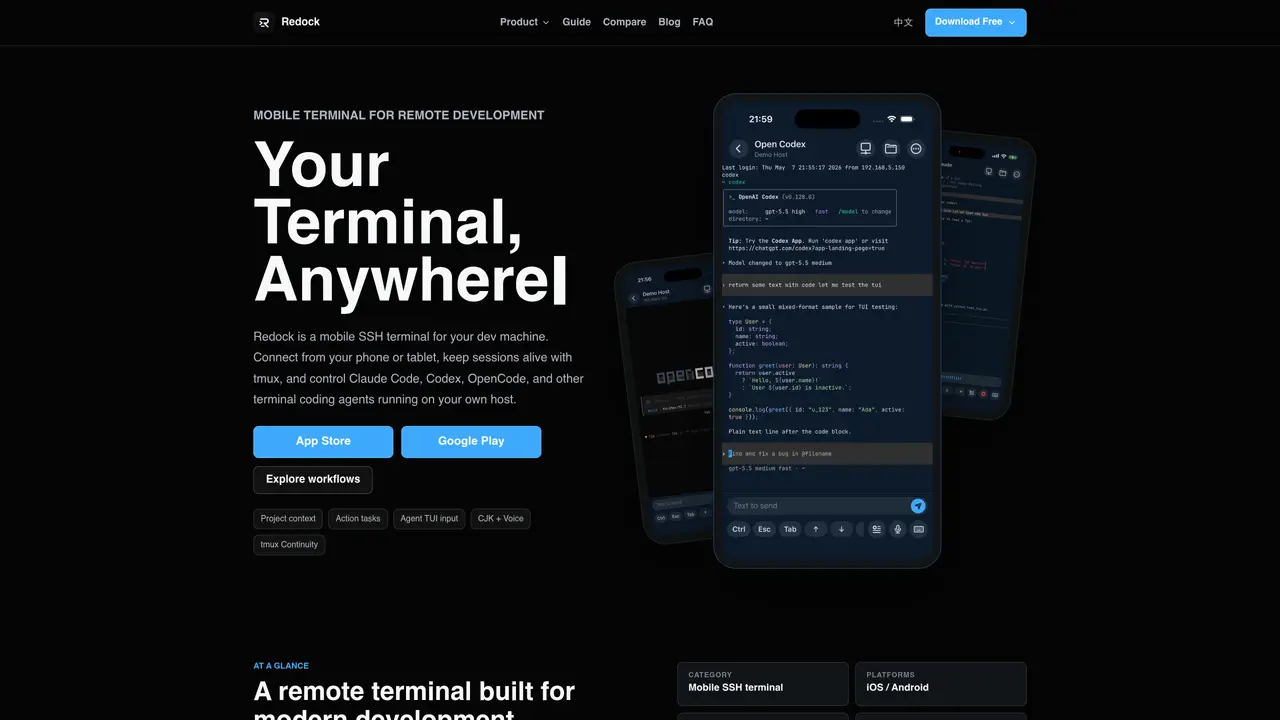
Redock provides a mobile interface to access and control a remote development environment via SSH or Mosh. It connects phones or tablets to a user’s own Mac, Linux, or Windows machine, enabling terminal-based workflows without replacing the existing setup. The tool supports coding agents such as Claude Code, Codex, and OpenCode, allowing users to run, monitor, and resume tasks from a mobile device. Sessions persist through disconnections using tmux, herdr, or psmux, and the interface includes features like staged prompts, speech input, and project-specific snippets. The terminal is optimized for terminal user interface (TUI) sessions used by coding agents, with mobile-friendly gestures and layout. Users can pin hosts and working directories, launch agents or scripts, and return to active work without rebuilding context.
Redock is a mobile SSH terminal that connects phones or tablets to a user’s own Mac, Linux, or Windows machine, enabling terminal-based workflows remotely. It provides a mobile interface to control coding agents such as Claude Code, Codex, and OpenCode running on the user’s host.
Redock is designed for developers who need to access and manage their development environment from a mobile device. It suits users who rely on terminal workflows and coding agents but want the flexibility to work remotely without replacing their existing setup.
Redock supports session persistence through tools like tmux, herdr, or psmux, allowing users to disconnect and reconnect without losing their work context. This ensures that active sessions, agent tasks, and terminal states remain intact.
Redock supports coding agents such as Claude Code, Codex, and OpenCode. Users can run, monitor, and resume tasks from their mobile device while the agents execute on their own host machine.
Yes, Redock includes custom speech input for voice transcription and supports CJK (Chinese, Japanese, Korean) input, making it accessible for users who need to input text in these languages.
To get started, enable Remote Login on your Mac or configure SSH access on your Linux or Windows machine. Connect your phone or tablet to the same network, discover the device in Redock, and establish an SSH or Mosh connection. For remote access outside the local network, tools like Tailscale or ngrok can be used.
We use essential cookies to run aitoolnavio™, and optional cookies to analyze traffic and measure our marketing. You choose what we use — optional cookies stay off unless you turn them on. See our Privacy Policy.
One short email a week: fresh tools worth trying, honest takes and the updates that actually matter. No spam, unsubscribe any time.
AI-powered website builder that generates a professional site in under a minute and includes tools for content, SEO, and analytics.
AI-powered coding platform that uses agents to plan, write, and test software with real-time feedback and verifiable artifacts.
Automate code, research, and documents using agents.
AI-powered code assistant that generates, reviews, optimizes, and debugs code with natural language prompts and editor integrations.
AI assistant for safe, reliable productivity with code, collaboration, and integrations.
AI-powered IDE for autonomous coding tasks and agentic development workflows
Privacy-focused AI chatbot that generates uncensored text, code, images, and translations without storing conversations or requiring an account.
A free web-based AI chatbot and agent for writing, coding, research, and content creation with multilingual support.
Write & run code in 50+ languages, auto-complete with AI, and code faster with an intuitive interface.
An IDE that automates legacy-to-modern code migration using autonomous coding agents.
AI models that return typed decisions with calibrated confidence for software automation
Practice coding challenges, improve technical skills, get detailed explanations, compare performance with peers.
Matched on what this tool does — grouped by the job you would be replacing.
matches SSH and Mosh connectivity · Tmux session persistence · Activity and tmux entry points for quick resumption
Remote control of a developer’s Mac from a mobile device
Mobile interface for managing terminal-based coding agents on Mac
Mobile interface for monitoring and controlling local AI coding agents on a Mac
Voice notifications and responses for coding agents like Claude Code and Codex
matches Agent TUI optimization · Project pinning and snippet management · Staged input for prompt composition
Centralizes and visualizes AI coding tool configurations, provider keys, and model routing for developers and teams.
Task orchestration tool for coding agents
Open agent harness system that standardizes AI coding workflows with reusable skills, repo-aware guidance, and security scanning for Claude Code, Codex, Cursor, and OpenCode.
Desktop library to search and resume coding agent sessions locally