Tesla’s AI stack powers Full Self-Driving, Optimus humanoid robots, and real-world autonomy with neural networks, custom hardware, and Dojo-scale training.
31M visits/mo+5.5%#8 Coding & Development

Browser extension that scans Gmail, Outlook and LinkedIn messages for phishing threats in real time
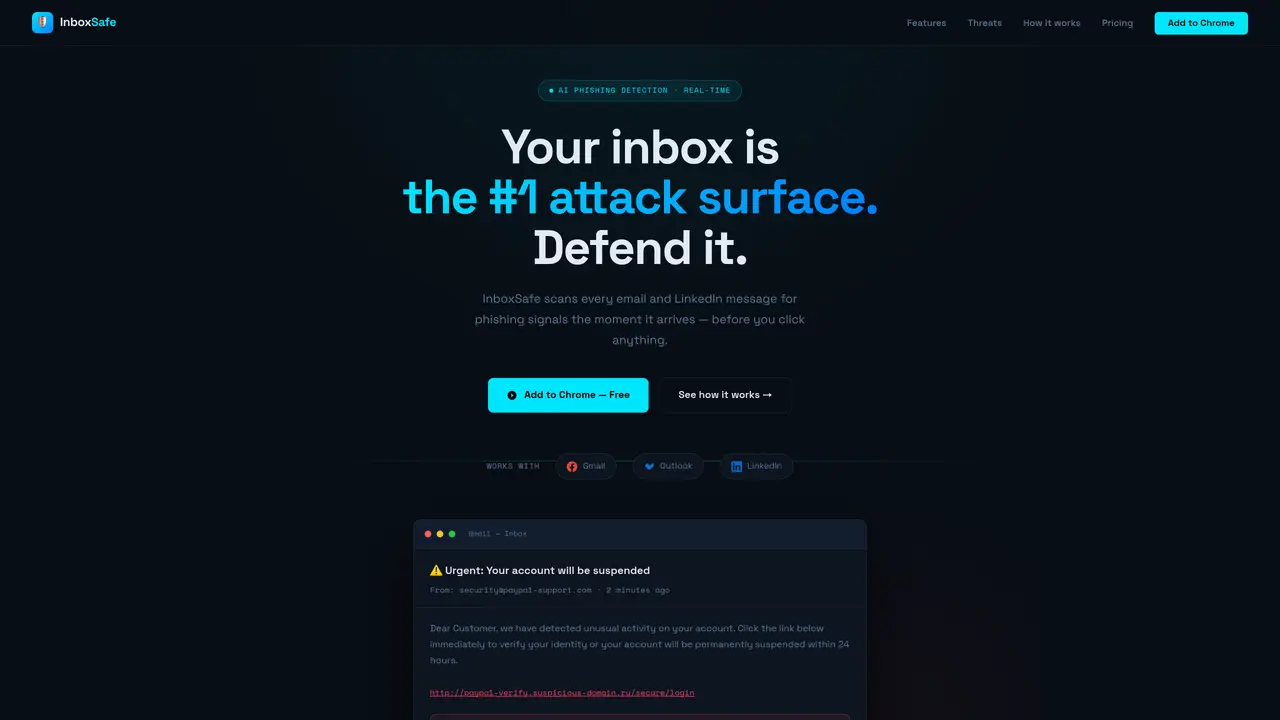
InboxSafe is a browser extension that integrates with Gmail, Outlook and LinkedIn to scan incoming messages for phishing indicators before they are opened. It uses behavioral AI to detect social engineering tactics such as urgency manipulation, impersonation and authority spoofing, rather than relying solely on keyword matching or spam rules. The tool inspects URLs and domains for lookalike patterns, hidden redirects and credential harvesting pages, and verifies sender domains against known legitimate services to catch display name spoofing. It also extends protection to LinkedIn direct messages, which are increasingly used for spear phishing targeting professionals. Detection occurs within two seconds of message arrival, with alerts displayed directly in the inbox showing the specific risk signals identified. Users can report and block suspicious messages with one click, contributing to a shared threat intelligence network. Weekly threat reports summarize blocked attempts, risk trends and top attack patterns for individual or team accounts.
InboxSafe is a browser extension that scans incoming emails and LinkedIn messages for phishing indicators in real time, using behavioral AI to detect social engineering tactics such as urgency manipulation, impersonation, and authority spoofing before any links are clicked.
InboxSafe is designed for individuals and teams who rely on Gmail, Outlook, or LinkedIn for professional communications, particularly those handling sensitive information or working in environments where phishing risks are a concern.
InboxSafe uses behavioral AI to analyze messages for phishing signals, inspects URLs and domains for lookalike patterns or hidden redirects, verifies sender domains, and flags suspicious content such as credential harvesting pages or display name spoofing.
Yes, InboxSafe extends protection to LinkedIn direct messages, which are increasingly targeted for spear phishing attacks against professionals.
InboxSafe scans messages within two seconds of arrival, providing real-time alerts directly in the inbox with specific risk signals identified.
Yes, users can report and block suspicious messages with one click, which contributes to a shared threat intelligence network and improves detection accuracy for all users.
We use essential cookies to run aitoolnavio™, and optional cookies to analyze traffic and measure our marketing. You choose what we use — optional cookies stay off unless you turn them on. See our Privacy Policy.
One short email a week: fresh tools worth trying, honest takes and the updates that actually matter. No spam, unsubscribe any time.
Tesla’s AI stack powers Full Self-Driving, Optimus humanoid robots, and real-world autonomy with neural networks, custom hardware, and Dojo-scale training.
Customize, deploy, and control AI models securely.
Standardize application packaging and execution with portable containers for consistent local and cloud workflows.
AI-first electronic design automation for ICs, advanced packaging, and systems with hardware-assisted acceleration and elastic cloud delivery.
Unified AI-powered platform for real-time monitoring, analytics, and security across cloud infrastructure, applications, and services.
Prevention-first, AI-powered cybersecurity platform protecting networks, clouds, and endpoints with unified controls and autonomous response.
Automate tasks, analyze data, and ensure data security with advanced measures.
Cloud communications platform that lets developers embed SMS, voice, WhatsApp, email, video, verification, and conversational AI via APIs.
AI-powered endpoint security with XDR, cloud or on-prem control, and low system impact for ransomware, email threats, and account takeover prevention.
Automate error tracking, monitor application performance, and gain insights with advanced analytics.
Identify stolen identities, uncover copyright infringements, and find unauthorized use of images with precision.
Instant threat detection and response, AI-powered prevention, unified dashboard for full visibility and control.
Matched on what this tool does — grouped by the job you would be replacing.
matches Real-time phishing detection · URL and domain inspection · Behavioral AI engine for social engineering detection
AI-powered phishing detection and email security tool with Outlook integration
AI add-in for Outlook that flags scams, summarizes threads, drafts replies, and auto-categories inbox messages
AI-powered inbox manager that drafts context-aware email replies and surfaces action items across Gmail, Outlook, and calendars.
matches URL and domain inspection · Behavioral AI engine for social engineering detection
AI-powered platform that detects and removes fake websites, phishing pages, and fraudulent apps to protect businesses from online scams.
AI-driven platform that monitors and neutralizes digital threats like phishing and brand impersonation to protect online presence.