Automate error tracking, monitor application performance, and gain insights with advanced analytics.
2.9M visits/mo-2.4%#50 Coding & Development

Kane CLI is a terminal-native AI testing tool that turns plain-English instructions into verified browser tests.
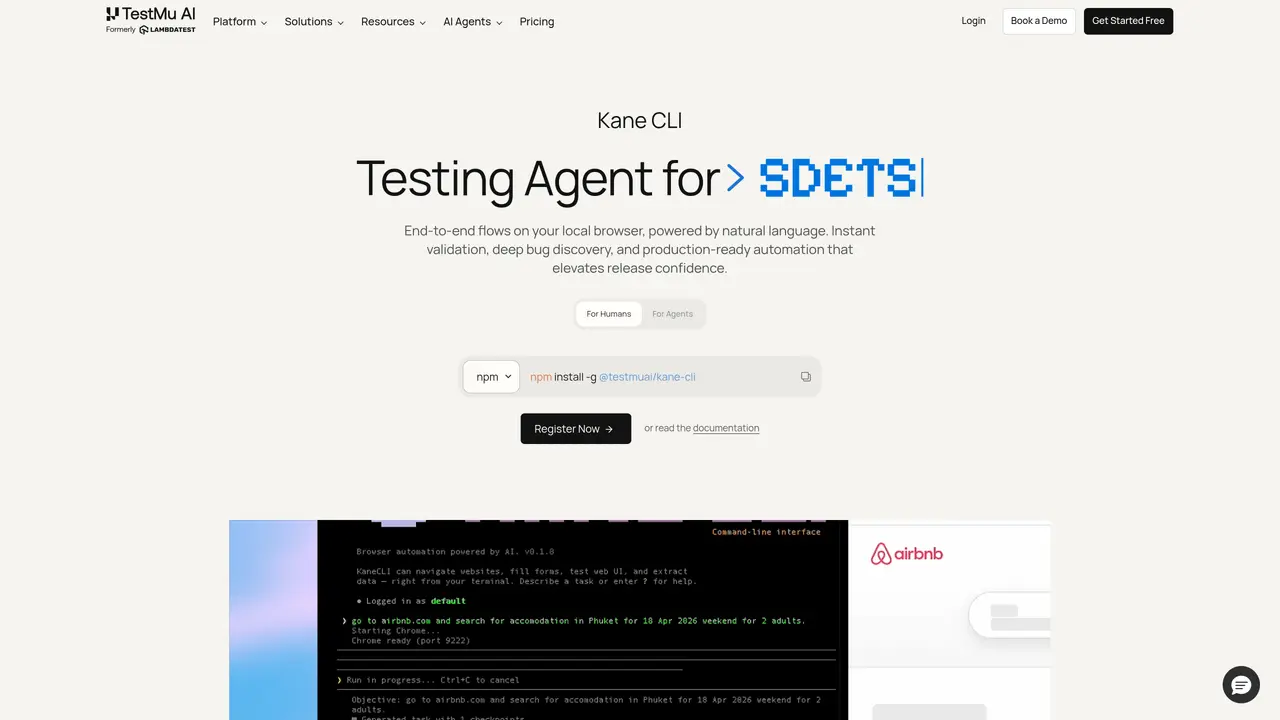
Kane CLI — AI Browser Automation & Testing, From Your Terminal Kane CLI is a terminal-native AI testing tool from TestMu AI (formerly LambdaTest) that turns plain-English instructions into verified browser tests. Instead of writing and maintaining brittle Playwright or Selenium scripts, you describe what should happen — “log in as an admin, open the billing page, and confirm the plan shows Enterprise” — and Kane CLI drives a real Chrome browser to execute it, verify each step, and return a deterministic pass or fail with a shareable evidence link. It’s built for two kinds of users at once: humans who want fast end-to-end verification without scripting, and AI coding agents that need a reliable way to prove the code they write actually works in a browser. Use Cases And Features 1. Pre-PR feature verification Before opening a pull request, verify the feature you just built works end-to-end — “sign up, confirm the welcome email flow, land on the dashboard” — without writing 200 lines of test code first. 2. Smoke testing new releases Run quick natural-language checks across critical user journeys (login, checkout, search, key forms) after every deploy to catch breakages before users do. 3. End-to-end flow automation Automate and validate complete multi-step journeys — onboarding, checkout, account settings, booking flows — as a single plain-English objective instead of a brittle script.
Kane CLI is a terminal-native AI browser automation tool that converts plain-English instructions into verified end-to-end browser tests. It drives a real Chrome browser to execute and validate user journeys, returning a deterministic pass or fail result with shareable evidence.
Kane CLI is designed for two types of users: humans who want fast end-to-end verification without scripting, and AI coding agents that need a reliable way to prove their code works in a browser.
Users describe a test scenario in natural language, such as 'log in as an admin and open the billing page.' Kane CLI then automates a real browser to execute the steps, verifies each action, and generates a pass or fail result with evidence.
Yes, Kane CLI is designed to integrate into existing workflows by reading PRDs, tickets, and existing test suites to map requirements into testable use cases and acceptance criteria before execution.
Yes, Kane CLI measures coverage by use case and criteria, ensuring only verified outcomes count toward coverage. It highlights gaps ranked by risk, providing a strict and transparent view of what has been tested.
To get started, install Kane CLI via npm using 'npm install -g @testmuai/kane-cli' and then run a test using a natural language command like 'kane-cli run verify checkout flow on staging'.
We use essential cookies to run aitoolnavio™, and optional cookies to analyze traffic and measure our marketing. You choose what we use — optional cookies stay off unless you turn them on. See our Privacy Policy.
One short email a week: fresh tools worth trying, honest takes and the updates that actually matter. No spam, unsubscribe any time.
Automate error tracking, monitor application performance, and gain insights with advanced analytics.
Instant threat detection and response, AI-powered prevention, unified dashboard for full visibility and control.
Open-source platform combining product analytics, session replay, A/B testing, and feature flags in one toolkit for product engineers.
AI development platform for experiment tracking, model optimization, and team collaboration in machine learning workflows.
Open-source framework for reliable, cross-browser web testing with auto-waiting, parallel execution, and built-in debugging tools.
CodeRabbit is an AI tool that helps you review and improve your code easily.
Labelbox is an enterprise-grade data labeling platform designed to help organizations create, manage, and deploy AI applications.
An AI-native cloud testing platform for developers and QA teams to automate cross-browser and real-device tests with self-healing automation and reporting.
Parallel AI coding agent IDE that runs multiple agents side by side in isolated git worktrees for faster, comparative development.
AI-powered bug reporting and feedback collaboration tool that streamlines issue identification and resolution for developers.
Monitor IT infrastructure, detect and resolve system issues, and proactively identify risks and threats.
Create tests, evaluate results in real-time with analytics, and save time and money with advanced automation.
Matched on what this tool does — grouped by the job you would be replacing.
matches Turns plain-English instructions into verified browser tests · Drives a real Chrome browser to execute tests · Verifies each step and returns pass or fail with a shareable evidence link
AI agents perform UI/UX testing in real browsers from plain-English instructions
No-code UI automation tool that lets users create and run tests by describing flows in plain English.
AI-assisted Playwright test generation and maintenance for web apps
matches Supports pre-PR feature verification · Supports smoke testing new releases · Supports end-to-end flow automation
Open-source framework for reliable, cross-browser web testing with auto-waiting, parallel execution, and built-in debugging tools.
An AI-native cloud testing platform for developers and QA teams to automate cross-browser and real-device tests with self-healing automation and reporting.
Cloud-based platform for cross-browser, mobile app, and automation testing across real devices and browsers.
Unified platform for manual testing and automated QA workflows with AI assistance