
Unleash creativity: edit photos, videos, and designs with AI-enhanced tools.
16M visits/mo-11.4%#6 Image & Design
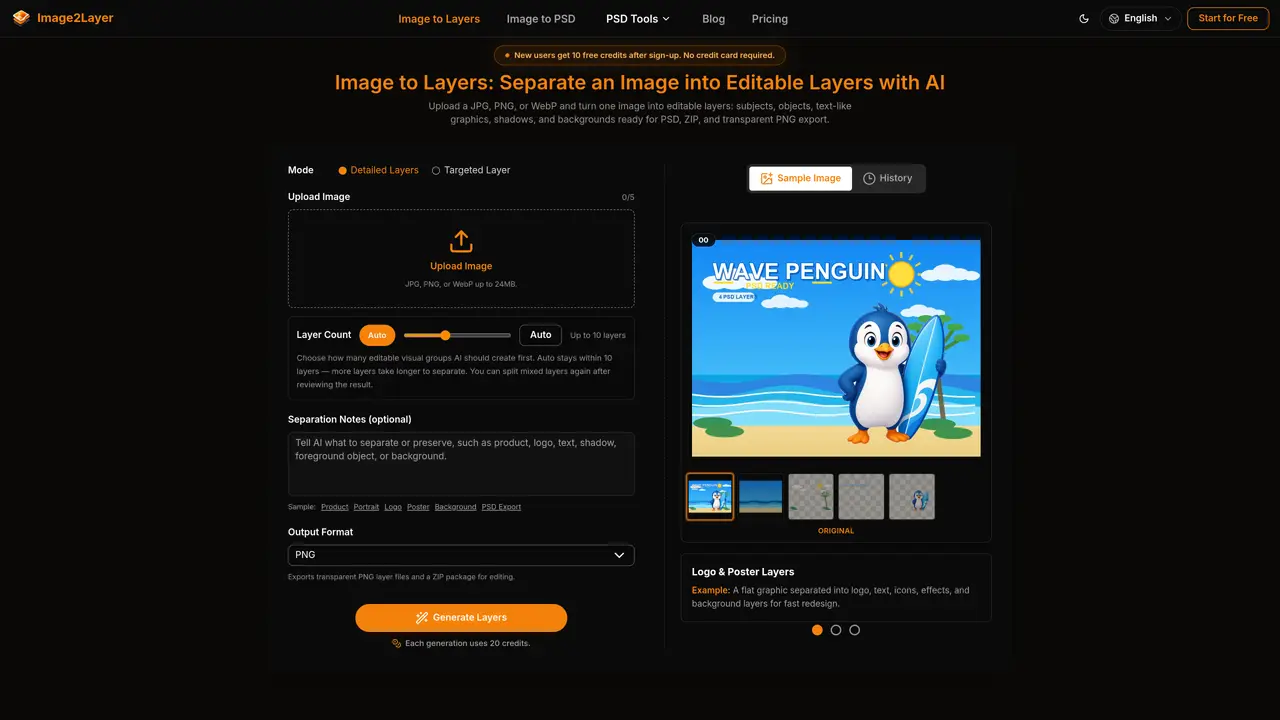
Image2Layer processes JPG, PNG, or WebP files and separates them into editable layers such as subjects, objects, text, shadows, and backgrounds. The tool reconstructs hidden areas behind removed elements so layers remain usable for design edits. Outputs include layered PSD files for Photoshop, transparent PNG layers in a structured ZIP package, or individual PNG files. It supports both detailed and targeted layer separation modes, with a maximum of 10 layers per image. Users can preview results and split mixed layers further after generation. The platform is designed for creative workflows including design revisions, product marketing, animation, game scenes, and client handoffs.
Image2Layer accepts JPG, PNG, or WebP files as input. Output formats include layered PSD files for Photoshop, transparent PNG layers in a structured ZIP package, or individual PNG files.
The tool uses AI to detect and separate major subjects, objects, text, shadows, and backgrounds into independently editable layers. It also reconstructs hidden areas behind removed elements to maintain usability.
Yes, users can preview the separated layers after generation and further split mixed layers if needed before exporting the final output.
The tool supports up to 10 layers per image, with an option to let the AI automatically determine the number of layers within this limit.
Yes, new users receive 10 free credits after sign-up, and no credit card is required to start using the tool.
The tool is commonly used for design revisions, product marketing, animation, game scenes, and client handoffs where editable layered assets are required.
We use essential cookies to run aitoolnavio™, and optional cookies to analyze traffic and measure our marketing. You choose what we use — optional cookies stay off unless you turn them on. See our Privacy Policy.
One short email a week: fresh tools worth trying, honest takes and the updates that actually matter. No spam, unsubscribe any time.
Unleash creativity: edit photos, videos, and designs with AI-enhanced tools.
A drag-and-drop design platform for presentations and social graphics with AI photo tools and a large template library.
Create captivating, customizable presentations and easily share them across devices with a cloud-based platform.
Generate custom visuals for blogs, create unique social media images, and design eye-catching visuals for marketing campaigns.
Create stunning designs, edit photos, remove objects, make collages, and transform images with powerful AI tools and effects.
Create auto-resized campaign images and videos with DaVinci AI's generative media suite.
Create precise 3D models, collaborate on designs, and analyze simulations in real-time.
Cloudinary provides APIs and tools to integrate, manage, and optimize images and videos for AI-driven visual experiences.
Generate custom color palettes instantly with AI or from images for design projects.
Turn simple prompts into flyers, social posts, emails, event pages, and tickets using AI-powered design and marketing tools.
Generate high-quality images with flawless embedded text from text prompts, plus batch output and style control in a creative canvas.
Edit, transform, and enhance photos with text prompts using our free AI photo editor online.
Matched on what this tool does — grouped by the job you would be replacing.
matches Semantic layer separation of subjects, objects, text, shadows, and backgrounds · Background reconstruction for clean edits without empty gaps · Layered PSD export for Photoshop compatibility
Separates flat AI-generated images into editable PNG layers for further design work
Converts flat images into editable transparent PNG layers using AI