AI chatbot for conversation, work, research, coding, and content creation.
5.9B visits/mo+5%#1 Chatbots & Assistants
An AI assistant for professionals that rewrites text, drafts emails, summarizes documents, translates content, and generates images via web app and Chrome extension.
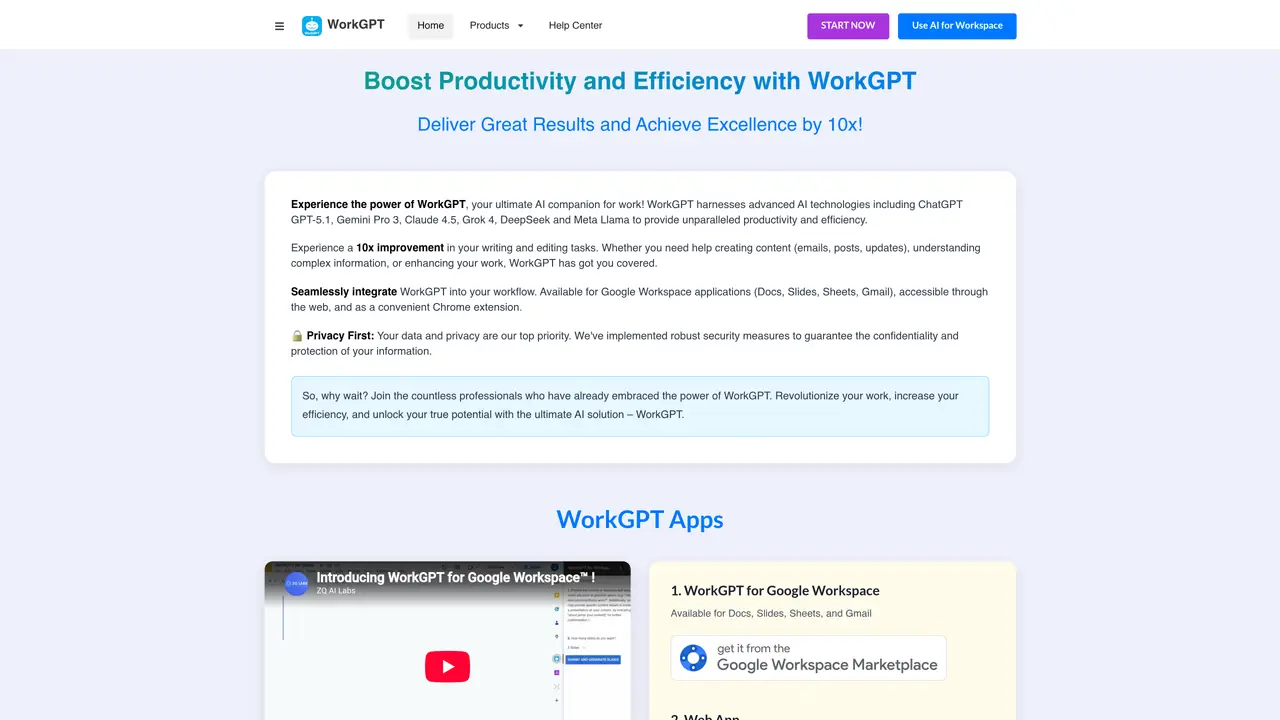
WorkGPT is a web app, Chrome extension, and Google Workspace add-on designed for professionals and teams seeking AI assistance with writing, email, documents, and daily tasks across Google Docs, Sheets, Slides, Gmail, and Calendar. The tool provides AI-powered writing and editing features, including grammar and spelling fixes, tone adjustments (professional, friendly, formal), text expansion or shortening, and alternative phrasing suggestions. It supports content generation tasks such as drafting emails, reports, social media posts, and video scripts, along with image generation via DALL·E 3. WorkGPT also handles document processing by summarizing or explaining content, translating languages, formatting text, and converting text into to-do lists. Users can choose from multiple AI models including ChatGPT/GPT-5, Gemini, Grok, Claude, and DeepSeek to suit their needs. The tool emphasizes seamless integration with Google Workspace and Chrome, enabling efficient workflows without requiring additional installations beyond the browser or add-on setup.
WorkGPT is an AI-powered assistant designed for professionals and teams to enhance productivity within Google Workspace and Chrome. It provides AI-driven writing, editing, document processing, and task automation features directly in tools like Google Docs, Sheets, Slides, Gmail, and Calendar.
WorkGPT is ideal for professionals, teams, and individuals who frequently use Google Workspace and Chrome for writing, communication, and document management. It suits users seeking to streamline workflows with AI assistance for tasks like drafting emails, reports, or social media content.
Yes, WorkGPT integrates seamlessly with Google Workspace as a web app, Chrome extension, and Google Workspace add-on. This allows users to access AI features directly within Google Docs, Sheets, Slides, Gmail, and Calendar without additional installations.
WorkGPT supports multiple AI models, including ChatGPT/GPT-5, Gemini, Grok, Claude, and DeepSeek. Users can choose the model that best fits their needs for writing, editing, or document processing tasks.
Yes, WorkGPT includes image generation capabilities powered by DALL·E 3, allowing users to create visuals directly within their workflows.
To get started, users can install the WorkGPT Chrome extension or Google Workspace add-on. Once installed, they can access AI features directly within their Google Workspace tools or Chrome browser.
We use essential cookies to run aitoolnavio™, and optional cookies to analyze traffic and measure our marketing. You choose what we use — optional cookies stay off unless you turn them on. See our Privacy Policy.
One short email a week: fresh tools worth trying, honest takes and the updates that actually matter. No spam, unsubscribe any time.
AI chatbot for conversation, work, research, coding, and content creation.
Generate captions, optimize content, and enhance with custom images for maximum engagement.
xAI builds Grok frontier AI models for reasoning, coding, voice, images, video, enterprise workflows, and developer APIs.
Explore and test Google’s experimental AI tools and prototypes before they become products.
Creates licensed videos, images, music.
Privacy-focused AI chatbot that generates uncensored text, code, images, and translations without storing conversations or requiring an account.
Web and mobile AI platform for generating, editing, and training custom visuals from prompts with community models and face-swap tools.
A drag-and-drop design platform for presentations and social graphics with AI photo tools and a large template library.
Generate unique artwork, customize with an intuitive interface, and push creative boundaries with AI-generated art.
Generate unique AI art, share your creations, and explore a vast selection of AI artwork.
Generate custom visuals for blogs, create unique social media images, and design eye-catching visuals for marketing campaigns.
Easily find and explore diverse AI art and prompts with a vast library of 10 million+ creations.
Matched on what this tool does — grouped by the job you would be replacing.
matches AI writing and editing with grammar, spelling, and tone controls · Alternative phrasing and text expansion/shortening · Language translation capabilities
AI-powered writing assistant for grammar, style, and tone improvements across documents and emails.
AI-powered writing tool for paraphrasing, summarizing, and enhancing writing effortlessly.
AI email assistant that rewrites, drafts, and improves messages in Outlook, Gmail, Chrome, and iOS with tone control and grammar fixes.
A native macOS AI writing assistant that converts speech to text, rewrites text, and translates in 180+ languages across 300+ apps for Mac users.
matches Document summarization, translation, and formatting · Text-to-to-do list conversion
matches Content generation for emails, reports, social posts, and video scripts · Image generation via DALL·E 3
Summarizes, extracts, and rewrites content from files.
AI Doc GPT automates document generation, generates high-quality content quickly, and summarizes large documents.
AI assistant that brings ChatGPT directly into Google Sheets and Docs to generate, analyze, and transform content.
Generate multilingual team reports, collaborate in real-time, and automate research for quick blog post generation.
Generate content, correct spelling, suggest synonyms to enhance writing.
AI platform for upscaling images, enhancing photos, and generating high-quality creative assets with contextual detail.
A free web-based AI chatbot and agent for writing, coding, research, and content creation with multilingual support.
Generate images, videos, and voices from text with an AI creativity platform for professionals and creators.