Generate content, correct spelling, suggest synonyms to enhance writing.
173M visits/mo+0.1%#1 Productivity & Office

A visual knowledge base for students, researchers, and lifelong learners to organize and explore ideas interactively.
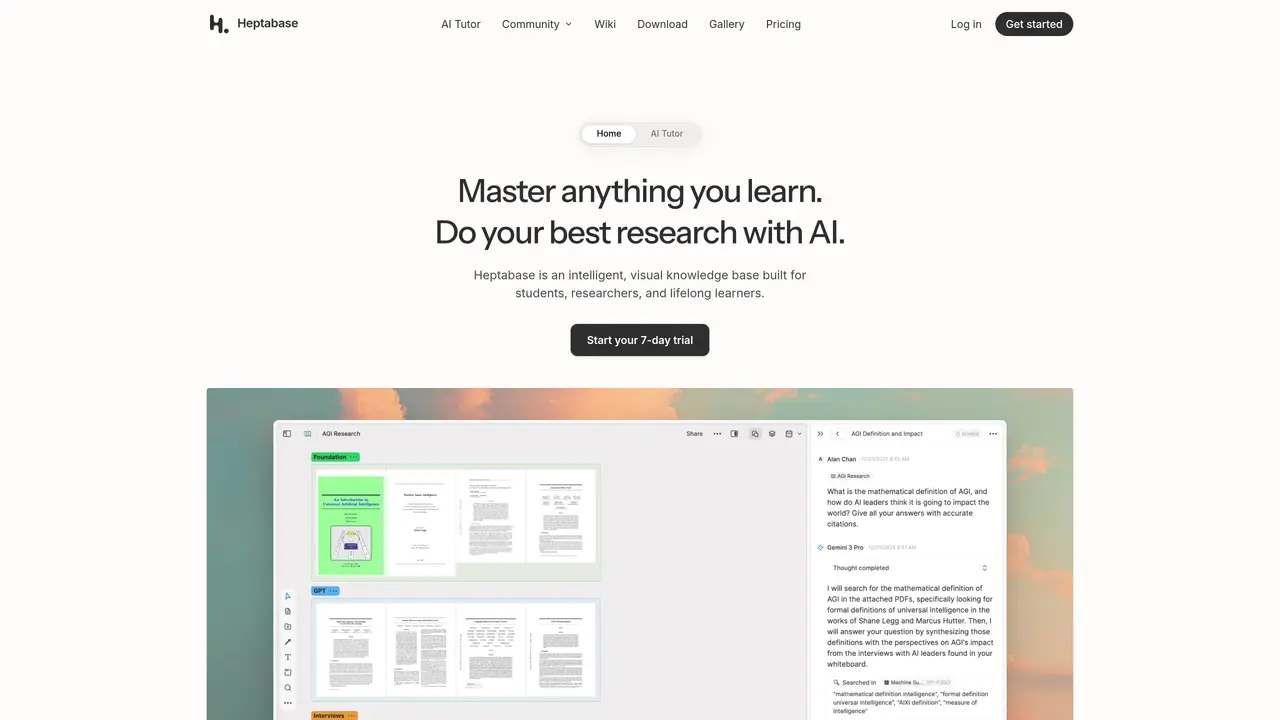
Heptabase is an intelligent, visual knowledge base designed to help students, researchers, and lifelong learners capture, organize, and explore ideas in a flexible, canvas-based environment. Users can create interconnected mind maps, whiteboards, and notes to visualize relationships between concepts, making it easier to track progress and synthesize information. The tool supports real-time collaboration, allowing teams to work together on projects or study groups. Heptabase integrates with external sources like PDFs, web pages, and documents, enabling users to pull in relevant content and annotate it directly within their workspace. Its intuitive interface encourages iterative thinking, helping users refine their understanding as they add new insights. The platform is particularly useful for complex research projects, study sessions, or personal knowledge management where structure and visual clarity are essential. With a focus on flexibility and interactivity, Heptabase bridges the gap between traditional note-taking and dynamic knowledge exploration.
Heptabase is an intelligent, visual knowledge base designed for students, researchers, and lifelong learners to capture, organize, and explore ideas in a flexible, canvas-based environment.
It allows users to create interconnected mind maps, whiteboards, and notes, while its AI Tutor guides structured, personalized learning sessions and organizes knowledge automatically.
Yes, it supports integrations with PDFs, web pages, documents, Readwise, and Zotero, enabling users to pull in and annotate relevant content directly within their workspace.
Yes, Heptabase offers real-time collaboration features, allowing teams or study groups to work together on projects or shared knowledge bases.
The AI Tutor is an agent that guides users through structured, personalized learning sessions, helping them master topics by explaining sources, taking notes, and organizing knowledge.
Users can start with a trial by signing up on the Heptabase website, which provides access to the platform's features and tools for organizing and exploring knowledge.
heptabase.com · third-party estimates from Similarweb
Last 4 months · grows by one month every month
Share of visits by channel
No measurable traffic from Paid Referrals.
Share of visits · estimated visits
Other countries: 23.2%
How people reach this site from other AI tools
1.8K a month · 1% of all visits
Productivity & Office · Sep 2026
Traffic figures are third-party estimates, good for scale and trends; they can differ from a company's own numbers. Updated monthly.
We use essential cookies to run aitoolnavio™, and optional cookies to analyze traffic and measure our marketing. You choose what we use — optional cookies stay off unless you turn them on. See our Privacy Policy.
One short email a week: fresh tools worth trying, honest takes and the updates that actually matter. No spam, unsubscribe any time.
Generate content, correct spelling, suggest synonyms to enhance writing.
Markdown-based note-taking and personal knowledge management app that turns notes into a connected system of ideas.
Capture, organize, and share ideas, notes, and documents effortlessly.
Easily create and track training courses, design learning environments, and access from any device with an intuitive interface.
An AI-powered note-taking app for students and professionals to write, sketch, annotate PDFs, record audio, and generate summaries, quizzes, and flashcards.
Handwritten note-taking app with searchable ink, PDF annotation, synced audio, and AI-powered study tools.
AI-powered process documentation tool that captures workflows into visual step-by-step guides with screenshots, editing, and exports.
AI web app that transcribes audio, video, and YouTube links into text in 98 languages with summaries, mind maps, and export formats for students and teams.
A note-taking and spaced-repetition flashcard app for students and learners, with PDF annotation plus AI tools for generating cards, quizzes, and study summaries.
AI-powered research assistant for organizing, analyzing, and synthesizing information from notes and documents.
Capture thoughts, create documents, and access on any device for convenient organization and productivity.
AI-powered PDF editor with built-in agents for summarization, translation, and document analysis.
Matched on what this tool does — grouped by the job you would be replacing.
matches Canvas-based visual workspace for mind mapping and whiteboarding · Interactive nodes for organizing and linking ideas · Flexible structure for personal or collaborative projects
Visual note-taking and research tool for organizing ideas with linked docs, boards, and real-time collaboration.
Turns notes, documents, and videos into interactive mind maps with an integrated AI assistant for organizing and collaborating on complex ideas.
A web-based AI mind mapping platform that turns searches and documents into interactive knowledge maps for writers, educators, and learners.
Interactive digital canvas for research and learning that responds to hand movements, connects ideas, and integrates files and 3D models into a personal atlas.
matches Integration with PDFs, web pages, and documents · Progress tracking and iterative refinement of knowledge · Cross-platform accessibility for seamless workflows
An AI research workspace for uploading sources, chatting for insights, building knowledge graphs, collaborating, and running semantic search.
An infinite canvas workspace that merges web browsing, reading, and visual content organization in one app.
AI-powered knowledge base to capture, analyze, and repurpose content from videos, social media, and documents into reusable insights and formats.
AI-powered research engine that analyzes sources, builds mind maps, and streamlines research workflows for deeper insights.