

Generate content, correct spelling, suggest synonyms to enhance writing.
173M visits/mo+0.1%#1 Productivity & Office
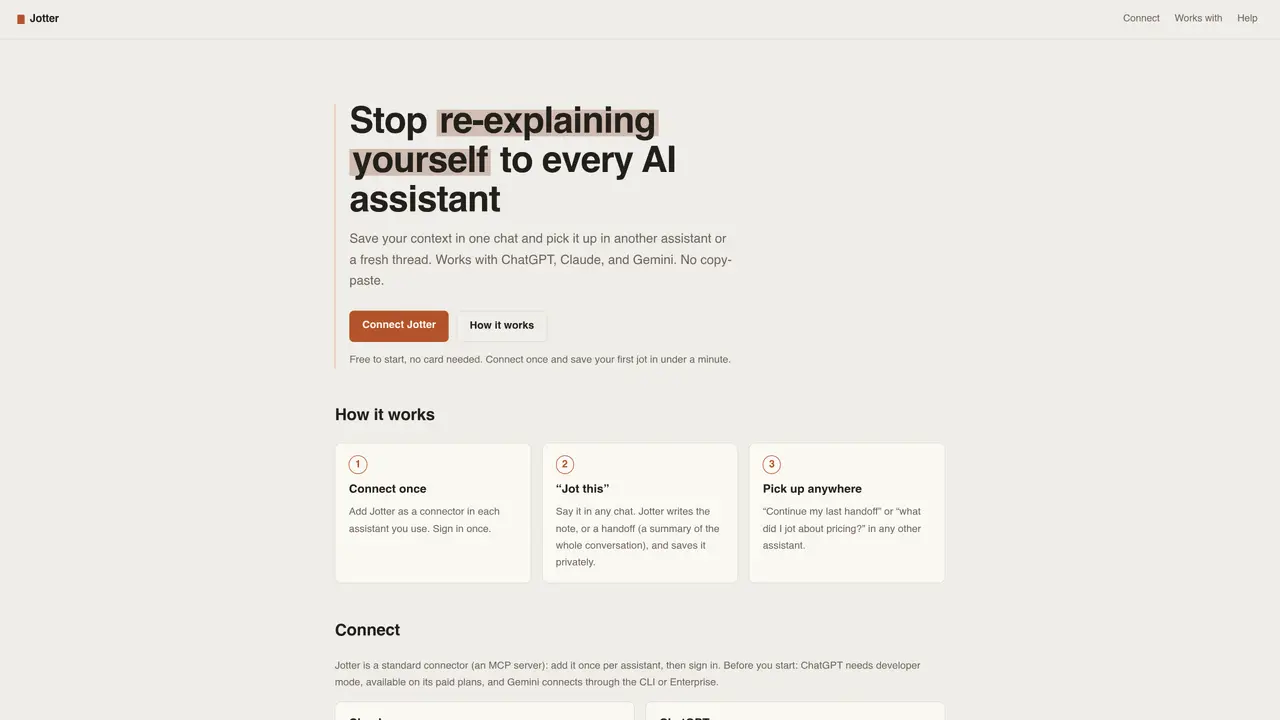
Jotter allows users to save conversation context from one AI assistant and load it into another without copy-pasting. The tool works with multiple assistants including ChatGPT, Claude, and Gemini by using a connector system. Users can create notes or handoff summaries in any supported chat, then retrieve them later in a different assistant or fresh thread. The service operates as an MCP server, requiring a one-time setup per assistant. Jots are stored privately and retained indefinitely under the free plan, with a paid tier offering higher storage limits. The system is designed to prevent the need to re-explain context when switching between AI tools.
Jotter saves context from one AI assistant so you can load it in another. Users jot a note or handoff a conversation in ChatGPT, Claude, or Gemini, then retrieve it in any other assistant or a new chat without copy-pasting or re-explaining.
Built-in AI memory is vendor-locked and captures context automatically. Jotter allows users to choose what to save and moves that context across different assistants like ChatGPT, Claude, and Gemini, making it portable and user-controlled.
Jotter works with any assistant that supports connectors (MCP), including ChatGPT in developer mode, Claude on web, desktop, mobile, and Code, and Gemini via CLI or Enterprise. Users connect Jotter once per assistant.
Yes, your jots are private and stored only at your direction. Jotter does not use your content to train AI models or sell your data.
No, the free plan does not require a credit card. Users can connect Jotter to an assistant, sign in, and save their first jot immediately without any payment.
The free plan includes 10 jots kept forever, while the Pro plan offers 5,000 jots. These caps help keep Jotter fast for all users, and nothing auto-deletes unless the user chooses to delete it.
We use essential cookies to run aitoolnavio™, and optional cookies to analyze traffic and measure our marketing. You choose what we use — optional cookies stay off unless you turn them on. See our Privacy Policy.
Generate content, correct spelling, suggest synonyms to enhance writing.
Markdown-based note-taking and personal knowledge management app that turns notes into a connected system of ideas.
Capture, organize, and share ideas, notes, and documents effortlessly.
Easily create and track training courses, design learning environments, and access from any device with an intuitive interface.
An AI-powered note-taking app for students and professionals to write, sketch, annotate PDFs, record audio, and generate summaries, quizzes, and flashcards.
Handwritten note-taking app with searchable ink, PDF annotation, synced audio, and AI-powered study tools.
AI-powered process documentation tool that captures workflows into visual step-by-step guides with screenshots, editing, and exports.
AI web app that transcribes audio, video, and YouTube links into text in 98 languages with summaries, mind maps, and export formats for students and teams.
A note-taking and spaced-repetition flashcard app for students and learners, with PDF annotation plus AI tools for generating cards, quizzes, and study summaries.
AI-powered research assistant for organizing, analyzing, and synthesizing information from notes and documents.
Capture thoughts, create documents, and access on any device for convenient organization and productivity.
AI-powered PDF editor with built-in agents for summarization, translation, and document analysis.
Matched on what this tool does — grouped by the job you would be replacing.
matches Save conversation context as notes or handoff summaries · Retrieve saved context in any supported AI assistant · Permanent storage with no auto-deletion
Pieces auto-captures your workflow context across tools and surfaces it via a privacy-first AI assistant for faster recall and reuse.
Portable AI memory layer that merges histories from multiple AIs into one searchable, evidence-linked system
Memory MCP server integrates Memory with Cursor, Claude Desktop and Windsurf for persistent context across sessions.
Shared memory layer for AI agents across apps and models
matches One-click conversation capture from major AI platforms · Smart compression of long chats into summaries · Instant context injection into any AI input box
Browser extension that transfers AI conversation context between platforms
A notepad that saves and organizes AI conversations and notes in one place
One short email a week: fresh tools worth trying, honest takes and the updates that actually matter. No spam, unsubscribe any time.