Create stunning visuals, develop ideas with AI-powered tools, and instantly share content without coding or formatting.

unfill.io
0Popularity
About unfill.io
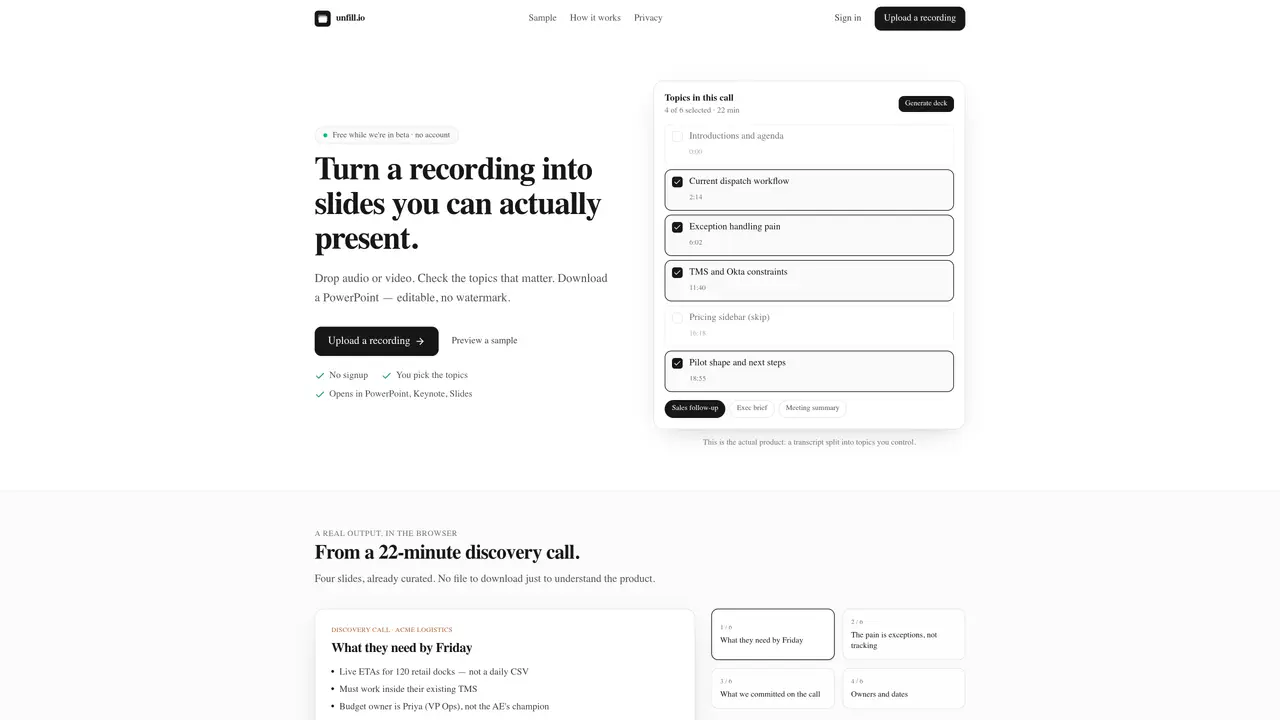
The service processes recordings such as meetings, podcasts, interviews, or lectures and generates presentation slides based on selected topics. Users upload an audio or video file or a direct link, and the tool splits the recording into segments by topic and speaker. The user then selects which segments to include as slides. The output is a downloadable PowerPoint or PDF file that can be edited in standard presentation software. The tool is designed to create concise decks for follow-ups, summaries, or study guides without requiring manual transcription. Recordings are processed temporarily and deleted after job completion, with no model training performed on user files. The interface emphasizes user control over content selection and output format.
Key features
- Audio and video file support
- Topic and speaker segmentation
- Editable slide output
- No watermark on generated decks
- Temporary file processing
- Multiple output formats
- User-selected topics for slides
- No model training on user files
Use cases
- Creating follow-up decks after sales calls
- Generating meeting summaries with action items
- Producing study guides from lectures or webinars
Pros
- No account required for use
- Output is editable PowerPoint or PDF with no watermark
- Supports multiple file formats including MP3, MP4, MOV, WAV
- Processed files are deleted after job completion
- Allows selection of specific topics for slide generation
Cons
- File size limited to 500MB
- Only direct file links are accepted, not cloud storage links
- Currently in beta with no long-term pricing details
- Output limited to presentation formats (PPTX or PDF)
Frequently asked questions about unfill.io
What types of recordings can I upload to unfill.io?
Users can upload audio or video files in formats such as MP3, MP4, MOV, or WAV, as well as direct file links like Loom downloads. The tool supports recordings up to 500MB in size.
Does unfill.io require an account to use?
No, unfill.io does not require users to create an account. The service operates on a no-signup basis, allowing users to process recordings directly.
What happens to my recordings after processing?
Recordings are processed temporarily to generate the presentation and are deleted after the job is completed. The service does not train models on user files.
Can I edit the generated presentation?
Yes, the output is a downloadable PowerPoint or PDF file that can be edited in standard presentation software like PowerPoint, Keynote, or Google Slides.
What types of presentations can I generate with unfill.io?
The tool can generate various types of decks, including sales follow-ups, executive briefs, meeting recaps, study guides, or custom prompts tailored to the user's needs.
How does unfill.io split the recording into topics?
The tool automatically splits the recording into segments by topic and speaker. Users can then select which segments to include as slides in the final presentation.