Generate cinematic video clips from text or images and refine them with AI-powered editing tools for creators and visual professionals.
6.4M visits/mo+14.2%#8 Video & Animation

Online AI tool that turns still images into short videos from text prompts
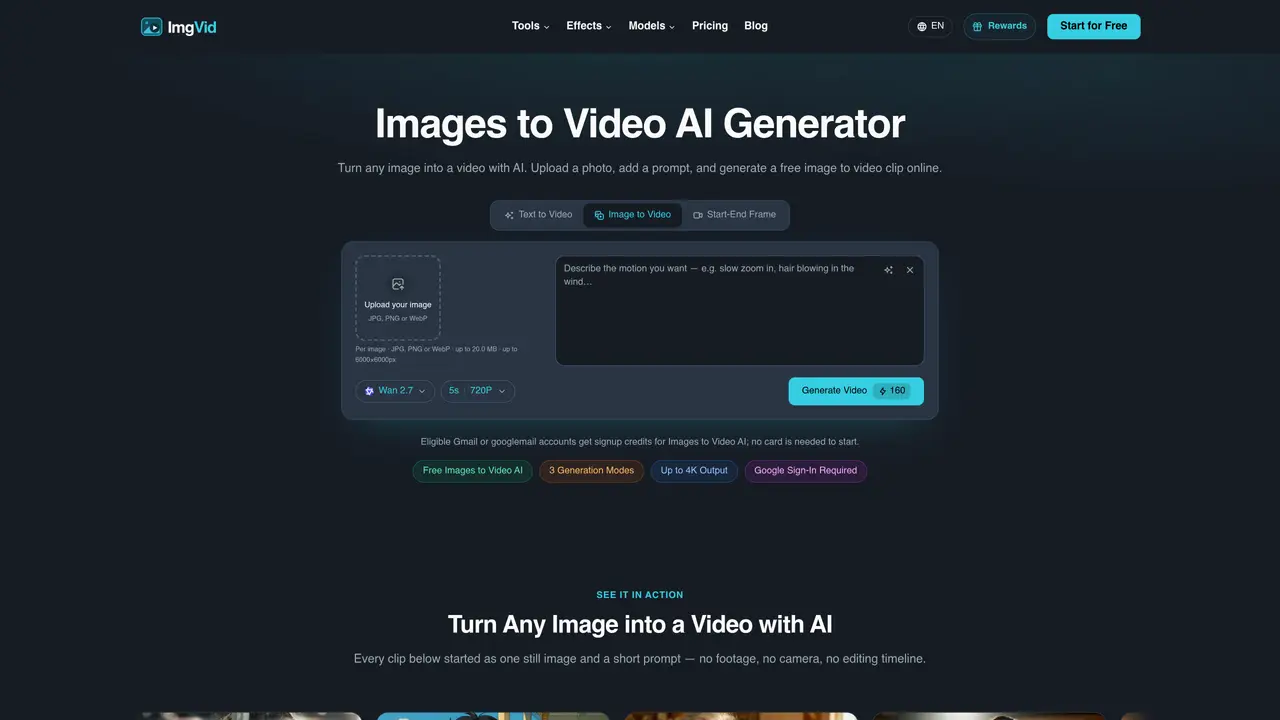
Images to Video AI is a browser-based service that converts still images into animated videos using artificial intelligence. Users upload JPG, PNG, or WebP files and describe the desired motion, camera movement, or mood in plain text. The AI then generates a short video clip that matches the prompt, which can be previewed and downloaded as an MP4 file. The tool supports single images, multiple images blended into one clip, or start-and-end frames where the AI fills in the motion between them. Outputs can be formatted for social platforms like TikTok and Reels, and the service offers up to 4K resolution without watermarks. It operates entirely online with no software installation required, and eligible Gmail accounts receive initial credits to start generating videos immediately.
Images to Video AI is an online tool that converts still images into animated videos using artificial intelligence. Users upload an image, describe the desired motion or mood in a text prompt, and the AI generates a short video clip that matches the prompt. The process requires no software installation and runs entirely in a web browser.
The tool is designed for creators, marketers, e-commerce sellers, and anyone looking to quickly turn static images into engaging video content. It suits users who need social media clips, product ads, or creative animations without requiring video editing skills.
Eligible Gmail or googlemail accounts receive initial credits to start generating videos for free. The service offers a free tier with limited generations, and additional usage may require purchasing credits or a subscription.
The tool supports JPG, PNG, and WebP image formats, with a maximum file size of 20 MB and dimensions up to 6000×6000 pixels. Users can upload a single image, multiple images for blending, or start-and-end frames for AI-generated motion.
Yes, users can describe the desired motion, camera movement, and mood in the prompt to guide the AI. Output videos can be generated in up to 4K resolution without watermarks, and are optimized for social platforms like TikTok and Reels.
To get started, sign in with an eligible Gmail or googlemail account to receive signup credits. Upload an image, enter a text prompt describing the motion or mood, and generate the video. The AI processes the request, and the resulting video can be previewed and downloaded as an MP4 file.
We use essential cookies to run aitoolnavio™, and optional cookies to analyze traffic and measure our marketing. You choose what we use — optional cookies stay off unless you turn them on. See our Privacy Policy.
One short email a week: fresh tools worth trying, honest takes and the updates that actually matter. No spam, unsubscribe any time.
Generate cinematic video clips from text or images and refine them with AI-powered editing tools for creators and visual professionals.
Create custom titles, 3D objects, adjust color and contrast, add special effects, transitions, and animations.
Animate images effortlessly with text prompts and motion control.
Professional visual AI engine for node-based image, video, 3D, audio and generative workflows with full control over models and outputs.
AI video generation tool that creates videos from text prompts, images, or reference clips with strong character consistency.
AI-powered tool for creating, customizing, and animating lightweight Lottie graphics for websites and apps from text prompts.
Generates high-quality videos and images from text or images with cinematic controls and native 4K output.
An all-in-one creative suite specializing in Image-to-Video animation.
A web-based motion design tool for creating collaborative animations with Figma import and exports like 4K video, GIF, and Lottie.
AI-powered platform to create professional animated videos and presentations with voice-overs, text animation, and asset libraries.
Create animated presentations, design videos with voiceovers and music, and access tutorials and resources for easy use.
Create immersive experiences, personalize customer interactions, and provide dynamic conversations and advice to multiple players.
Matched on what this tool does — grouped by the job you would be replacing.
matches Prompt-driven motion generation · Single or multiple image inputs · Start and end frame animation
Online AI tool that converts still images into short video clips with motion and audio
Turns still photos into short AI-generated videos with adjustable motion and camera effects
AI video generator that creates short cinematic videos from text or still images
Converts text or still images into short cinematic videos using multiple AI models