AI-powered video messaging tool that records, shares, and manages video messages with AI-generated titles, summaries, and tasks.
16M visits/mo-3.4%#5 Chatbots & Assistants

VideoSwapFace delivers state-of-the-art facial replacement technology for your video content with seamless motion tracking.
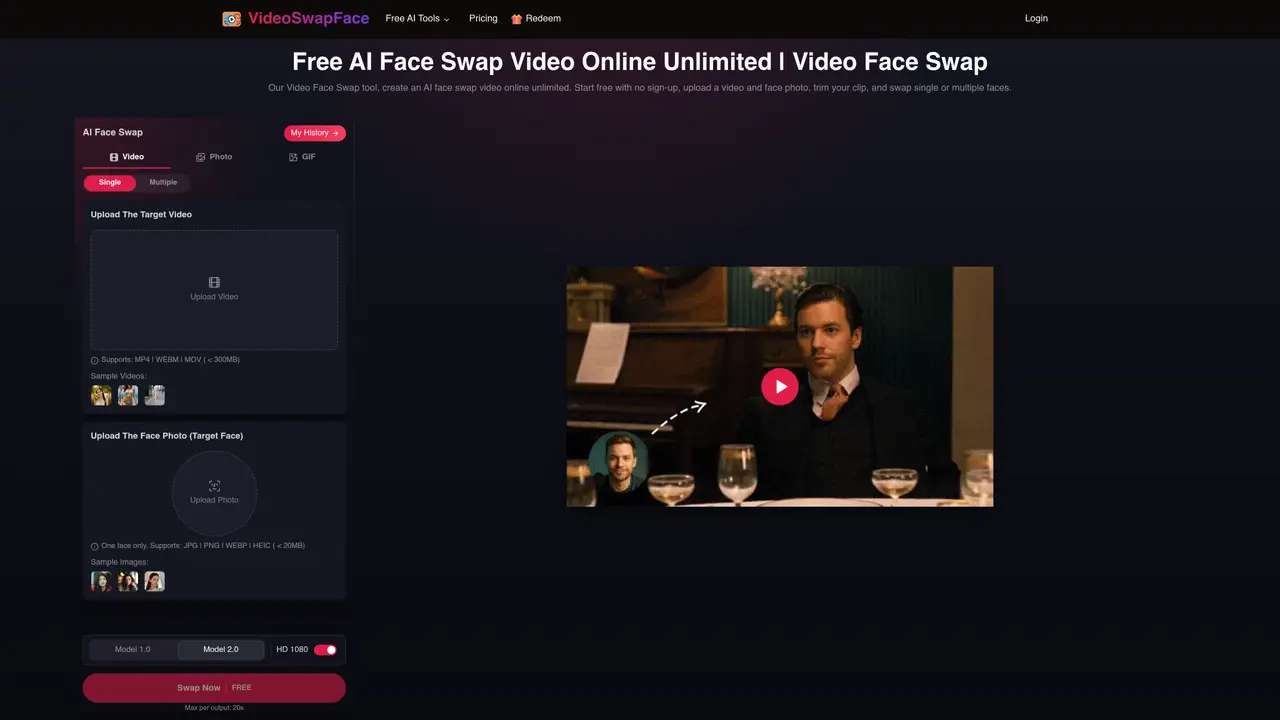
VideoSwapFace is a free, browser-based AI tool designed to replace faces in videos with high fidelity and no time constraints. Users can upload their own footage or select from over 150 premium video templates, which include professionally crafted scenes, emotional moments, and business presentations. The platform simplifies the face-swapping process through an intuitive interface where users upload a target video, provide a face image, and initiate the transformation with a single click. The tool leverages advanced AI algorithms to synchronize facial expressions and head movements, ensuring realistic and emotionally accurate results across every frame. The service operates entirely in the browser, removing the need for software downloads or hardware dependencies, making it accessible to users regardless of technical expertise or device limitations. VideoSwapFace emphasizes ease of use while maintaining quality, allowing creators, marketers, educators, and hobbyists to generate professional-looking swapped-face videos efficiently. Its smart expression matching technology preserves the original video’s emotional tone and timing, delivering seamless integration of the new face.
A video face swap replaces a visible face in a clip with a face from another image. VideoSwapFace processes the selected clip across frames, then returns a generated result for review and download.
Upload the target video, add a clear replacement face photo, trim the clip, and choose Single or Multiple mode. Select the free or credit generation option, then review the result in My History.
Yes. The video editor shows a free generation option for an output of up to 60 seconds. Longer clips or higher-volume use can require credits, and the current cost is shown in the editor before generation.
No. You can try free generation as a guest. Guest creations expire after 2 hours; signing in saves future creations for 2 days.
The video uploader accepts MP4, WEBM, and MOV files under 300MB. A single replacement face can be a JPG, PNG, WEBP, or HEIC image under 20MB.
Yes. Choose Multiple mode, select a frame for face detection, and match one replacement photo to each detected face before generating.
videoswapface.com · third-party estimates from Similarweb
Last 4 months · grows by one month every month
Share of visits · estimated visits
Other countries: 28%
How people reach this site from other AI tools
365 a month · 0.3% of all visits
Video & Animation · Sep 2026
Traffic figures are third-party estimates, good for scale and trends; they can differ from a company's own numbers. Updated monthly.
We use essential cookies to run aitoolnavio™, and optional cookies to analyze traffic and measure our marketing. You choose what we use — optional cookies stay off unless you turn them on. See our Privacy Policy.
One short email a week: fresh tools worth trying, honest takes and the updates that actually matter. No spam, unsubscribe any time.
AI-powered video messaging tool that records, shares, and manages video messages with AI-generated titles, summaries, and tasks.
Unleash creativity: edit photos, videos, and designs with AI-enhanced tools.
Record lectures, create tutorials, and securely share videos with teams.
Create stunning videos in a few clicks, customize with powerful tools, and automate editing without experience.
Create, convert, and enhance videos effortlessly with professional effects and royalty-free music.
Create marketing videos quickly, customize with templates, music, and photos, optimize for different platforms with AI.
Automate video editing, add text-to-speech voice-overs, and optimize videos for impactful results.
Freemium, uncensored AI video and image creation for individual creators with text-to-video, image effects, and gem-based upgrades for HD and no watermarks.
Create, edit, subtitle, and translate pro-grade videos instantly.
Cloudinary provides APIs and tools to integrate, manage, and optimize images and videos for AI-driven visual experiences.
All-in-one AI suite for creators to automate workflows, edit media, and generate content across video, design, and productivity tools.
Generate cinematic video clips from text or images and refine them with AI-powered editing tools for creators and visual professionals.
Matched on what this tool does — grouped by the job you would be replacing.
matches Unlimited video face swapping · Seamless motion tracking · Intuitive face replacement interface
Face AI is an all-in-one online face swap toolkit that lets you swap faces in photos, videos, and GIFs with fast, realistic AI results.
AI tool that swaps faces in videos, images, and GIFs to create realistic deepfake content.
Web-based AI video editing platform for transforming, editing, and restyling videos with prompt-driven controls and multi-model workflows.
Browser-based AI tool for hyper-realistic face swaps in videos up to 4K
matches 150+ premium video templates · Browser-based video processing
Replace faces in any GIF without watermarks or usage limits with unlimited free usage and 100+ professional templates.
Free online AI tool that swaps faces in GIFs, images, and videos with realistic results in seconds.
Online AI tool that swaps faces in images or videos with a few clicks, ideal for creative projects and quick edits.
Swap faces in images using customizable templates while preserving surrounding areas.