AI-powered video messaging tool that records, shares, and manages video messages with AI-generated titles, summaries, and tasks.
16M visits/mo-3.4%#5 Chatbots & Assistants

Extends AI-generated videos by adding new segments while maintaining visual consistency
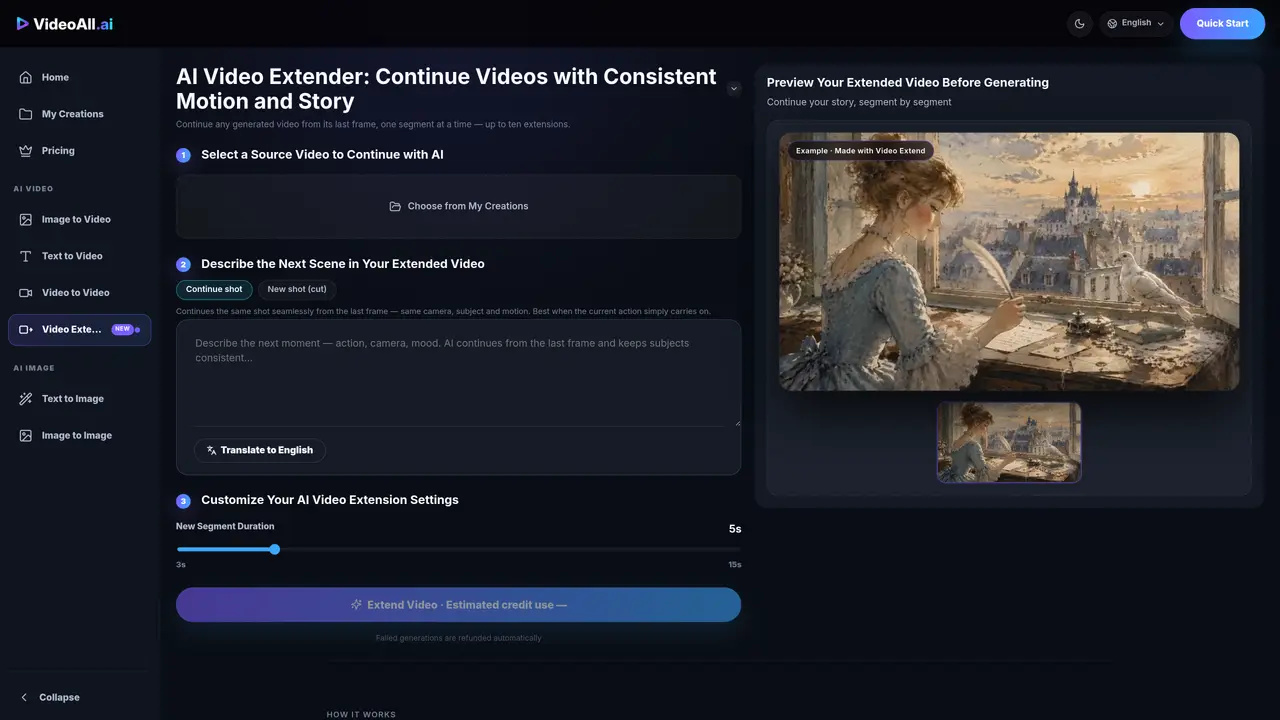
Video Extend is a tool for extending AI-generated videos by appending new segments that continue from the last frame of the previous clip. Users can select a source video from their creations and describe the next scene, action, or story beat to generate a continuation. Each extension starts from the exact last frame, preserving subjects, camera angles, and motion to maintain visual continuity. The process allows for iterative extension, enabling the creation of longer videos by repeating rounds of generation and previewing results before finalizing. The tool provides options to customize segment duration and supports previewing extensions before committing credits. Failed generations are automatically refunded, and users can revise prompts and regenerate as needed.
Each extension starts from the exact last frame of the previous segment, preserving subjects, camera angles, and motion to maintain visual continuity.
Users can revise the prompt and regenerate the segment. Failed generations are automatically refunded, and previews allow for adjustments before finalizing.
The extended segment is added to the original video, enabling iterative extension to build longer videos. The process can be repeated for additional segments.
Credits are used per extension task, with the estimated cost displayed before generation. Failed renders are refunded automatically.
Yes, the tool supports iterative extension, allowing users to continue their story by repeatedly extending from the latest segment.
Yes, users can preview the new segment before committing credits, ensuring satisfaction with the result before finalizing.
We use essential cookies to run aitoolnavio™, and optional cookies to analyze traffic and measure our marketing. You choose what we use — optional cookies stay off unless you turn them on. See our Privacy Policy.
One short email a week: fresh tools worth trying, honest takes and the updates that actually matter. No spam, unsubscribe any time.
AI-powered video messaging tool that records, shares, and manages video messages with AI-generated titles, summaries, and tasks.
Unleash creativity: edit photos, videos, and designs with AI-enhanced tools.
Record lectures, create tutorials, and securely share videos with teams.
Create stunning videos in a few clicks, customize with powerful tools, and automate editing without experience.
Create, convert, and enhance videos effortlessly with professional effects and royalty-free music.
Create marketing videos quickly, customize with templates, music, and photos, optimize for different platforms with AI.
Automate video editing, add text-to-speech voice-overs, and optimize videos for impactful results.
Freemium, uncensored AI video and image creation for individual creators with text-to-video, image effects, and gem-based upgrades for HD and no watermarks.
Create, edit, subtitle, and translate pro-grade videos instantly.
Cloudinary provides APIs and tools to integrate, manage, and optimize images and videos for AI-driven visual experiences.
All-in-one AI suite for creators to automate workflows, edit media, and generate content across video, design, and productivity tools.
Generate cinematic video clips from text or images and refine them with AI-powered editing tools for creators and visual professionals.
Matched on what this tool does — grouped by the job you would be replacing.
matches Continue videos from the last frame · Customizable segment duration (3s, 5s, 15s) · Preview extensions before generation
Online AI tool for generating videos and images from text or images
Web-based AI video editing platform for transforming, editing, and restyling videos with prompt-driven controls and multi-model workflows.
Extends videos online by generating new footage before or after an existing clip using AI
AI tool for writing and generating short drama scenes one at a time