Generate lifelike human videos with AI, making professional video creation fast and accessible for any user.
41M visits/mo+26.2%#1 Video & Animation

A multimodal AI workspace that turns text briefs into finished videos, images, and audio while showing exact credit costs.
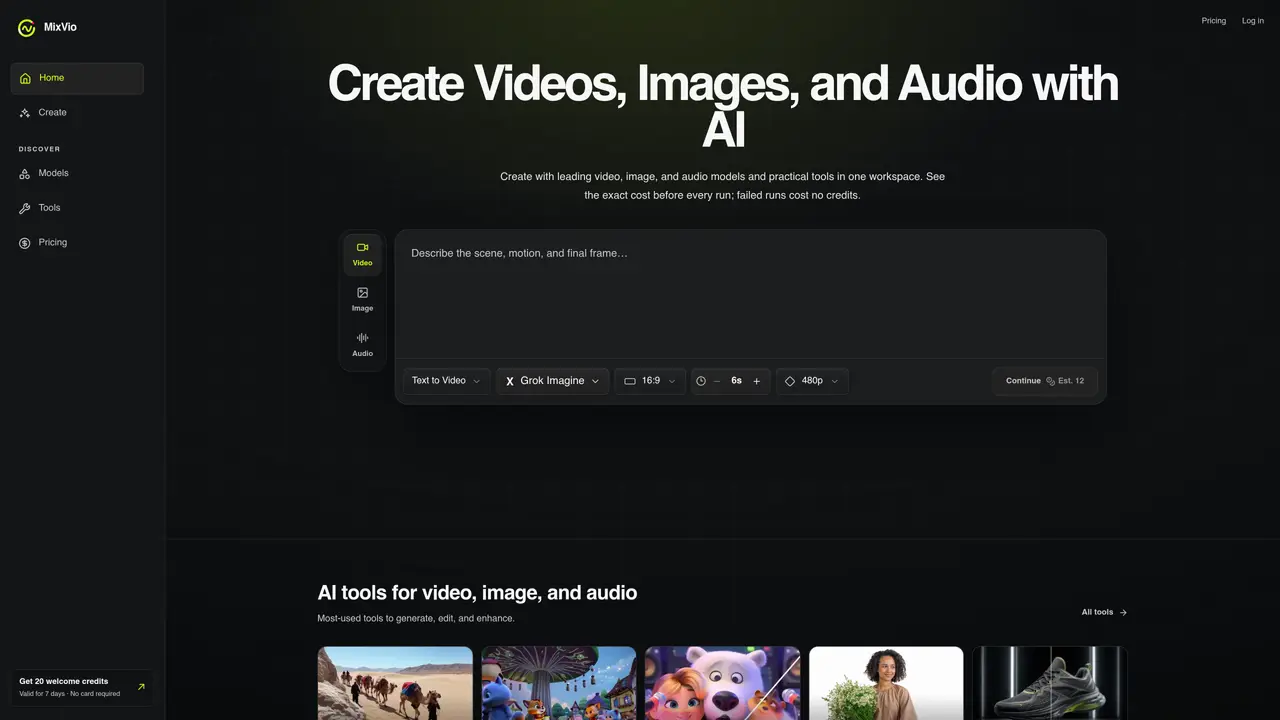
MixVio AI is a multimodal creative workspace designed for video, image, and audio generation. It brings together leading AI models and practical tools into a single interface, allowing creators to move seamlessly from concept to final output. Users can generate videos directly from text briefs, create and edit images within the same workspace, and produce audio and voice assets without switching tools. The platform provides transparency by displaying the exact credit cost for each generation before execution, ensuring users can plan their workflow efficiently. All uploads and results remain private, and reserved credits are automatically released if a generation fails, reducing wasted resources. MixVio AI is built for creators, marketers, and teams who need an integrated solution for multimedia content creation without the complexity of juggling multiple tools or platforms.
Short videos from text or reference images, product-ready images and edits, voiceovers in multiple languages, and original music. Available routes include Seedance, Kling, Veo, GPT Image, and Seed Audio.
Yes. Every new account receives a set of welcome credits valid for a limited time, with no credit card required. Every generation consumes credits, and upgrades are available when credits expire.
Yes. Free plan image outputs include a visible MixVio watermark, and free voiceovers include an audible MixVio disclosure. Free videos and paid plan exports do not include watermarks.
No. Video starts with a default model, and image and audio start with default models. Users can switch to compatible alternatives at any time.
Yes, on routes that accept references such as Image to Video and editing tools. Uploads remain private to your workspace, and formats and limits are shown before submission.
Every model and tool displays an integer credit cost before submission. A task reserves the quote, settles it on success, and releases the reservation if the run fails.
mixvio.ai · third-party estimates from Similarweb
Share of visits by channel
Video & Animation · Sep 2026
Traffic figures are third-party estimates, good for scale and trends; they can differ from a company's own numbers. Updated monthly.
We use essential cookies to run aitoolnavio™, and optional cookies to analyze traffic and measure our marketing. You choose what we use — optional cookies stay off unless you turn them on. See our Privacy Policy.
One short email a week: fresh tools worth trying, honest takes and the updates that actually matter. No spam, unsubscribe any time.
Generate lifelike human videos with AI, making professional video creation fast and accessible for any user.
xAI builds Grok frontier AI models for reasoning, coding, voice, images, video, enterprise workflows, and developer APIs.
AI-powered video messaging tool that records, shares, and manages video messages with AI-generated titles, summaries, and tasks.
Explore and test Google’s experimental AI tools and prototypes before they become products.
Creates licensed videos, images, music.
Web and mobile AI platform for generating, editing, and training custom visuals from prompts with community models and face-swap tools.
Create stunning videos in a few clicks, customize with powerful tools, and automate editing without experience.
Create, convert, and enhance videos effortlessly with professional effects and royalty-free music.
Create engaging videos with voiceovers, music, and customizations using a library of royalty-free assets.
Create auto-resized campaign images and videos with DaVinci AI's generative media suite.
Freemium, uncensored AI video and image creation for individual creators with text-to-video, image effects, and gem-based upgrades for HD and no watermarks.
Generate cinematic video clips from text or images and refine them with AI-powered editing tools for creators and visual professionals.
Matched on what this tool does — grouped by the job you would be replacing.
matches Generate videos from text briefs · Create and edit images in one workspace · Produce audio and voice assets
Unified AI studio for generating images with Nano Banana 2 and videos with Seedance 2 or Veo 3.1, with transparent credit costs.
All-in-one AI platform for creators to generate high-quality images, videos, and music from text prompts in a single workspace.
AI video generator converting text or images into videos using multiple models
Canvas-based AI image and video generator with node workflows and credit-based pricing
matches Generate videos from text briefs · Create and edit images in one workspace · Produce audio and voice assets
matches Create and edit images in one workspace · Multimodal creative workflow for video, image, and audio
All-in-one AI platform for individuals to chat with AI and generate images, video, text, voice, and music across web and mobile.
Unified platform providing access to nine AI tools via a single prepaid balance
AI platform for generating images, videos, audio and text without watermarks
AI platform for upscaling images, enhancing photos, and generating high-quality creative assets with contextual detail.
A web-based AI image generator for creators and designers using Flux.1 models to produce high-quality images and videos from text or reference visuals.
All-in-one AI platform for generating images, videos and editing assets