Design, automate, and analyze email campaigns with drag-and-drop builders, AI editing, and real-time analytics.
5.2M visits/mo+4.7%#21 Business & Marketing

Generates tailored cover letters optimized for applicant tracking systems
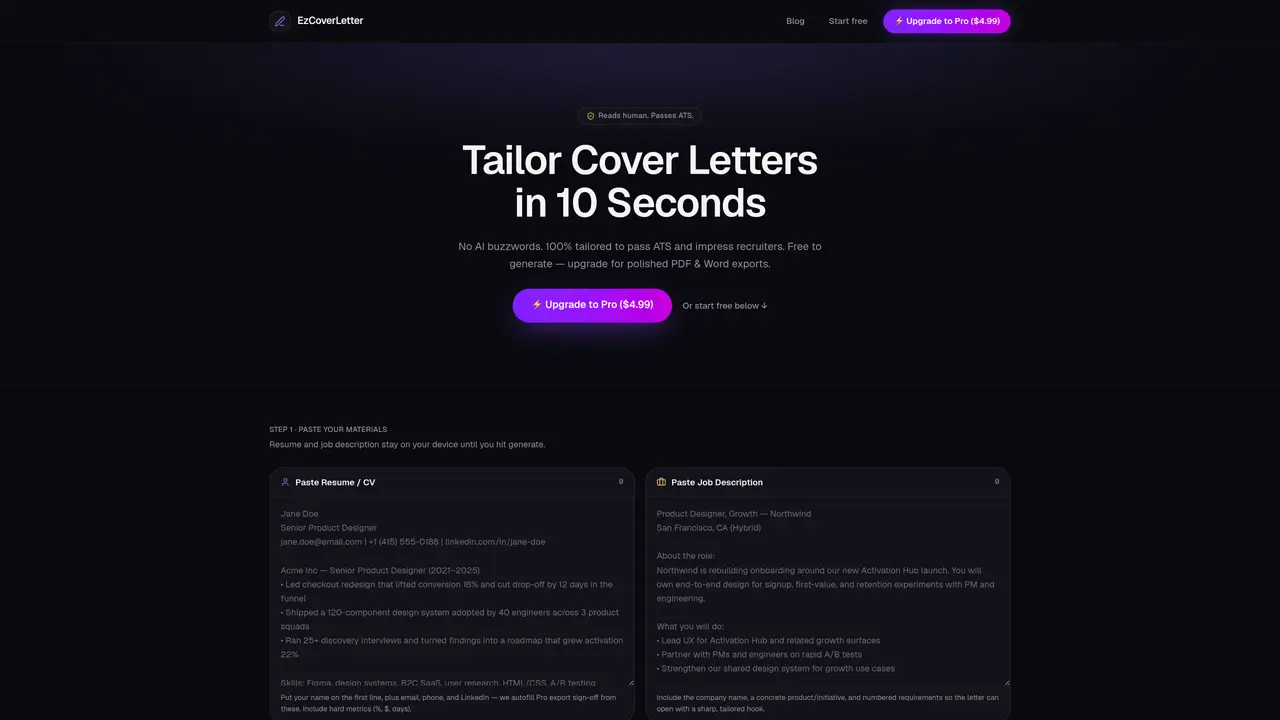
EzCoverLetter creates cover letters tailored to specific job applications by analyzing the provided resume and job description. The process begins with pasting the resume and job posting, which remain on the user’s device until generation. Users can adjust the tone of the letter to suit professional, concise, or natural styles. The tool highlights matched keywords between the resume and job description to demonstrate ATS compatibility. A cover letter is generated using DeepSeek AI, optimized for applicant tracking systems. The output is available as free text, while polished PDF and Word exports require a Pro upgrade. The sign-off details are automatically filled from the user’s profile information.
EzCoverLetter is a tool that generates tailored cover letters by analyzing a user's resume and a specific job description. The process involves pasting both documents, selecting a tone, and generating an ATS-optimized cover letter using DeepSeek AI.
Job seekers looking to create personalized cover letters quickly and effectively, especially those aiming to pass applicant tracking systems (ATS) and impress recruiters.
Yes, users can generate a cover letter for free, while polished PDF and Word exports require a Pro upgrade. The free version provides the cover letter text, and the Pro version includes formatted exports with sign-off details.
The tool highlights matched keywords between the resume and job description, demonstrating ATS compatibility. The generated cover letter is optimized to align with applicant tracking systems.
Yes, users can choose from different tones such as Professional, Concise & Short, or Natural to tailor the cover letter to their preferences.
The resume and job description remain on the user’s device until generation, ensuring privacy and security.
We use essential cookies to run aitoolnavio™, and optional cookies to analyze traffic and measure our marketing. You choose what we use — optional cookies stay off unless you turn them on. See our Privacy Policy.
One short email a week: fresh tools worth trying, honest takes and the updates that actually matter. No spam, unsubscribe any time.
Design, automate, and analyze email campaigns with drag-and-drop builders, AI editing, and real-time analytics.
Identify contacts, generate emails, track prospects and accounts based on key signals.
AI assistant that automates routine work across email, calendar, Slack, files and other tools with human oversight.
Schedule events, streamline projects, and draft emails efficiently with its features.
AI-powered email assistant that organizes inboxes, drafts replies, and automates routine tasks for professionals.
Generate SEO-friendly YouTube video scripts and descriptions for blog posts.
Create personalized emails, follow up automatically, and analyze for optimization and insights.
AI-powered email management for Gmail and Google Workspace teams with shared inboxes, AI drafting, automation, and analytics.
Cross-platform email client with unified inbox, calendar, and optional AI assistance for students, professionals, and small teams.
AI executive assistant that organizes Gmail and Outlook inboxes, drafts replies in your voice, schedules meetings, and tracks follow-ups for busy professionals.
Create interactive email campaigns with automated personalization.
Automate responses, personalize emails, and enjoy an intuitive interface for efficient email management.
Matched on what this tool does — grouped by the job you would be replacing.
matches ATS optimization · Keyword matching display · Tone selection (Professional, Concise, Natural)
AI-powered resume builder, cover letter generator and portfolio creator with ATS optimization
Generates ATS-optimized job applications from CV and job description
Generates ATS-friendly cover letters from user input and job descriptions
AI-powered tool that tailors CVs, cover letters and LinkedIn messages to job descriptions
matches ATS optimization · Keyword matching display · Resume and job description input
Quickly craft customized resumes with AI-powered text generation, intuitive design, and expertly written templates.
AI-powered resume builder that generates optimized resumes with writing assistance, templates, and real-time feedback for job seekers.
AI-powered resume builder that optimizes documents for applicant tracking systems
AI-powered resume tailoring and ATS optimization tool