

AI chatbot for conversation, work, research, coding, and content creation.
5.9B visits/mo+5%#1 Chatbots & Assistants
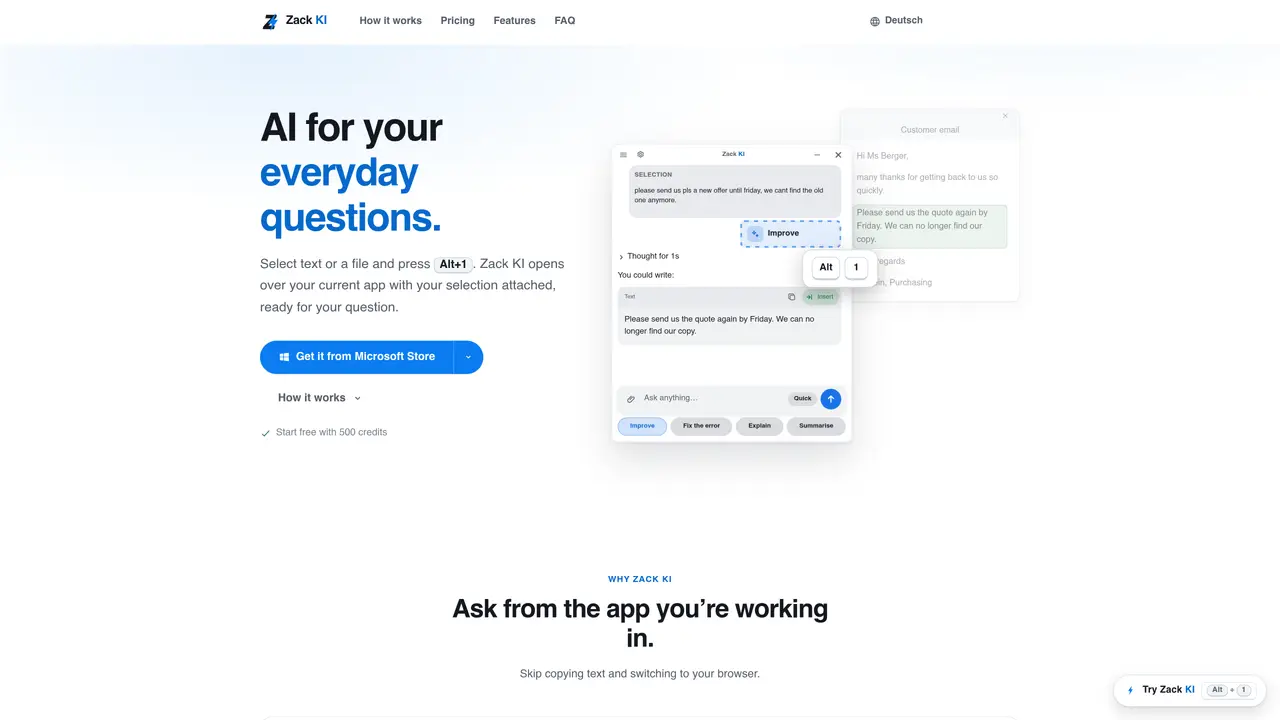
Zack KI is a Windows desktop application that integrates with existing programs to answer questions about selected text or attached files. It opens as an overlay above the current application when a user presses Alt+1, attaching the selected content or allowing a screenshot to be captured. The tool can process text from Outlook, Word, Excel, or web browsers, as well as files such as PDFs, Word documents, Excel spreadsheets, and plain text. Users can ask for improvements, error fixes, explanations, or summaries, and receive answers that can be inserted back into the original document. Zack KI offers two response modes: Quick for fast answers and Deep for more complex reasoning tasks. It operates locally on the user’s PC and does not store requests on external servers beyond the session.
Zack KI integrates directly with programs like Outlook, Word, Excel, or web browsers. Users select text or files, then press Alt+1 to open Zack KI as an overlay, attach the content, and ask questions without leaving the current application.
Zack KI allows users to work with selected text from their current app and insert the answer back there, eliminating the need to copy text and switch to a browser. This streamlines workflows by keeping interactions within the same environment.
The Free plan provides 500 starter credits and 100 additional credits weekly, primarily for Quick mode. Deep mode and web search features are not included and require upgrading to Basic or Pro plans.
Quick mode delivers fast answers suitable for short questions, rewrites, summaries, and simple research. Deep mode takes more time for complex tasks requiring higher accuracy and quality, consuming more credits per query.
Chats and data remain stored locally on the user’s PC. Zack KI’s servers in Germany do not retain user requests beyond the session, as outlined in the privacy policy.
Zack KI is designed to run on Windows PCs. Users can download the application directly from the website or Microsoft Store to install and use it on compatible systems.
We use essential cookies to run aitoolnavio™, and optional cookies to analyze traffic and measure our marketing. You choose what we use — optional cookies stay off unless you turn them on. See our Privacy Policy.
One short email a week: fresh tools worth trying, honest takes and the updates that actually matter. No spam, unsubscribe any time.
AI chatbot for conversation, work, research, coding, and content creation.
Generate content, correct spelling, suggest synonyms to enhance writing.
Summarizes, extracts, and rewrites content from files.
Automate research, make corrections, and integrate easily into text editors for convenient content generation and error detection.
AI-powered writing assistant for grammar, style, and tone improvements across documents and emails.
Instantly detect AI-generated text, identify plagiarism, and customize the detection process.
A free web-based AI chatbot and agent for writing, coding, research, and content creation with multilingual support.
AI research assistant that finds trusted sources, summarizes documents and videos, and generates cited answers with a browser extension for capturing findings.
AI-powered proofreading, editing, plagiarism checking, and citation generation for academic papers.
AI-powered web design suite inside Webflow that generates sites, code components, and SEO improvements from prompts.
Get quick copywriting help, generate marketing copy, and easily translate, explain, and rephrase web page text.
Craft captivating stories effortlessly using AI-powered GPT technology and an intuitive interface.
Matched on what this tool does — grouped by the job you would be replacing.
matches Text selection attachment from documents or browsers · File attachment support for PDF, Word, Excel, and plain text · Screenshot capture for visual context
Browser and desktop tool to feed text, files and screenshots into any AI model
AI-powered worksheet solver and PDF annotation canvas
Answers and summaries generated from uploaded files and media
Converts PDFs, documents and code to clean Markdown on a local Windows machine
matches Alt+1 shortcut integration with any Windows program · Quick and Deep response modes · Local operation with German server compliance
Private AI-powered file search for Windows that indexes and retrieves documents, images and notes by meaning
Windows-only legal AI that indexes case files locally and answers questions without uploading data