28 Best AI Tools for Black Friday and Holiday Sellers in 2026 (Shopify, Etsy, Amazon)
Black Friday is November 27. Here are 28 AI tools that take the grind out of the holiday rush, from product photos and gift-ready listings to ad creatives, email flows, and support bots, plus a week-by-week plan to have them working before Thanksgiving.
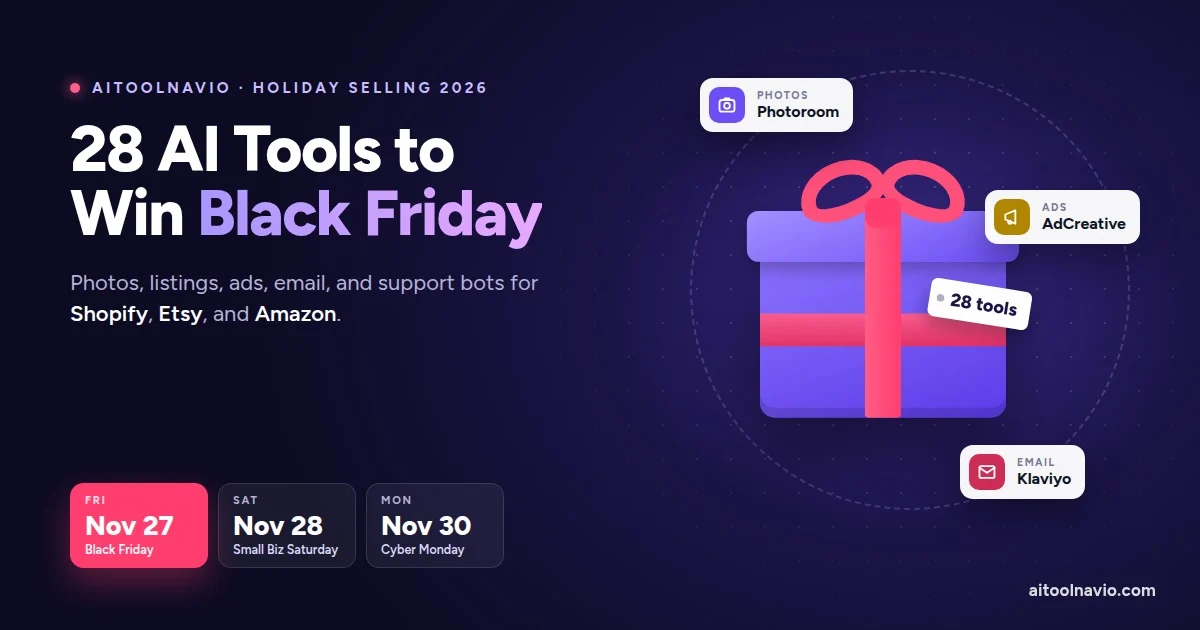
Black Friday falls on November 27 this year, and Cyber Monday on November 30. For most online sellers, the five days from Thanksgiving through Cyber Monday bring more orders, more ads, more emails, and more “where’s my package?” messages than any other week of the year.
AI won’t pick your products or set your prices for you. What it does well is the grind that piles up before and during the rush: shooting and editing hundreds of product photos, rewriting listings, making dozens of ad variations, writing the email sequence, and answering the same shipping question for the 300th time.
This guide covers 28 AI tools from the Aitoolnavio directory that Shopify, Etsy, and Amazon sellers can set up in the next few weeks, grouped by the job they do. There’s also a week-by-week plan so everything is ready before Thanksgiving.
Quick picks if you only have time for one tool per job:
- Product photos: Photoroom
- Listings on Shopify: Shopify Magic (already in your admin)
- Listings on Amazon: Helium 10
- Listings on Etsy: Roketfy
- Ad creatives: AdCreative.ai
- Holiday email and SMS: Klaviyo
- Customer service bot: Gorgias on Shopify, or Lyro by Tidio for a smaller shop
How we put this list together
Every tool here has a live listing on Aitoolnavio, and every link in this post goes to that listing, where you’ll find current pricing, features, screenshots, and alternatives. We chose tools with four questions in mind:
- Does it help with a job that gets bigger in November and December? Photos, listings, ads, email, and support all do. Year-round back-office tools didn’t make this list; they’re covered in our small business guide.
- Can you set it up before Thanksgiving? Anything that needs a developer or a six-week rollout was left out.
- Does it work with Shopify, Etsy, or Amazon? We note which platform each tool fits best.
- Can you try it first? Most tools here have a free plan or a free trial.
What this list is not: a lab test. We didn’t run every tool on the same product catalog, and prices change often, which is why we don’t quote dollar amounts. Check each listing for current plans. If “freemium” and “free trial” blur together, see AI Tool Pricing Explained.
Your holiday AI timeline
The biggest mistake is setting up new tools during Black Friday week. Everything below should be tested on real orders well before then.
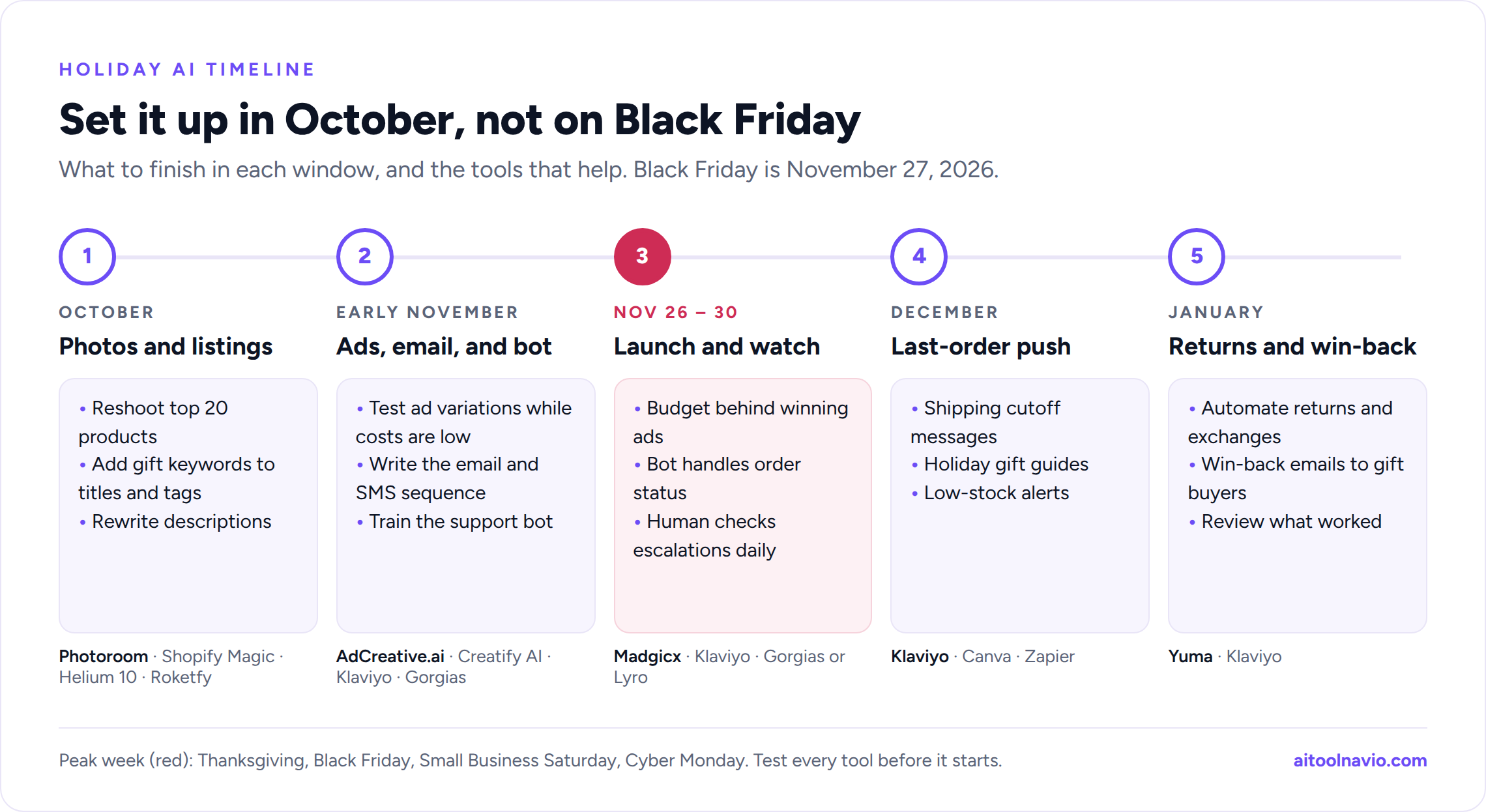
| When | What to get done | Tools to use |
|---|---|---|
| October | Reshoot product photos, rewrite your top listings, fix keywords | Photoroom, Shopify Magic, Helium 10, Roketfy |
| Early November | Build ads and video, write the email and SMS sequence, train the support bot | AdCreative.ai, Creatify AI, Klaviyo, Gorgias |
| Thanksgiving to Cyber Monday (Nov 26 to 30) | Launch, watch the numbers daily, let the bot handle routine tickets | Madgicx, Klaviyo, Gorgias or Lyro |
| December | Last-shipping-day messages, gift guides, restock alerts | Klaviyo, Canva, Zapier |
| January | Returns and exchanges, win-back emails | Yuma, Klaviyo |
1. Product photos
Product photos sell the item, and holiday shoppers scroll fast. AI photo tools remove messy backgrounds, create lifestyle scenes (a candle on a mantel, a mug next to a Christmas tree), and resize one shot for every channel, without a studio.
Photoroom
Photoroom is the easiest place to start. Snap products on your phone, and it removes the background, adds a clean white or seasonal backdrop, and fixes shadows. Batch mode lets you edit a whole collection at once, which matters when you’re refreshing 200 listings for the holidays.
Best for: sellers on every platform who shoot their own products. Free option: Yes, with limits.
Pebblely
Pebblely turns one plain product photo into a set of styled lifestyle scenes. Pick a theme like “snowy,” “cozy,” or “festive table,” and you have holiday-ready images for ads and social posts in minutes.
Best for: quick seasonal lifestyle shots. Free option: Yes, with limits.
Claid.ai
Claid.ai is built for catalogs. It upscales and cleans up low-quality supplier photos, applies consistent sizing and backgrounds across hundreds of products, and can generate AI photoshoots. If your images come from many different sources, it makes them look like one store.
Best for: larger catalogs and dropshippers working with supplier photos. Free option: Yes, with limits.
Flair AI
Flair AI works like a design canvas for product scenes. Drag your product in, describe the setting, and it builds a branded photo around it. It also offers on-model shots for apparel, which saves booking a model for every holiday drop.
Best for: brands that want styled, on-brand scenes and fashion shots. Free option: Check the listing for current plans.
Pixelcut
Pixelcut is a phone-first editor that removes backgrounds, upscales, and fixes lighting in a couple of taps. It suits Etsy and resale sellers who list straight from their phone.
Best for: sellers who list from their phone. Free option: Yes.
Also worth a look: Remove.bg does one thing, background removal, and does it fast.
A note on Amazon photos: Amazon’s main image rules still apply to AI-edited photos. The main image needs a pure white background and must show the actual product. Save the lifestyle scenes for your secondary images.
2. Listings, product descriptions, and marketplace SEO
Holiday shoppers search differently. They type “gifts for dad under 50” and “personalized ornament,” not your product’s model number. Updating titles, tags, and descriptions for gift searches is one of the highest-return jobs you can do in October. Listings are also increasingly read by AI shopping assistants like Amazon’s Rufus, so clear, complete product details matter more than keyword stuffing.
Shopify Magic and Sidekick
If you sell on Shopify, start with what you already pay for. Shopify Magic writes product descriptions, email subject lines, and blog drafts, and edits product images inside your admin. Sidekick, Shopify’s AI assistant, answers questions about your store’s sales and can take actions like setting up a discount. Both are included with Shopify plans at no extra cost.
Best for: every Shopify store. Free option: Included with Shopify.
Describely
Describely rewrites product descriptions in bulk. Import your catalog, set your brand voice once, and update hundreds of product pages for the season instead of editing them one at a time.
Best for: stores with large catalogs. Free option: Yes, with limits.
Hypotenuse AI
Hypotenuse AI is another strong bulk writer for e-commerce. It pulls in product data, writes SEO-friendly descriptions and meta tags, and can also draft gift guides and blog posts for the season.
Best for: e-commerce teams that need descriptions plus holiday content. Free option: Yes, with limits.
Helium 10
Helium 10 is the go-to toolkit for Amazon sellers. Use its keyword research to find the gift searches your listings are missing, then its AI listing builder to work them into titles, bullets, and backend keywords.
Best for: Amazon sellers. Free option: Yes, with limits.
Jungle Scout
Jungle Scout covers product research, sales estimates, and AI-written listings for Amazon. It’s especially useful for deciding which products to stock up on before the rush, based on last year’s holiday demand.
Best for: Amazon sellers planning inventory. Free option: Paid. Check the listing for current plans.
Roketfy
Roketfy is built for Etsy. It finds the keywords shoppers actually search, scores your listings, and suggests better titles and tags. Etsy search leans heavily on titles and tags, so this is where holiday traffic is won or lost.
Best for: Etsy sellers. Free option: Check the listing for current plans.
EtsyGenerator
EtsyGenerator is a lighter option. Describe your item, and it writes an Etsy title, description, and all 13 tags in Etsy’s format.
Best for: new or small Etsy shops. Free option: Yes, with limits.
Also worth a look: CopyMonkey writes Amazon listings from your keywords, and SellerApp combines Amazon listing checks with advertising analytics.
Built into Amazon itself: Seller Central now includes Amazon’s own AI tools that draft listings from a photo, a short description, or a product URL, suggest listing improvements, and answer questions through Amazon’s Seller Assistant. In September 2026, Amazon also began letting sellers connect outside AI assistants, starting with Claude, to check inventory, adjust prices, and update listings with the seller’s approval. Try the built-in tools before paying for more.
3. Ads, video, and social media
Ad costs usually climb in late November as every brand bids at once. The sellers who do well test more creative variations earlier, find the winners, and put their budget behind them before Black Friday.
AdCreative.ai
AdCreative.ai generates dozens of ad images and headlines from your product photos and brand kit, sized for Meta, Google, TikTok, and more. It also predicts which variations are likely to perform, so you can start testing with a shortlist.
Best for: stores running paid social and display ads. Free option: Yes, with limits.
Madgicx
Madgicx focuses on Meta (Facebook and Instagram) ads. It spots which ads and audiences are wasting money, suggests budget changes, and can automate rules like pausing an ad when costs spike. During the rush, that daily check saves real money.
Best for: stores spending seriously on Meta ads. Free option: Paid. Check the listing for trials.
Creatify AI
Creatify AI turns a product link into short video ads, including UGC-style clips with AI presenters. It’s a fast way to get vertical video for TikTok, Reels, and YouTube Shorts when you don’t have time to film.
Best for: getting video ads made fast. Free option: Yes, with limits.
Canva
Canva is where most small sellers make holiday banners, gift guides, social posts, and packaging inserts. Its AI tools write copy, generate images, and resize one design for every channel. Set up your Brand Kit once so every Black Friday graphic matches.
Best for: all your holiday graphics in one place. Free option: Yes.
CapCut
CapCut is the quickest way to turn phone footage, like an unboxing, a gift-wrap video, or a behind-the-scenes clip, into polished short videos with auto-captions and trending templates.
Best for: TikTok and Reels content. Free option: Yes.
Predis
Predis turns your product catalog into social posts, carousels, and short videos, then schedules them. It’s useful for keeping your feed active through December without writing every post by hand.
Best for: sellers who run their own social media. Free option: Free trial.
4. Holiday email and SMS
Email and text are where holiday profit usually comes from, because you’re not paying for every click. The key flows to set up before Thanksgiving are an early-access list, a Black Friday launch sequence, abandoned-cart reminders, and a “last day to order for Christmas delivery” message.
Klaviyo
Klaviyo is the standard choice for Shopify stores. It predicts which customers are likely to buy again and when, writes subject lines and campaign copy with AI, and runs email and SMS from one place. Its SMS assistant helps write short text messages that fit SMS length limits.
Best for: Shopify and e-commerce brands. Free option: Yes, for small lists.
Omnisend
Omnisend is a simpler, often cheaper alternative with ready-made e-commerce automations for welcome, cart, and post-purchase messages across email and SMS. It works with Shopify, WooCommerce, and other platforms.
Best for: smaller stores that want holiday automations without the learning curve. Free option: Check the listing for current plans.
Remember the rules: U.S. marketing texts need the customer’s prior consent, and marketing emails need a working unsubscribe link. AI can write the message, but you’re responsible for who receives it.
5. Customer service bots
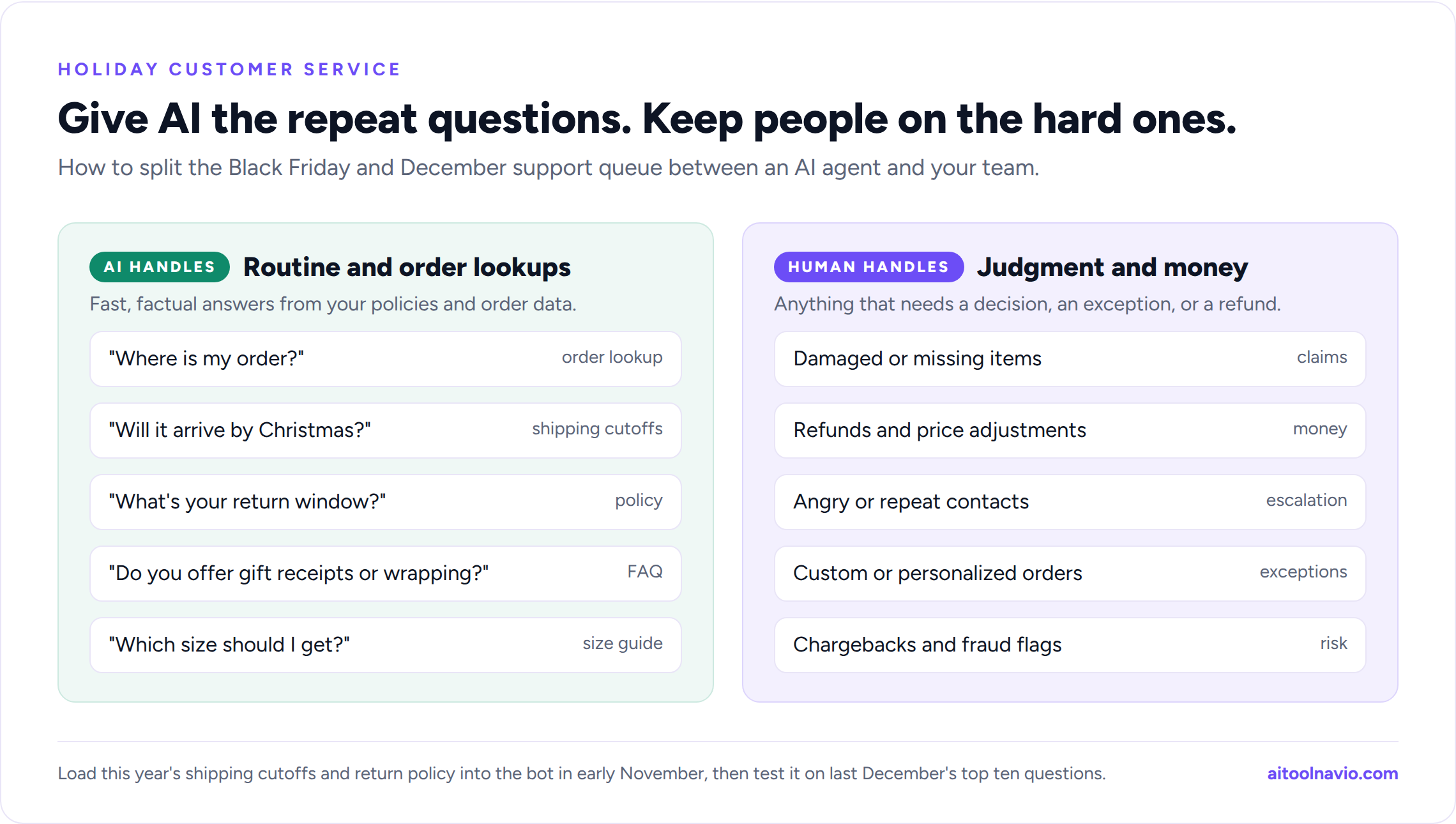
“Where is my order?” is the most common holiday support question, followed by returns, gift receipts, and “will this arrive by Christmas?” A good AI support tool answers these instantly, looks up the actual order, and hands the tricky ones to a person.
Gorgias
Gorgias is the help desk most Shopify brands use. It pulls email, chat, and social messages into one inbox, shows the customer’s orders next to each ticket, and its AI agent can resolve order-status, return, and product questions on its own.
Best for: Shopify stores with a real support volume. Free option: Free trial.
Lyro by Tidio
Lyro by Tidio is the small-shop pick. Point it at your FAQ and shipping policy, and it starts answering website chat questions in minutes. It connects to Shopify and WordPress.
Best for: small stores that want a chat bot this week. Free option: Yes, with a limited number of conversations.
Yuma
Yuma is an AI agent made for e-commerce support that works on top of help desks like Gorgias and Zendesk. It handles order tracking, address changes, cancellations, and returns end to end, which is exactly the January returns pile.
Best for: brands that already use a help desk and want more tickets fully automated. Free option: Free trial.
Zendesk
Zendesk suits larger teams that sell across several channels and need AI agents, routing, and reporting at scale.
Best for: larger sellers with a dedicated support team. Free option: Free trial.
Fin by Intercom
Fin by Intercom is a high-accuracy AI agent that answers from your help content and policies. It can run inside Intercom or on top of other help desks.
Best for: brands that care most about answer quality. Free option: Free trial.
Also worth a look: OctaneAI builds product quizzes, such as “Find the perfect gift for her,” that recommend products and grow your email list at the same time.
Train it before the rush: load your holiday shipping cutoffs, return window, and gift-receipt policy into the bot in early November, then test it with the ten questions you got most last December.
6. The all-purpose helpers
ChatGPT
ChatGPT handles the odd jobs: a gift guide outline, a promo calendar, analyzing last year’s sales export, or drafting a polite reply to an angry customer.
Best for: everything that doesn’t have a dedicated tool. Free option: Yes, with limits.
Claude
Claude is strong at long, careful writing and at working through spreadsheets and documents. Amazon sellers can now connect it to their Seller Central account to check inventory and update listings and prices, with approval before any change is made.
Best for: longer writing, data analysis, and Amazon sellers who want an assistant tied to their account. Free option: Yes, with limits.
Zapier
Zapier connects your store to everything else. Examples: post a Slack alert when a big order comes in, add a review request to a spreadsheet, or text you when stock on a bestseller drops below 20.
Best for: automating the handoffs between your tools. Free option: Yes.
Which tools fit which platform
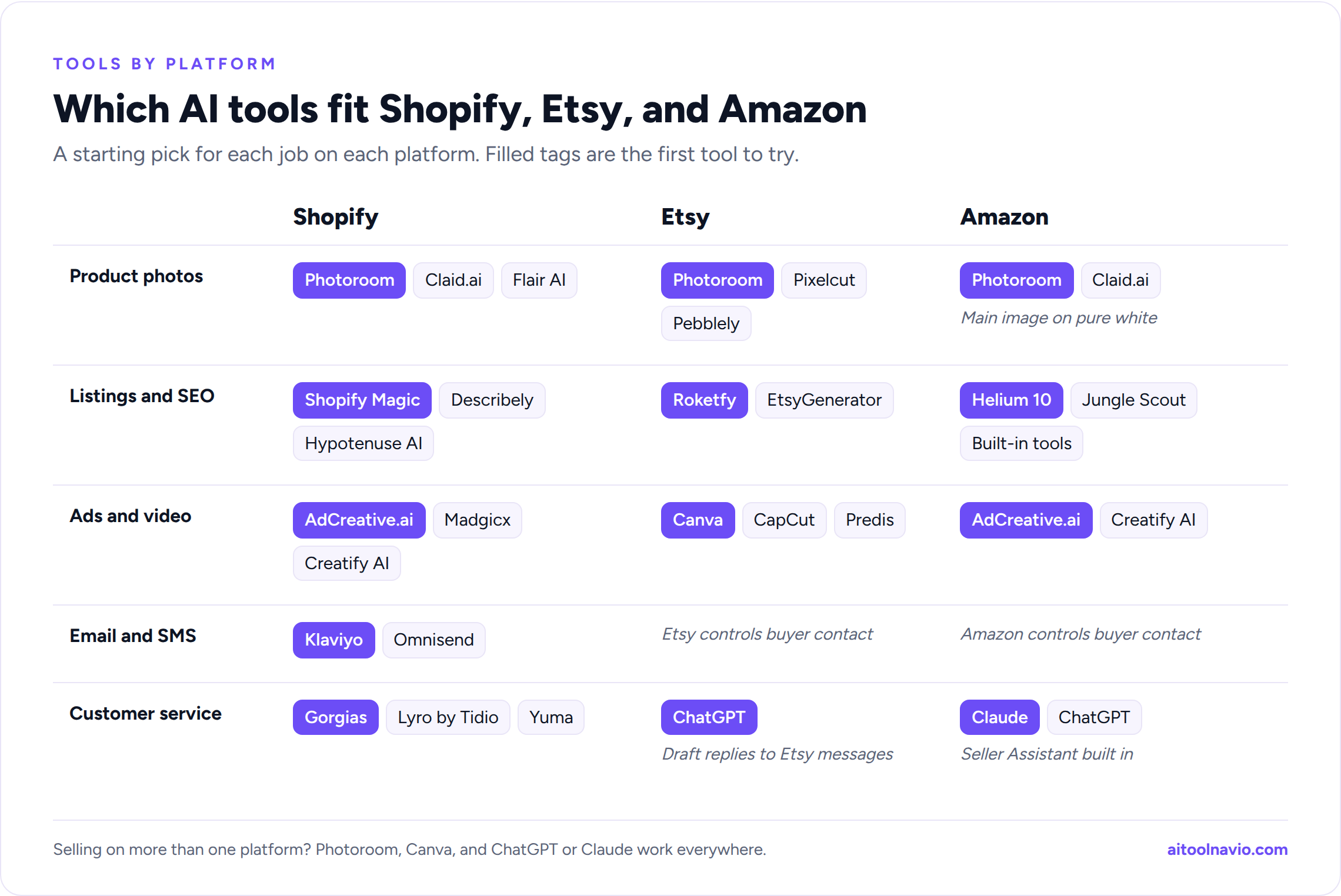
| Job | Shopify | Etsy | Amazon |
|---|---|---|---|
| Product photos | Photoroom, Claid.ai, Flair AI | Photoroom, Pixelcut, Pebblely | Photoroom, Claid.ai (main image on pure white) |
| Listings and SEO | Shopify Magic, Describely, Hypotenuse AI | Roketfy, EtsyGenerator | Helium 10, Jungle Scout, Amazon’s built-in tools |
| Ads and video | AdCreative.ai, Madgicx, Creatify AI | Canva, CapCut, Predis | AdCreative.ai, Creatify AI |
| Email and SMS | Klaviyo, Omnisend | Etsy controls buyer contact | Amazon controls buyer contact |
| Customer service | Gorgias, Lyro by Tidio, Yuma | ChatGPT to draft replies to Etsy messages | Claude, ChatGPT; Seller Assistant built in |
The first tool in bold is the one to try first. Etsy and Amazon control most customer contact, so email lists and support bots matter most if you also run your own Shopify store. Selling on more than one platform? Photoroom, Canva, and ChatGPT or Claude work everywhere.
Comparison table: all 28 tools at a glance
| Tool | Job | Best platform fit | Free option |
|---|---|---|---|
| Photoroom | Product photos | All | Yes |
| Pebblely | Lifestyle photos | All | Yes |
| Claid.ai | Catalog photos | Shopify, Amazon | Yes |
| Flair AI | Branded scenes | Shopify | Check listing |
| Pixelcut | Phone photo editing | Etsy | Yes |
| Shopify Magic | Listings and store help | Shopify | Included |
| Describely | Bulk descriptions | Shopify | Yes |
| Hypotenuse AI | Descriptions and content | Shopify | Yes |
| Helium 10 | Keywords and listings | Amazon | Yes |
| Jungle Scout | Research and listings | Amazon | Paid |
| Roketfy | Keywords and listings | Etsy | Check listing |
| EtsyGenerator | Titles, tags, descriptions | Etsy | Yes |
| AdCreative.ai | Ad creatives | All | Yes |
| Madgicx | Meta ad optimization | Shopify | Paid |
| Creatify AI | Video ads | All | Yes |
| Canva | Graphics | All | Yes |
| CapCut | Short video | All | Yes |
| Predis | Social posts | All | Trial |
| Klaviyo | Email and SMS | Shopify | Yes |
| Omnisend | Email and SMS | Shopify | Check listing |
| Gorgias | Help desk and AI agent | Shopify | Trial |
| Lyro by Tidio | Chat bot | Shopify | Yes |
| Yuma | Support automation | Shopify | Trial |
| Zendesk | Help desk at scale | All | Trial |
| Fin by Intercom | AI support agent | All | Trial |
| ChatGPT | All-purpose | All | Yes |
| Claude | All-purpose | All, Amazon account link | Yes |
| Zapier | Automation | All | Yes |
“Free option” reflects each tool’s plans at the time of writing. Check the listing for current pricing.
More options mentioned above: Remove.bg, CopyMonkey, SellerApp, Klaviyo SMS Assistant, OctaneAI.
Marketplace rules to know before you use AI
- Etsy: You can sell items made with AI tools, but Etsy requires you to say so in the listing description when an item was created using AI. AI-edited product photos should still show the item the buyer will actually receive.
- Amazon: AI-written listings must follow the same style and accuracy rules as any other listing, and the main image must be the real product on a pure white background. Review every AI suggestion before you accept it.
- Reviews: The Federal Trade Commission’s rule on fake reviews bans reviews written by people, or AI, who never used the product. Don’t use AI to write reviews for your own products, even as “examples.”
- Accuracy: If an AI tool writes “ships in 2 days” or “100% cotton,” you are the one making that claim. Check facts, sizes, and materials before publishing.
How to get ready without wasting money
- Start now, not in November. Give every new tool at least two weeks on real work before the rush.
- Use what you already pay for first. Shopify Magic, Sidekick, and Amazon’s built-in AI tools cost nothing extra.
- Fix your top 20 products first. Better photos and listings on your bestsellers beat small tweaks across the whole catalog.
- Test ads early. Run creative tests in early November, when costs are lower, and put your Black Friday budget behind the winners.
- Train the support bot on this year’s policies. Holiday cutoffs and return windows change every year.
- Keep a human on duty. Let AI handle order status and FAQs, but have someone check escalations every day from Thanksgiving through Cyber Monday.
Frequently asked questions
What is the best AI tool for Black Friday sellers? It depends on where your time goes. For most small sellers, the biggest wins are a photo tool like Photoroom and a listing tool that fits your platform: Shopify Magic for Shopify, Helium 10 for Amazon, or Roketfy for Etsy. Add Klaviyo and a support bot like Gorgias or Lyro if you run your own store.
Are there free AI tools for Etsy sellers? Yes. Pixelcut, Photoroom, Pebblely, EtsyGenerator, Canva, CapCut, and ChatGPT all have free plans. Browse more on our free AI tools page.
Does Amazon have its own AI listing tools? Yes. Seller Central includes AI tools that draft listings from a photo, a short description, or a product URL, suggest improvements to existing listings, and answer questions through Amazon’s Seller Assistant. Always review the suggestions before publishing.
Do I have to tell Etsy buyers I used AI? If the item itself was created using AI, Etsy requires you to disclose that in the listing description. Using AI to edit a photo of a real product or to polish your description is a different case, but the photo still has to show what the buyer gets.
Can an AI chat bot handle Black Friday customer service on its own? Not entirely. AI agents are good at order status, shipping times, and return policy questions, which is most of the volume. Keep a person checking escalations, damaged-item claims, and anything involving a refund.
Related reading
Liked this? We do one every Friday.
The week's new AI tools, what each one actually does, and the ones worth your time — written the same way as this post.
One email a week · unsubscribe in one click