The 27 Best Free AI Tools in 2026 (No Credit Card Required)
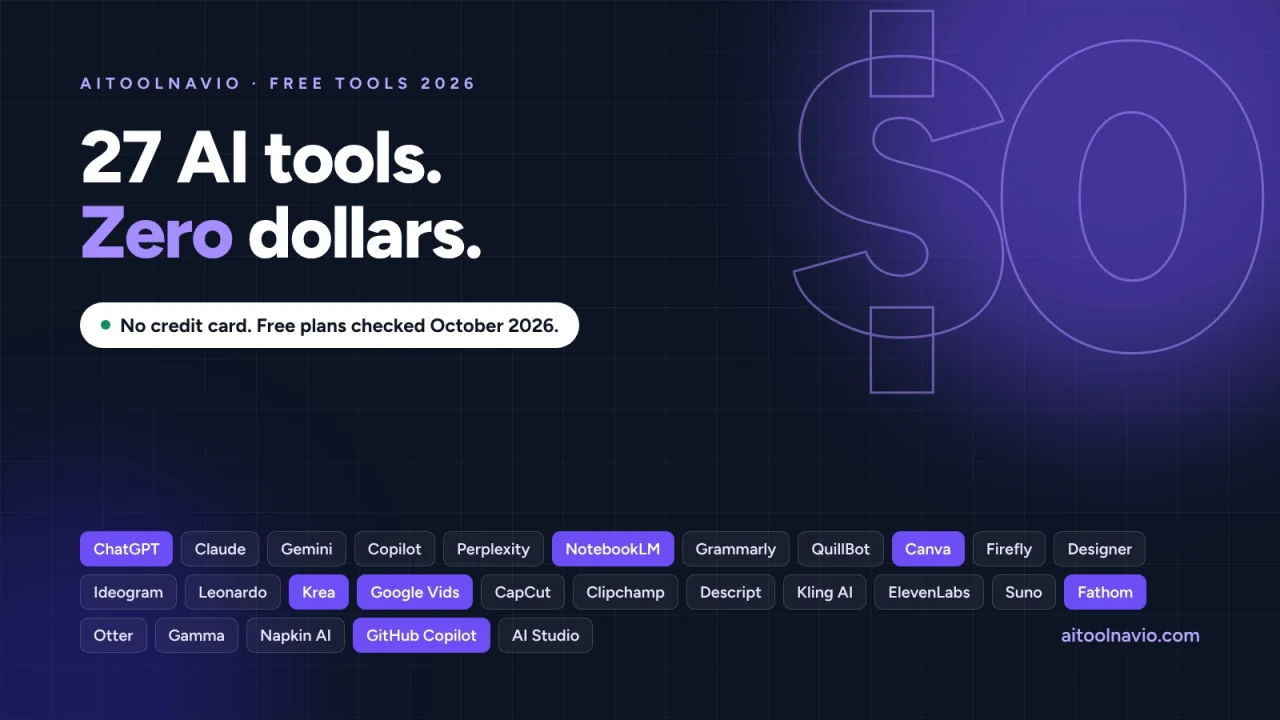
27 AI tools with a permanent free plan and no card to sign up, from ChatGPT and NotebookLM to Canva, Google Vids, and Fathom, with each plan's real limits.
You can do a surprising amount of real work in 2026 without paying for AI. The free plans of the big assistants now include web search, file uploads, and image generation. Google gives away video generation in Vids. GitHub gives away a coding assistant. A meeting notetaker will record and summarize every call you have for free.
The catch is that “free” means something different at every company. One tool refills your allowance every five hours, another every day, another once a month, and some give you a single batch of credits that never comes back. Some free plans let you use the output commercially and some forbid it. Some add a watermark. A few train on what you type unless you switch it off.
This list covers the 27 free AI tools we think are worth signing up for as of October 18, 2026, grouped by job, with the limit that matters for each one.
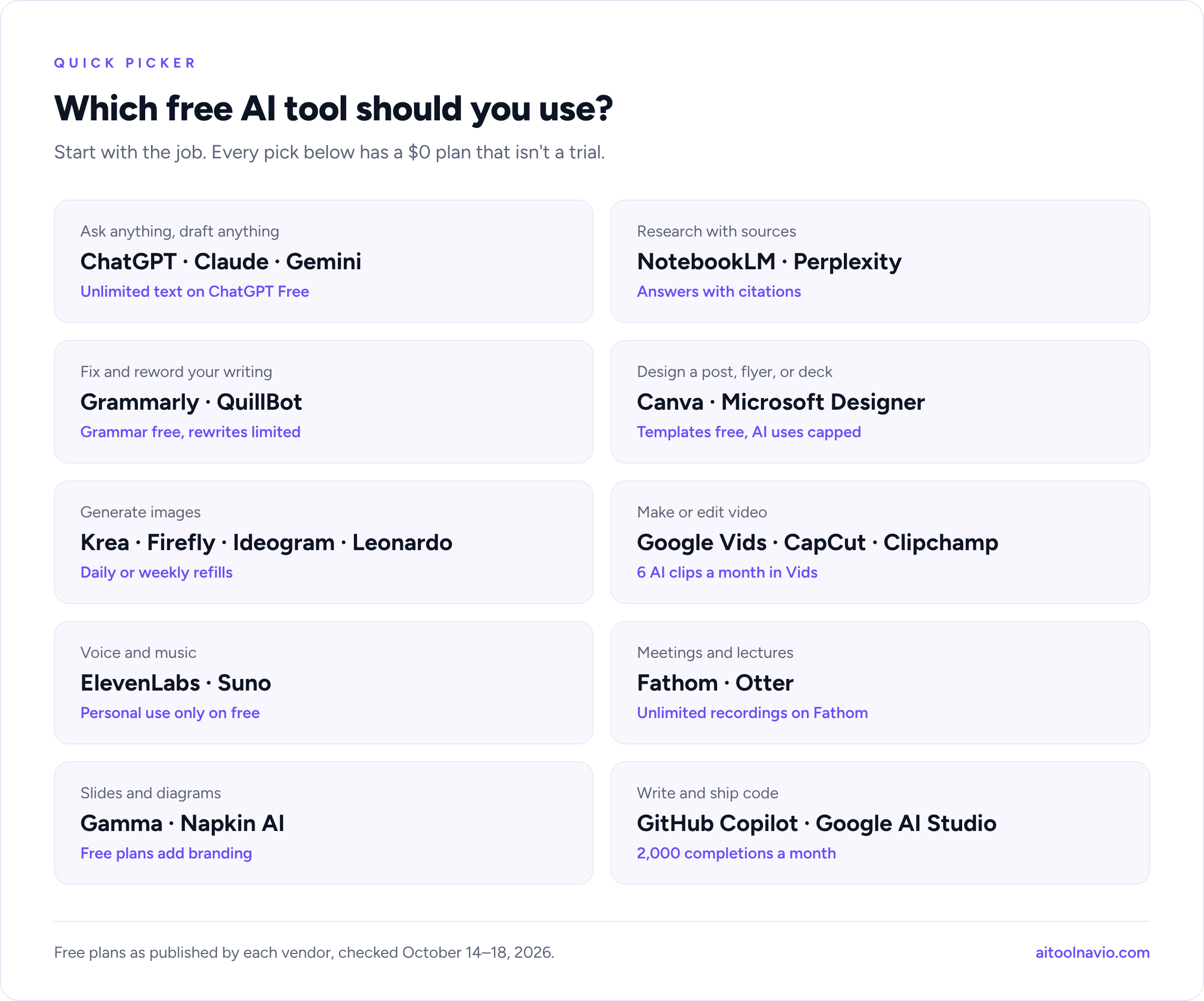
Quick picks:
- Best free AI assistant: ChatGPT, with Claude for writing and long documents
- Best free research tool: NotebookLM
- Best free design tool: Canva
- Best free image generator: Krea
- Best free video tools: Google Vids for AI clips, CapCut for editing
- Best free meeting notetaker: Fathom
- Best free coding assistant: GitHub Copilot Free
How we put this list together
This is a desk review of free plans, not a lab test. For each tool we read the vendor’s current pricing page, help center, and terms between October 14 and 18, 2026, and noted what the free plan includes, how its allowance refills, and what it forbids. Where a vendor doesn’t publish a number, we say so rather than repeat a figure from a third-party blog.
A tool made the list if it passed four checks:
- A real free plan, not a trial. Every tool here has a $0 plan that doesn’t expire after 7 or 14 days.
- No payment details to start. You sign up with an email address or a Google, Apple, or Microsoft account. Claude, Perplexity, Descript, Gamma, Krea, GitHub Copilot, and Google AI Studio say in writing that the free plan needs no card or billing account. The rest list the free plan as a $0 tier without stating it either way. If a sign-up screen ever asks for a card, you’re starting a paid trial, not the free plan.
- Useful on its own. The free plan has to finish a real task, not just show you a demo.
- Available to a US user today.
What this list is not: a price sheet for paid plans, and not a promise that limits will stay put. Free tiers are the first thing companies change. Canva cut its free AI allowance in September and Gemini changed which model free users get on October 9. Treat every number below as a snapshot from mid-October 2026.
What changed for free AI plans in 2026
- ChatGPT got ads, and more free text. OpenAI started testing ads for logged-in adult US users on the free plan in January. Its pricing page now promises unlimited free text chats, within abuse limits.
- Google made AI video free. Since September 23, anyone with a Google account can generate video clips with Gemini Omni in Google Vids, with a monthly cap.
- Some free allowances shrank. Canva’s free plan now includes up to 20 AI uses a month, down from a larger allowance before mid-September. Gemini’s free plan now sends most prompts to its lightest model (Flash-Lite) by default.
- Coding tools moved to usage-based billing. GitHub moved all Copilot plans to usage-based billing on June 1. Cursor replaced its free Hobby plan for new users on October 12.
- A favorite is closing. remove.bg’s standalone website shuts down on December 1, 2026, as background removal moves into Canva.
Free AI chatbots and research tools
1. ChatGPT: best free AI assistant
The free plan of ChatGPT is the most capable general assistant you can use without paying. OpenAI’s pricing page says it now includes unlimited text chats, subject to abuse guardrails, plus limited file uploads, image creation, voice, deep research, and memory.
Best for: everyday questions, drafting, brainstorming, and a bit of everything. Watch out for: ads may appear on the free plan in the US. The free context window is small (about 12 pages), so it forgets the start of long documents. Check the data controls in Settings if you don’t want your chats used to improve models.
2. Claude: best free assistant for writing and documents
Claude Free runs Anthropic’s Sonnet and Haiku models and includes web search, file creation, code execution, memory, voice mode, and up to five Projects. Usage resets on a rolling five-hour window rather than a fixed message count. Anthropic says chats are used for training only if you allow it.
Best for: careful writing, editing, and working through long files. Watch out for: heavy sessions hit the five-hour limit, and the top Opus model isn’t on the free plan.
3. Gemini: best free assistant inside Google’s apps
The free Gemini app includes image generation and editing, Deep Research, Gemini Live voice chat, Canvas, and Gems. Usage refreshes every five hours, with a weekly cap. Since October 9, free users default to “Auto,” which sends most prompts to the lightweight Flash-Lite model and routes harder ones to stronger models.
Best for: people who live in Gmail, Docs, and Drive. Watch out for: with Keep Activity on, Google can use your chats to train models and human reviewers may read a sample.
4. Microsoft Copilot: best free assistant on Windows
Microsoft Copilot is free with or without a Microsoft account, though some features need you to sign in. The free version includes chat, web answers with sources, image creation, voice in supported markets, Vision, and memory. Microsoft doesn’t publish its free limits or which models it uses.
Best for: quick answers and images without leaving Windows or Edge. Watch out for: limits aren’t published, so you find them when you hit them.
5. Perplexity: best free AI search engine
Perplexity answers questions with cited sources. The free plan includes what it calls “practically unlimited” basic searches, 3 Pro Searches a day, and 1 Research query a month. Perplexity picks the model for you.
Best for: fact-finding where you want to see the sources. Watch out for: AI data retention is on by default for free users, so your searches may be used for training. Turn it off in your account preferences.
6. NotebookLM: best free research tool
NotebookLM answers questions only from sources you upload: PDFs, docs, web pages, videos. Its answers cite the passage they came from, so it’s far less likely to invent things than a general chatbot. The free plan allows 100 notebooks with 50 sources each, and includes Audio Overviews, the podcast-style summaries that made it famous.
Best for: students, researchers, and anyone studying a pile of documents. Watch out for: Google doesn’t publish the daily and monthly free quotas for chats and overviews.
Free AI writing tools
7. Grammarly: best free writing checker
Grammarly Free fixes spelling and grammar wherever you type and shows how your tone comes across. It also includes 100 AI prompts a month for drafting and rewriting.
Best for: emails, applications, and anything where a typo costs you. Watch out for: full-sentence rewrites, tone changes, plagiarism checks, and AI detection are paid features.
8. QuillBot: best free paraphraser and summarizer
QuillBot Free rewrites up to 100 words at a time in two modes and summarizes up to 1,200 words. It also includes basic grammar fixes and limited use of its AI chat and AI detector.
Best for: rewording a paragraph or boiling down an article. Watch out for: the 100-word cap means paraphrasing anything long is slow.
Free AI image and design tools
9. Canva: best free design tool
Canva Free gives you more than a million templates, millions of stock photos and graphics, 5 GB of storage, and one Brand Kit. Its AI features draw from a shared free pool of up to 20 uses a month.
Best for: social posts, flyers, presentations, and anything that needs to look designed. Watch out for: the AI allowance dropped in September, and complex AI tasks use more than one of your 20 uses.
10. Adobe Firefly: best free image generator for commercial work
Adobe Firefly now gives free users daily generations across image, video, and audio, refreshing every day. Its free model lineup includes Adobe’s own Firefly models and partner models such as Nano Banana. Adobe designs its own Firefly models to be commercially safe.
Best for: marketing images where you care where the training data came from. Watch out for: Adobe doesn’t publish the daily free limit, and the commercial-safety promise covers Adobe’s own models, not every partner model on the platform.
11. Microsoft Designer: best free image tool for quick graphics
Microsoft Designer is free with a Microsoft account. You get a fresh batch of AI credits each month (one credit per AI action), plus free editing tools for background removal, cropping, text, and resizing.
Best for: fast social graphics, invitations, and stickers. Watch out for: Microsoft doesn’t publish the monthly credit count. More credits require Microsoft 365 Personal or Family.
12. Ideogram: best free image generator for text in images
Ideogram is known for getting lettering right: posters, logos, and thumbnails with readable words. Free accounts get weekly credits in the slow queue when they sign in with Google, Apple, or Microsoft.
Best for: anything where the words in the image have to be spelled correctly. Watch out for: free images are public by default, and private generation is a paid feature. Ideogram says the free credit amount “may vary.”
13. Leonardo: best free image generator for daily volume
Leonardo gives free users 150 fast tokens a day, reset daily, with access to its own and third-party models.
Best for: making lots of images and iterating on a style. Watch out for: free images are public. You can use them commercially, but Leonardo keeps the right to use and distribute them too.
14. Krea: best free image generator overall
Krea has the clearest and most generous free plan on this list: 100 compute units a day, which Krea says is enough for about 50 fast images, a couple of short videos, upscales to 2K, and one custom style (LoRA) training. Krea states that generated content can be used commercially and that no credit card is needed.
Best for: high-volume image work and trying many models in one place. Watch out for: you can run only one image job at a time, and the best models cost far more units than the fast ones.
Free AI video tools
15. Google Vids: best free AI video generator
Google Vids made top-tier AI video free on September 23, 2026: anyone with a Google account can generate clips with Gemini Omni at vids.new. Personal accounts get 6 AI video clips a month (shared with AI avatars) plus 50 credits a month for other AI features, such as Help me create and AI voiceovers.
Best for: trying the best text-to-video model available without paying. Watch out for: it works on desktop only, many AI features are English-only, and every clip carries Google’s invisible SynthID watermark.
16. CapCut: best free video editor with AI
CapCut is the go-to free editor for short-form video, with auto captions, templates, and effects. The free plan covers basic editing and free templates.
Best for: TikToks, Reels, and Shorts. Watch out for: using any Pro-badged effect, font, template, or AI tool in a project means you need Pro to export it without a watermark. 4K and 60fps exports are locked on desktop. Check for the Pro badge before you build an edit around something.
17. Clipchamp: best free video editor with no watermark
Microsoft’s Clipchamp exports unlimited videos at up to 1080p with no watermark on the free plan. Free AI features include auto subtitles, AI voiceovers, and silence removal, plus screen and webcam recording and free stock media.
Best for: clean tutorials, explainers, and school or work videos. Watch out for: 4K export, premium stock, and the brand kit come with a Microsoft 365 subscription.
18. Descript: best free editor for podcasts and talking-head video
Descript lets you edit audio and video by editing the transcript. The free plan includes 60 media minutes a month, 100 one-time AI credits, 720p export, 5 GB of storage, and transcription in 25 languages. Descript says no card is needed.
Best for: cutting podcasts, interviews, and screen recordings. Watch out for: free exports are watermarked, and the 100 AI credits don’t refill.
19. Kling AI: best free AI video generator for daily practice
Kling AI has given logged-in users free credits every day since launch, enough to experiment with its video models. Kling’s own help pages confirm that free exports generally carry a watermark.
Best for: learning to prompt AI video without spending credits you paid for. Watch out for: Kling’s terms bar commercial use of output without its written permission, and Kling doesn’t publish the current daily credit amount on a page we could verify.
Free AI audio tools
20. ElevenLabs: best free AI voice generator
ElevenLabs Free includes 10,000 credits a month across text to speech, speech to text, sound effects, voice design, and music, plus three Studio projects.
Best for: natural voiceovers for personal projects and prototypes. Watch out for: the free plan has no commercial license, and anything you publish must credit ElevenLabs in the title.
21. Suno: best free AI music generator
Suno gives free users 50 credits a day on its best free model, with no rollover.
Best for: fun, demos, and hearing an idea fast. Watch out for: the free plan carries no commercial rights, Suno keeps ownership of songs made on it, and its pricing page now lists no monthly song downloads for free users.
Free AI tools for meetings and presentations
22. Fathom: best free AI meeting notetaker
Fathom is free forever with unlimited recordings and transcriptions and instant AI summaries of your video calls. You can record with a bot or, in beta, without one.
Best for: anyone who takes calls and hates writing notes. Watch out for: asking questions across your calls and some AI features are marked “limited use” on the free plan, and Fathom doesn’t define the limit.
23. Otter: best free live transcription
Otter Basic includes 300 transcription minutes a month, up to 30 minutes per conversation, live transcription in Zoom, Teams, and Meet, and 20 AI chat questions.
Best for: lectures, interviews, and short meetings. Watch out for: the 30-minute cap per conversation, only 3 file imports for the life of the account, and only your 25 most recent conversations are kept.
24. Gamma: best free AI presentation maker
Gamma turns a prompt or an outline into a slide deck, document, or web page. New accounts get 400 credits once, up to 10 slides per prompt, and export to PDF, PowerPoint, and Google Slides. Gamma says no credit card is required.
Best for: a first draft of a deck in minutes. Watch out for: the 400 credits don’t refresh (you can earn more by referring people), and free decks carry Gamma branding.
25. Napkin AI: best free tool for turning text into diagrams
Napkin AI reads your text and turns it into diagrams, flowcharts, and infographics you can edit. The free plan includes 500 AI credits a week (about one credit per word you select) and unlimited PNG and PDF exports.
Best for: slides, reports, and posts that need a visual. Watch out for: free visuals carry Napkin branding, and SVG and PowerPoint export are paid.
Free AI coding tools
26. GitHub Copilot Free: best free coding assistant
GitHub Copilot Free includes up to 2,000 code completions a month in VS Code and other editors, plus limited chat and agent use with automatic model selection. GitHub says no subscription or payment is required.
Best for: students and hobby developers. Watch out for: the free plan is for personal use only, and GitHub changed Copilot billing in June, so check current chat limits in your account.
27. Google AI Studio: best free way to build with AI models
Google AI Studio lets you try Google’s Gemini models in the browser and get a free API key for building your own apps. Free use covers Gemini’s Flash and Flash-Lite models, live and text-to-speech models, and more, with no billing account needed.
Best for: developers prototyping AI features before paying for anything. Watch out for: on the free tier, Google uses your inputs and outputs to improve its products and human reviewers may read them, so don’t send sensitive data. Pro, image, and video models aren’t free, and you must be 18 or older.
All 27 free AI tools at a glance
| # | Tool | Job | Free allowance | Biggest free-plan limit |
|---|---|---|---|---|
| 1 | ChatGPT | Assistant | Unlimited text chats; other features limited | Ads may appear; small context window |
| 2 | Claude | Assistant | Rolling 5-hour usage window | No Opus model |
| 3 | Gemini | Assistant | Refreshes every 5 hours, weekly cap | Mostly Flash-Lite by default |
| 4 | Microsoft Copilot | Assistant | Not published | Limits not stated |
| 5 | Perplexity | AI search | 3 Pro Searches a day, 1 Research a month | Data retention on by default |
| 6 | NotebookLM | Research | 100 notebooks, 50 sources each | Daily quotas not published |
| 7 | Grammarly | Writing | 100 AI prompts a month | No rewrites or tone changes |
| 8 | QuillBot | Writing | 100 words per paraphrase | Short inputs |
| 9 | Canva | Design | Up to 20 AI uses a month | Small AI pool |
| 10 | Adobe Firefly | Images | Daily generations | Daily limit not published |
| 11 | Microsoft Designer | Images | Monthly credits | Credit count not published |
| 12 | Ideogram | Images | Weekly slow-queue credits | Images public by default |
| 13 | Leonardo | Images | 150 tokens a day | Images public |
| 14 | Krea | Images, video | 100 compute units a day | One image job at a time |
| 15 | Google Vids | AI video | 6 clips a month | Desktop only |
| 16 | CapCut | Video editing | Basic editing, free templates | Pro features force a paid export |
| 17 | Clipchamp | Video editing | Unlimited 1080p exports | No 4K |
| 18 | Descript | Audio/video editing | 60 media minutes a month | Watermarked exports |
| 19 | Kling AI | AI video | Daily credits | Watermark; no commercial use |
| 20 | ElevenLabs | Voice | 10,000 credits a month | No commercial use; attribution |
| 21 | Suno | Music | 50 credits a day | No commercial rights |
| 22 | Fathom | Meetings | Unlimited recordings | Some AI features limited |
| 23 | Otter | Transcription | 300 minutes a month | 30 minutes per conversation |
| 24 | Gamma | Presentations | 400 credits, once | Credits don’t refresh |
| 25 | Napkin AI | Diagrams | 500 credits a week | Napkin branding |
| 26 | GitHub Copilot | Coding | 2,000 completions a month | Personal use only |
| 27 | Google AI Studio | Building with AI | Free Flash and Flash-Lite models | Inputs may be reviewed by humans |
When does your free allowance come back?
The single most useful thing to know about a free plan is how it refills. A tool with a small daily allowance is often more useful than one with a big monthly allowance, because a bad day doesn’t lock you out for weeks.
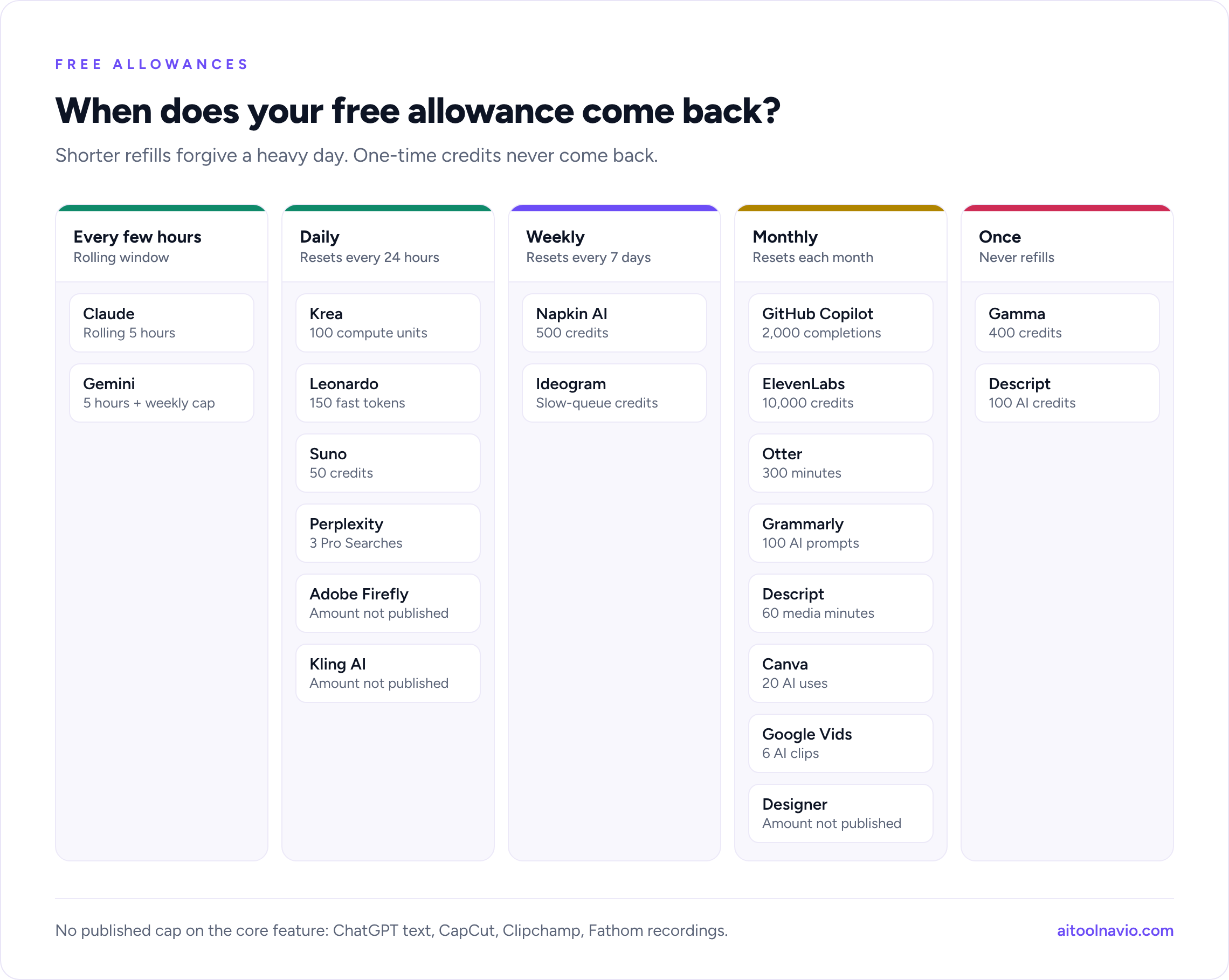
| Refills | Tools |
|---|---|
| Every few hours | Claude (rolling 5 hours), Gemini (every 5 hours, plus a weekly cap) |
| Daily | Adobe Firefly, Leonardo, Krea, Kling AI, Suno, Perplexity Pro Searches |
| Weekly | Ideogram, Napkin AI |
| Monthly | Canva, Microsoft Designer, Grammarly, Google Vids, Descript, ElevenLabs, Otter, GitHub Copilot |
| Once, never refills | Gamma (400 credits), Descript AI credits (100) |
| No published cap on the core feature | ChatGPT text, CapCut, Clipchamp, Fathom recordings |
The fine print: what free plans don’t let you do
Before you build a business process or a client deliverable on a free plan, check three things: whether you can use the output commercially, whether it carries a watermark or branding, and whether the tool trains on what you give it.
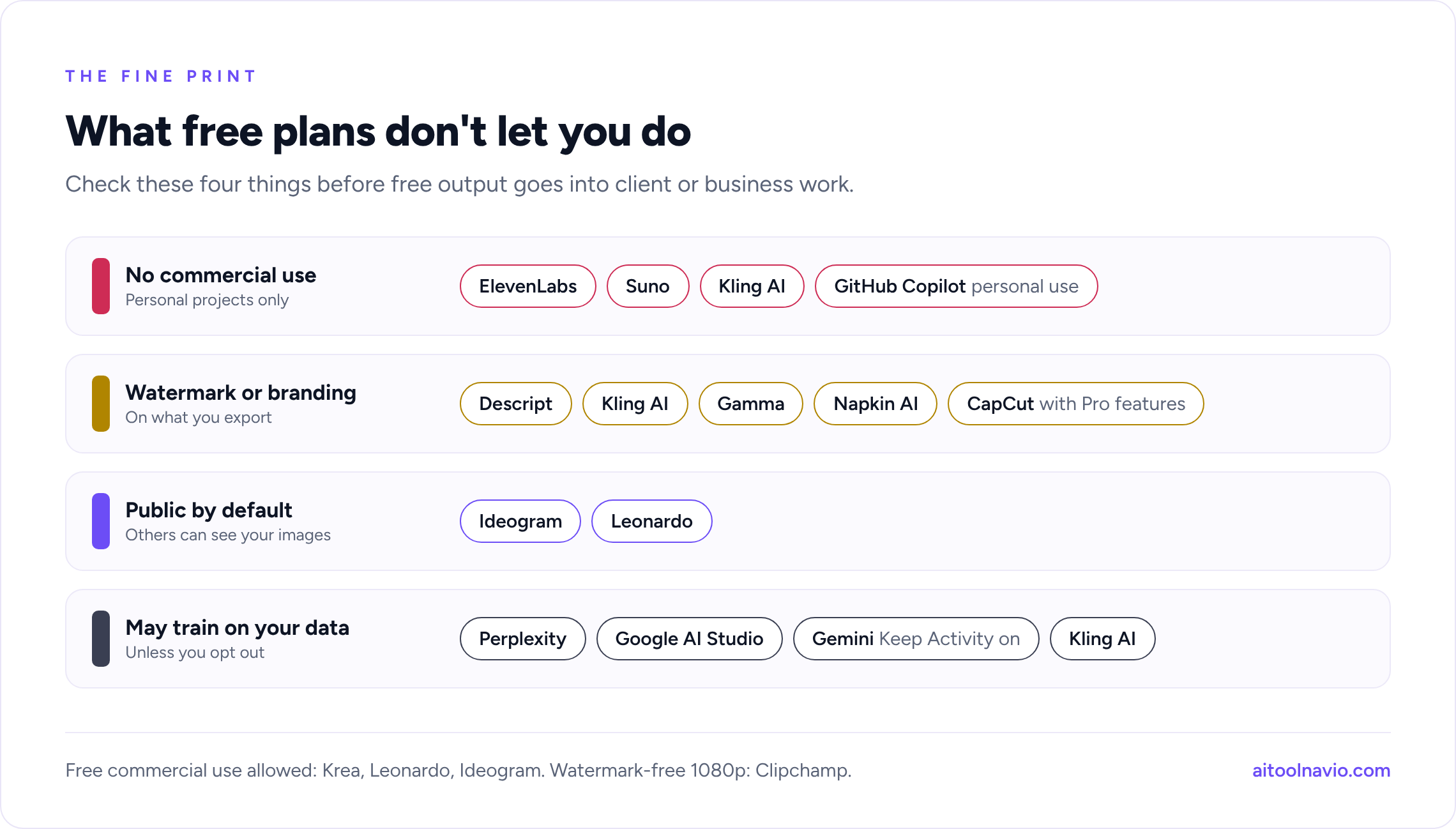
| Restriction on the free plan | Tools |
|---|---|
| No commercial use | ElevenLabs, Suno, Kling AI, GitHub Copilot (personal use only) |
| Watermark or branding on output | Descript, Kling AI, Gamma, Napkin AI, CapCut (when Pro features are used) |
| Outputs public by default | Ideogram, Leonardo |
| May train on your data by default | Perplexity, Google AI Studio, Gemini (with Keep Activity on), Kling AI |
Most assistants let you opt out of training in their settings. If you work with client or company data, use a paid business plan instead of a free personal account.
Free AI tools that didn’t make the list
- remove.bg: still free for low-resolution downloads, but its standalone website closes on December 1, 2026, as the service moves into Canva.
- Photoroom: a strong free background remover and photo editor, but its free plan is for personal, non-commercial use only and is capped at 25 exports a week.
- Cursor: its free Hobby plan is now closed to new users. Since October 12, new users start on a free tier bundled with an X subscription, and Cursor hasn’t published its limits.
- Hailuo AI: its free credits may have changed from daily to one-time, and we couldn’t confirm the current rules from Hailuo itself.
- Midjourney: still has no free plan.
How to get the most from free AI plans
- Stack tools, don’t upgrade one. A free assistant, a free research tool, a free design tool, and a free notetaker cover most daily work. Pay only when one of them becomes the bottleneck.
- Match the refill to your habit. If you work in bursts, prefer daily or rolling allowances. If you work steadily, monthly allowances are fine.
- Use each tool for what its free plan does best. Use Krea or Leonardo for volume, Firefly when commercial safety matters, and Ideogram when the image has words in it.
- Turn off training where you can. Check data settings in ChatGPT, Gemini, Perplexity, and Vibe (Mistral’s assistant, formerly Le Chat) on day one.
- Read the export rules before you start a project. In CapCut, Descript, and Gamma, the watermark question is answered at export time, after you’ve done the work.
- Never give a card to a “free” plan. A card at sign-up means a trial that bills when it ends.
Frequently asked questions
What is the best free AI tool in 2026? For most people it’s ChatGPT’s free plan, which now includes unlimited text chats plus limited image generation, voice, and file uploads. Pair it with NotebookLM for research and Canva for design and you cover most everyday tasks for $0.
Are these AI tools really free, with no credit card? Yes. Each one has a permanent $0 plan you can start with an email address or a Google, Apple, or Microsoft account. Seven of them (Claude, Perplexity, Descript, Gamma, Krea, GitHub Copilot, and Google AI Studio) say in writing that no card or billing account is needed. If a sign-up form asks for a card, you’re starting a paid trial instead.
What is the best free AI image generator? Krea has the most generous and clearly stated free plan, at 100 compute units a day with commercial use allowed. Adobe Firefly is the safer pick for commercial work with Adobe’s own models, and Ideogram is best when your image needs readable text.
Is there a free AI video generator? Yes. Google Vids lets anyone with a Google account generate up to 6 Gemini Omni clips a month for free on desktop. Kling AI and Krea also have daily free allowances. See our best AI video generators guide for a full comparison.
Can I use free AI tools for commercial work? Sometimes. ElevenLabs, Suno, and Kling AI forbid commercial use on their free plans, and GitHub Copilot Free is for personal use only. Krea and Leonardo allow commercial use of free outputs. Always check the terms of the tool you used before putting the output in a product or ad.
Do free AI tools use my data for training? Some do by default. Perplexity, Google AI Studio’s free tier, and Kling may use what you give them, and Gemini does when Keep Activity is on. Claude uses chats for training only if you allow it. Most tools let you opt out in settings.
Related reading
- The 100 Best AI Tools in 2026
- AI Tool Pricing Explained
- ChatGPT vs Claude vs Gemini
- The 18 Best AI Image Generators in 2026
- The Best AI Video Generators in 2026
- Browse all free AI tools
- Compare AI Tools Side by Side
Sources
Free-plan details were taken from each company’s own pricing pages, help centers, and terms, read October 14 to 18, 2026, and from each tool’s Aitoolnavio listing: OpenAI (ChatGPT pricing and free tier FAQ; January 2026 advertising announcement), Anthropic (Claude pricing and privacy center), Google (Gemini subscriptions and help center; NotebookLM help; Google Vids and Gemini Omni announcement, September 2026; Gemini API pricing, billing, and terms), Microsoft (Copilot for individuals; Designer and AI credits support; Clipchamp pricing), Perplexity (help center), Grammarly (plans), QuillBot (premium plans), Canva (pricing), Adobe (Firefly plans and FAQ), Ideogram (pricing and FAQ), Leonardo (pricing), Krea (pricing), CapCut (pricing and export help), Descript (pricing), Kling AI (help center, user policy, and launch announcement), ElevenLabs (pricing and help center), Suno (pricing and help center), Fathom (pricing), Otter (pricing), Gamma (pricing and help center), Napkin AI (pricing and help center), GitHub (Copilot plans, docs, and April 2026 changelog), Cursor (pricing and docs), remove.bg (site notice), Photoroom (help center), and Mistral (pricing and help center). Reporting from Engadget, Billboard, and The Decoder, and the pricing tracker PricingSaaS, informed the notes on 2026 changes.
Liked this? We do one every Friday.
The week's new AI tools, what each one actually does, and the ones worth your time — written the same way as this post.
One email a week · unsubscribe in one click