The Best AI Video Generators in 2026: Text-to-Video Compared
Gemini Omni, Kling 3.0, Seedance, Runway, Firefly, and more compared by quality, clip length, sound, and where US creators can actually use them in 2026.
A year ago, the question was which AI video generator could make a clip that didn’t look like a fever dream. In 2026 the question is different. Most of the leading models now produce sharp, stable footage with sound baked in. What separates them is how long a single shot can run, how well a character stays the same person from shot to shot, whether you can edit a clip by describing the change, and where you’re allowed to use the tool at all.
The field also moved fast this year. OpenAI shut down the Sora app in April. Google launched a new model family, Gemini Omni, in May and made it free inside Google Vids in September. ByteDance, Alibaba, and MiniMax all shipped models this summer that generate 15 to 30 seconds in one go.
This guide compares the text-to-video generators worth your time as of late September 2026, with a clear recommendation for each kind of work.
Quick picks:
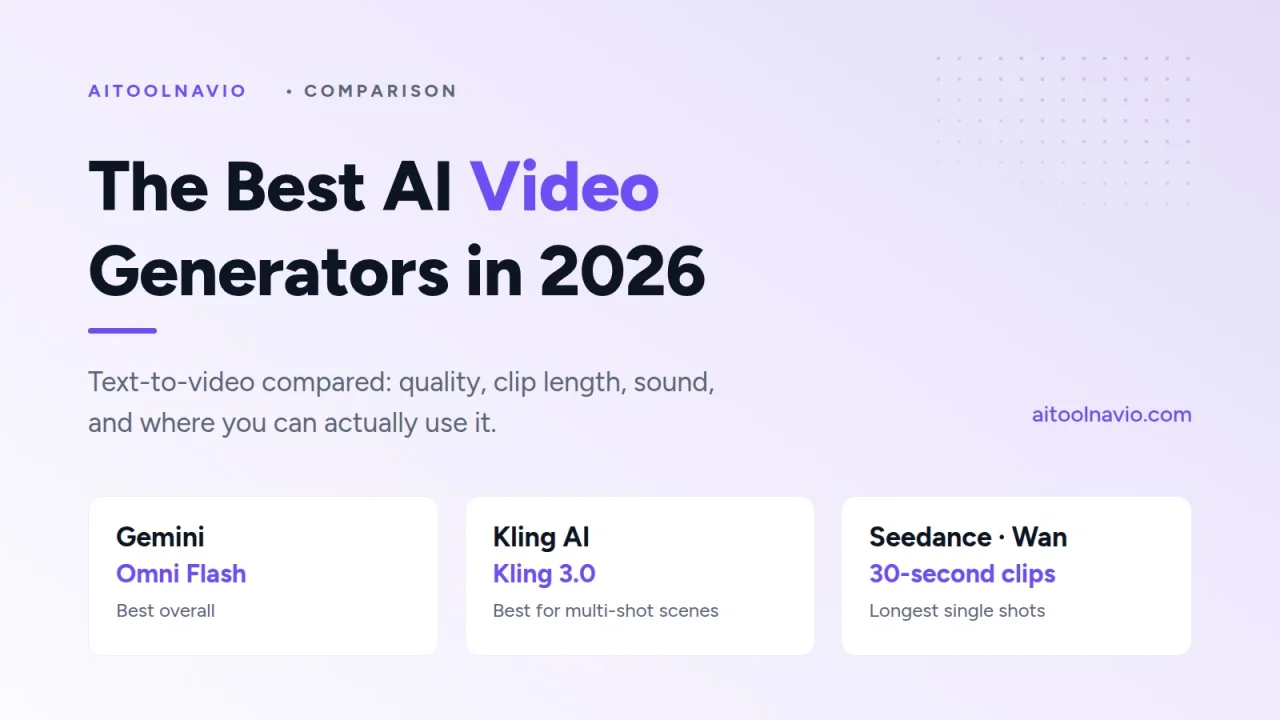
- Best overall: Gemini with Gemini Omni Flash, also inside Google Flow
- Best for multi-shot scenes and dialogue: KLING AI (Kling 3.0)
- Best for longer single shots: Dreamina (Seedance) and Wan 3.0
- Best for editors and production teams: Runway
- Best for commercial-safe work: Adobe Firefly
- Best free way to start: Gemini Omni in Google Vids, which only needs a Google account
- Best open model you can run yourself: LTX Studio (LTX-2)
How we put this comparison together
This is a desk comparison, not a lab benchmark. We read each vendor’s release notes and documentation, checked where each model is actually available to a US user today, and looked at how the models place on public side-by-side leaderboards, where people vote blind between two clips made from the same prompt. We weighed five things:
- Output quality: realism, motion, and how often a clip is usable on the first try.
- Control: reference images, character consistency, multi-shot storyboards, and editing an existing clip.
- Length and sound: how many seconds a single generation can run, and whether it produces synchronized audio.
- Access: whether a US creator can use it today, on what plan, and in which app.
- Commercial use: how clear the terms are for putting the output in ads and client work.
What this guide is not: a price sheet. Video generation is sold in credits that change often and cost different amounts per model, resolution, and length, so we don’t quote dollar amounts. Check each tool’s listing for current plans. If “credits” and “freemium” blur together, AI Tool Pricing Explained walks through it.
Specs below are the vendors’ own stated limits as of September 29, 2026. Models in this category update every few months, so treat any number here as a snapshot.
What changed in 2026
Four shifts define AI video this year:
- Sound is standard. Most leading models now generate dialogue, sound effects, and ambience in the same pass as the picture. A silent clip is now the exception.
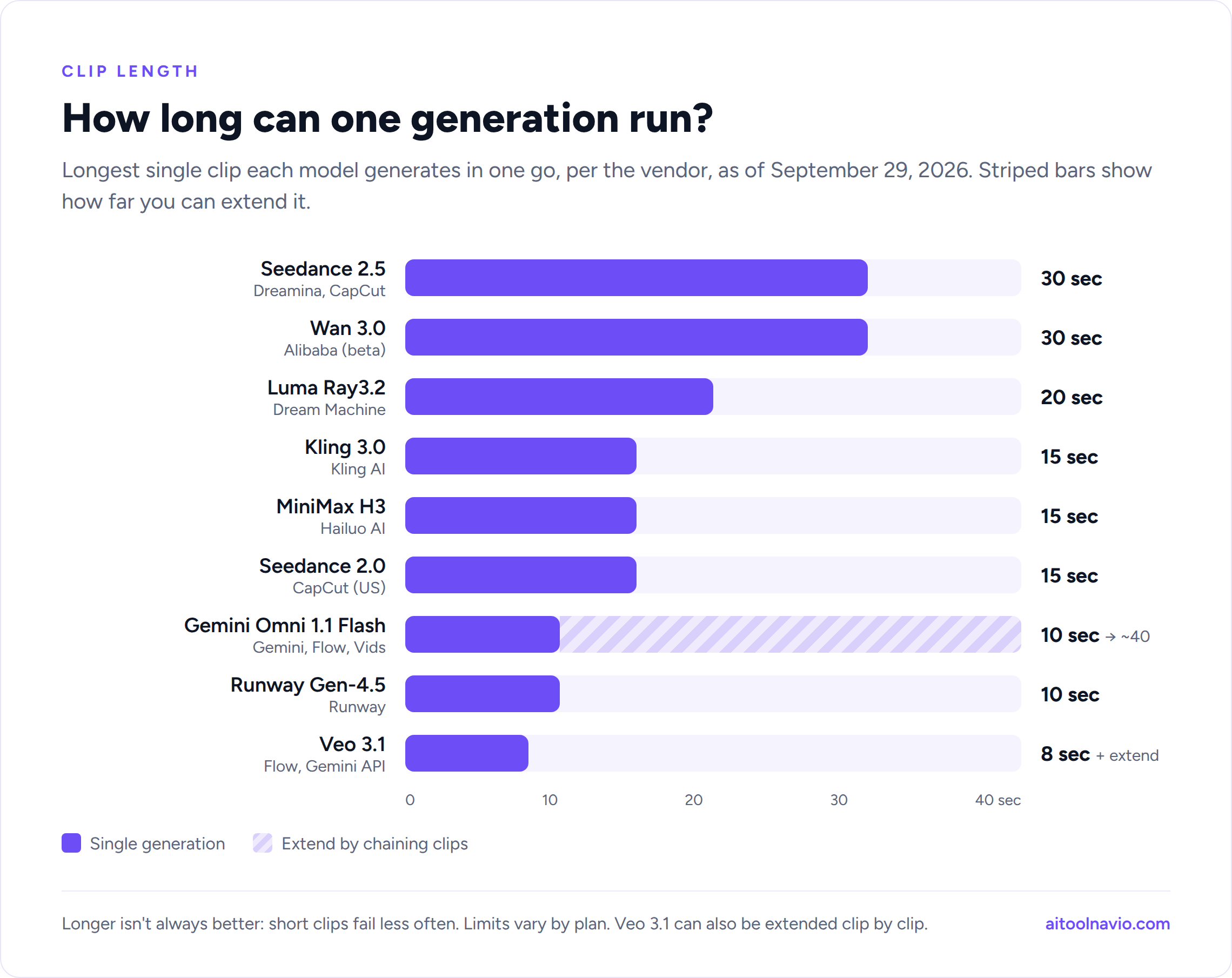
- Clips got longer. The ceiling for a single generation moved from 5 to 10 seconds to 15 to 30 seconds, and several tools let you extend a shot further.
- “Omni” models took over. Google, Kling, and MiniMax all moved to single models that accept text, images, video, and audio together, so you can say “use the camera move from this clip with the character from this photo.”
- Sora is gone. OpenAI closed the Sora app and website on April 26, 2026, and reports put the end of its API at September 24, 2026. If a guide still lists Sora as a top pick, it’s out of date. More on that below.
1. Gemini Omni Flash (Gemini, Flow, Google Vids): best overall
Google announced Gemini Omni at I/O on May 19, 2026, and released version 1.1 Flash in late August. It’s the model to beat right now. On blind side-by-side leaderboards it sits clearly ahead of Google’s own Veo 3.1, and its physics are noticeably better: water pours, fabric falls, and objects have weight.
What makes it different is editing by conversation. You generate a clip, then ask for changes (“make it dusk,” “have her turn toward the camera”) and it revises the video while keeping the character and scene consistent. It accepts several reference images and named characters, generates synchronized audio, and outputs up to 4K.
Where you can use it:
- Gemini app, on Google AI Plus, Pro, and Ultra plans.
- Google Flow, Google’s filmmaking workspace, for building scenes shot by shot.
- Google Vids, free for anyone with a Google account since September 23, 2026 (desktop only), with 1080p output and clips you can build up to about 40 seconds.
- YouTube Shorts and the YouTube Create app, for quick vertical clips.
Best for: anyone who wants the highest quality with the least fuss, and anyone who wants to try top-tier AI video without paying first. Watch out for: a single generation is still short (up to about 10 seconds), and higher limits need a paid Google AI or Workspace plan. Every clip carries Google’s invisible SynthID watermark.
Veo 3.1
Veo 3.1, released in November 2025, is still available in Flow and the Gemini API. It makes 4- to 8-second clips with sound and has an Extend feature for continuing a finished clip into a longer scene. Omni has overtaken it on quality, but Veo remains a reasonable budget choice for long, continuous shots built from many extensions.
2. Kling 3.0: best for multi-shot scenes and dialogue
KLING AI, from Kuaishou, launched Kling 3.0 on February 5, 2026, and it’s the most complete tool for short narrative scenes. A single generation runs up to 15 seconds. The Omni version adds a storyboard mode where you set the length, shot size, angle, and camera move for each shot, so one generation can cut between a wide shot and a close-up the way an editor would.
Its audio is a standout: it generates speech in English, Spanish, Chinese, Japanese, and Korean, and handles several characters talking in one scene. Reference-based generation keeps a character’s face and voice consistent across new clips.
Kling is also everywhere. Beyond its own app, Kling 3.0 is available inside Adobe Firefly and through Runway’s tools.
Best for: short films, ads with dialogue, and anyone who needs the same character across several shots. Watch out for: generations can queue during busy hours on lower plans.
3. Seedance (Dreamina and CapCut): best for longer single shots
ByteDance’s Seedance models power video generation in Dreamina and CapCut. Seedance 2.0 reached CapCut in the US in March 2026 and makes clips up to 15 seconds with audio. Seedance 2.5, launched in early August, doubles that to 30 seconds in one generation, accepts up to 50 reference files per clip, and lets you edit a specific moment or character inside a finished video.
One catch for US readers: ByteDance’s launch announcement for Seedance 2.5 listed Europe, Asia, the Middle East, and South America, not the United States. US users can use Seedance 2.0 in CapCut and Dreamina, but check the app to see whether 2.5 has reached your account.
Best for: social creators already editing in CapCut, and anyone who needs a long, unbroken shot. Watch out for: Seedance 2.0 drew heavy criticism from Hollywood studios over copyrighted characters appearing in its output. Don’t prompt for recognizable characters or real people if the video is going anywhere public.
4. Runway: best for editors and production teams
Runway was one of the first AI video companies, and in 2026 its strength is less about one model and more about the workflow around it. Its own Gen-4.5 model, released in December 2025, is strong on realism and camera control for clips up to 10 seconds. Runway also hosts other companies’ models, including Kling and MiniMax H3, so you can switch models without switching apps.
The bigger reason to choose Runway is how it fits into real production. In September 2026 it added plugins for Premiere Pro, After Effects, and DaVinci Resolve, a frame-rate conversion tool that takes footage from 24 to 120 fps, HDR output with alpha channels, and a Team plan with shared credits.
Best for: video editors, agencies, and teams who need AI shots to drop into an existing edit. Watch out for: Gen-4.5 doesn’t generate synchronized sound the way Omni, Kling, and Seedance do, so plan to add audio in the edit.
5. Hailuo (MiniMax H3): best for sharp, sound-on clips
Hailuo AI runs MiniMax’s H3 model, released July 31, 2026. It makes 4- to 15-second clips at 2K with native stereo sound, and like the other “omni” models it takes text, images, video, and audio as input in one prompt. You can ask it to borrow the camera movement from one video and apply it to a character from a photo.
Best for: creators who want crisp, high-resolution clips with sound at a lower cost per second than the premium tools. Watch out for: MiniMax said it would release H3’s model weights, but they hadn’t shipped at launch.
6. Luma Dream Machine (Ray3.2): best for cinematic color
Luma Dream Machine is built around Luma’s Ray models. Ray3.2 adds up to 16 keyframes, clips up to 20 seconds at 1080p, and HDR and EXR output, which matters if your footage goes to a colorist. It’s a favorite for moody, cinematic shots and for image-to-video, where you animate a still you’ve already perfected.
Best for: filmmakers and designers who care about color and want precise control over how a shot moves. Watch out for: no native audio, and features vary by plan and by whether you use the app or the API.
7. Adobe Firefly: best for commercially safe work
Adobe Firefly is two things at once. Adobe’s own Firefly video model is trained on licensed content and designed for commercial use, which is why brand teams and agencies default to it. Firefly is also a hub for other companies’ models: Veo 3.1, Kling 3.0 and Kling 3.0 Omni, Runway Gen-4.5, and Luma Ray3.14 are all available in the same app, alongside a video editor with Adobe Stock built in.
Best for: marketing teams already paying for Creative Cloud, and anyone whose legal team asks where the training data came from. Watch out for: Adobe’s commercial-safety promise covers its own Firefly models. Partner models inside Firefly carry their own terms, so check which model made a clip before it goes into a client ad.
8. Wan 3.0: best for long clips at a low cost
Alibaba’s Wan 3.0 went into public beta on August 6, 2026. It makes single clips up to 30 seconds at up to 1080p with synchronized audio, which ties Seedance 2.5 for the longest single generation on this list.
Wan has a history as the leading open-source video model, but 3.0 isn’t open. It’s available only through Alibaba’s API and apps. The most recent open-weight flagship is Wan 2.2, from July 2025, which still runs well on your own hardware but outputs 720p without sound.
Best for: long, continuous shots and developers building video into their own products. Watch out for: it’s a beta, and the easiest access is through an API or a third-party app rather than a polished consumer app.
9. LTX Studio (LTX-2): best open model you can run yourself
LTX Studio comes from Lightricks, which released its LTX-2 model with fully open weights in January 2026. It generates video and synchronized audio together at up to 4K. Because the weights are public, you can run it on your own GPU, fine-tune it on your own footage, and keep everything off third-party servers.
For everyone else, LTX Studio wraps the model in a storyboard-style app for planning a whole video scene by scene.
Best for: developers, studios with their own GPUs, and privacy-sensitive work. Watch out for: running it yourself takes a capable graphics card and some technical setup.
10. Others worth knowing
- Pika Labs: fast, playful effects and short social clips. Less realistic than the leaders, but quick and easy.
- PixVerse: popular for templates and effects aimed at social video.
- Vidu AI: strong at anime and stylized animation, with reference-based character consistency.
- Midjourney: animates your Midjourney images into short clips. It’s image-to-video only, so start with a still you like.
- Higgsfield: one subscription for many models (Kling, Veo, Seedance, and more) plus camera-move presets. Useful if you want to compare models side by side.
- Grok Imagine: xAI’s video model, updated to version 1.5 in June 2026, makes short clips with sound inside the Grok app. It had a high-profile deepfake scandal this year, so use it with care for anything public.
What happened to Sora?
OpenAI’s Sora 2 was the most talked-about video model of late 2025, and its app briefly topped the App Store. Usage fell quickly, and OpenAI announced in March 2026 that it was closing the app. The Sora app and sora.com shut down on April 26, 2026, and videos that weren’t exported were deleted. Reports put the end of Sora API access at September 24, 2026.
If you relied on Sora, the closest replacements are Gemini Omni for overall quality and Kling 3.0 for character-driven scenes with dialogue.
Comparison table
| Tool | Latest model | Longest single clip | Native sound | Where to use it | Best for |
|---|---|---|---|---|---|
| Gemini / Flow | Gemini Omni 1.1 Flash | 10 sec (extend to ~40) | Yes | Gemini app, Flow, Google Vids (free), YouTube | Best overall |
| Veo | Veo 3.1 | 8 sec (extend) | Yes | Flow, Gemini API | Long scenes via Extend |
| KLING AI | Kling 3.0 / 3.0 Omni | 15 sec | Yes, multilingual | Kling app, Firefly, Runway | Multi-shot, dialogue |
| Dreamina / CapCut | Seedance 2.0 (US), 2.5 | 15 sec (2.0), 30 sec (2.5) | Yes | CapCut, Dreamina | Long shots, social |
| Runway | Gen-4.5 (+ partner models) | 10 sec | No (add in edit) | Runway app, Adobe and Resolve plugins | Editors and teams |
| Hailuo AI | MiniMax H3 | 15 sec | Yes, stereo | Hailuo app, Runway | Sharp 2K clips |
| Luma Dream Machine | Ray3.2 | 20 sec | No | Dream Machine, Firefly | Cinematic color, HDR |
| Adobe Firefly | Firefly Video + partners | Depends on model | Depends on model | Firefly, Creative Cloud | Commercial-safe work |
| Wan | Wan 3.0 (beta) | 30 sec | Yes | Alibaba API and apps | Long clips, developers |
| LTX Studio | LTX-2 (open weights) | Varies by setup | Yes | LTX Studio, self-hosted | Running it yourself |
Specs are each vendor’s stated limits as of September 29, 2026, and can differ by plan. Check each listing for current details.
Which one should you use?
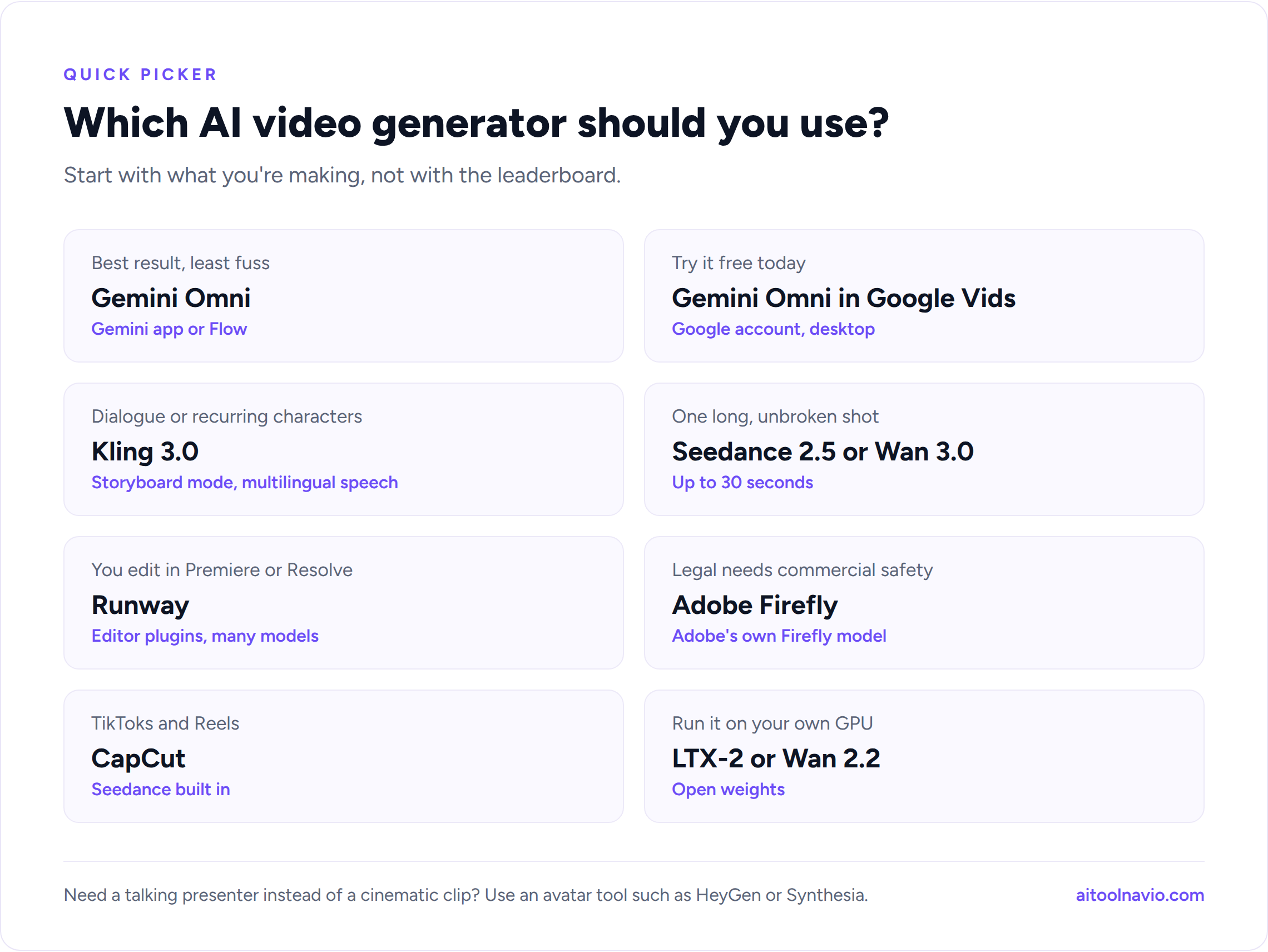
- You want the best result and don’t want to think about it: Gemini Omni, in the Gemini app or Flow.
- You want to try AI video for free today: Gemini Omni in Google Vids.
- You’re making a short scene with dialogue or recurring characters: Kling 3.0.
- You need one long, unbroken shot: Seedance 2.5 or Wan 3.0.
- You edit in Premiere, After Effects, or Resolve: Runway.
- Your client or legal team needs commercial safety: Adobe Firefly’s own model.
- You make TikToks and Reels: CapCut, with Seedance built in.
- You want to run a model on your own hardware: LTX-2 or Wan 2.2.
Not text-to-video, but maybe what you need
A lot of people searching for an “AI video generator” actually want a talking presenter for a training video, a product explainer, or a sales message. Cinematic models are the wrong tool for that. Look at avatar and script-to-video tools instead:
- HeyGen: realistic talking avatars, including one of you, with translation and lip-sync into dozens of languages.
- Synthesia: the enterprise standard for training and internal communications videos.
- invideo AI: turns a script or a topic into a full edited video with stock footage, voiceover, and captions.
And to cut long videos into shorts or edit by editing a transcript, see Opus Clip and Descript.
Tips for better AI video
- Write prompts like a shot list. Describe the subject, the action, the camera move, the lens or framing, the lighting, and the sound. “Slow dolly-in, 35mm, golden hour, wind and distant traffic” beats “a nice city scene.”
- Start from an image. Image-to-video gives you far more control than text alone. Perfect the first frame in an image generator, then animate it. Our best AI image generators guide covers the options.
- Use references for consistency. Upload the same character image to every shot rather than re-describing the person in words.
- Generate short, then extend. Short clips fail less often. Get a strong 5 to 8 seconds, then extend or cut to the next shot.
- Budget for retries. Even the best models need a few attempts for a usable shot. Credits run out faster than you expect.
- Keep real people and famous characters out. Most tools block them, and the ones that don’t expose you to legal risk. Label AI-generated video where your platform requires it.
Frequently asked questions
What is the best AI video generator in 2026? For most people, Gemini Omni Flash is the best overall, available in the Gemini app, Google Flow, and free in Google Vids. Kling 3.0 is the best alternative, especially for multi-shot scenes with dialogue.
Is there a free AI video generator? Yes. Since September 23, 2026, Gemini Omni is free in Google Vids for anyone with a Google account, on desktop. Most other tools on this list offer limited free credits or a trial. Browse more on our free AI tools page.
Is Sora still available? No. OpenAI shut down the Sora app and sora.com on April 26, 2026, and reports put the end of API access at September 24, 2026.
Which AI video generator makes the longest videos? Seedance 2.5 and Wan 3.0 generate up to 30 seconds in a single clip. Tools like Google Vids and Veo let you extend clips further by chaining generations together.
Which AI video generators create sound? Gemini Omni, Veo 3.1, Kling 3.0, Seedance, MiniMax H3, Wan 3.0, LTX-2, and Grok Imagine all generate synchronized audio. Runway Gen-4.5 and Luma Ray3.2 don’t, so you add sound in the edit.
Can I use AI-generated video commercially? Usually, on paid plans, but terms differ by tool and sometimes by model within the same tool. Adobe’s own Firefly models are designed for commercial use. Read the terms for the specific model you used, and don’t generate real people, logos, or copyrighted characters.
Related reading
Liked this? We do one every Friday.
The week's new AI tools, what each one actually does, and the ones worth your time — written the same way as this post.
One email a week · unsubscribe in one click