Best AI Tools for Realtors in 2026: Listing Descriptions, Virtual Staging, and CRM Follow-Ups
Nearly half of Realtors now use AI daily or weekly, mostly for listings, social posts, and follow-ups. Here are the tools for each job, from ChatGPT and ListingAI to Virtual Staging AI and Follow Up Boss, plus the fair housing and staging disclosure rules.
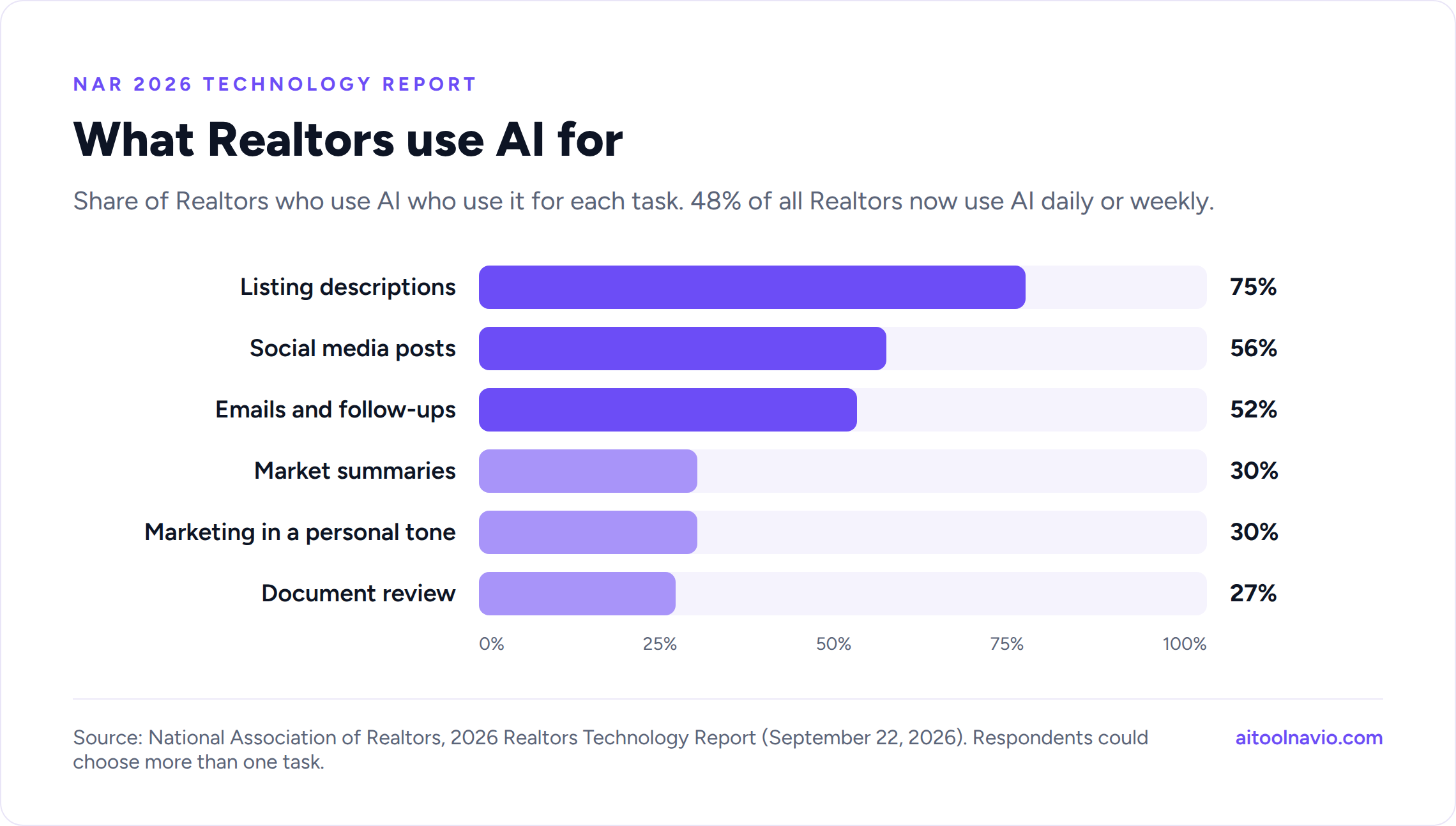
Real estate agents have quietly become some of the heaviest AI users in any industry. In the National Association of Realtors’ 2026 technology report, released September 22, 48% of Realtors said they use AI daily or weekly, and only 12% said they don’t use it and don’t plan to. Among agents who use AI, three jobs dominate: writing listing descriptions (75%), creating social media posts (56%), and drafting emails and follow-ups (52%).
That lines up with where AI actually saves an agent time. It won’t show a house or negotiate an inspection repair, but it will write the first draft of the listing, stage the empty living room, cut the photos into a Reel, and make sure the lead from last Tuesday gets a text today.
This guide covers the AI tools worth using for each of those jobs, grouped the way an agent’s week actually runs: list it, market it, follow up.
Quick picks:
- Listing descriptions: ChatGPT or Claude for flexibility, ListingAI for a real estate-specific workflow
- Virtual staging: Virtual Staging AI for speed, REimagineHome for flexibility
- Photo editing: Fotello
- Listing videos: AutoReel
- CRM and follow-ups: Follow Up Boss
- Social graphics: Canva
- Call and meeting notes: Fathom
How we put this list together
Every tool here has a live listing on Aitoolnavio, and every link goes to that listing, where you’ll find current pricing, features, screenshots, and alternatives. We chose tools against four questions:
- Does it save a US agent time on a task they do every week? Listing prep, marketing, and follow-up come first because that’s where NAR’s survey says agents already use AI.
- Can a solo agent set it up without IT help? Most of these take an afternoon.
- Does it respect the rules agents work under? Fair housing, MLS photo rules, state disclosure laws, and calling and texting consent all apply to AI output.
- Is there a free plan or trial? Most of these can be tested on a real listing before you pay.
What this list is not: a lab test. We didn’t run every tool on the same house, and pricing changes often, so we don’t quote dollar amounts. Check each listing for current plans. If “freemium,” “credits,” and “free trial” blur together, see AI Tool Pricing Explained.
| Task (Realtors who use AI) | Share |
|---|---|
| Listing descriptions | 75% |
| Social media posts | 56% |
| Emails and follow-ups | 52% |
| Market summaries | 30% |
| Marketing content in a personal tone | 30% |
| Document review or summaries | 27% |
Source: NAR 2026 Realtors Technology Report. Respondents could choose more than one task.
1. Listing descriptions
This is the most common AI task in real estate, and it’s the easiest win. A good tool turns your notes, the MLS fields, and a few photos into a clean first draft in under a minute. You still edit it. You know the house; the AI doesn’t.
ChatGPT
ChatGPT is what most agents already use for listing copy, and for good reason. Upload the listing photos, paste the MLS details, and ask for three versions: an MLS description within your board’s character limit, a longer version for your website, and a short social caption. Save your preferred tone and format in a custom GPT or project so every listing starts the same way.
Best for: agents who want one tool for listings, emails, and everything else. Free option: Yes, with limits.
Claude
Claude is especially good at careful, natural writing that doesn’t sound like every other AI listing. It’s also strong at long documents: drop in an HOA’s CC&Rs, a disclosure packet, or an inspection report and ask for a plain-English summary your buyer can actually read.
Best for: polished copy and summarizing long documents. Free option: Yes, with limits.
ListingAI
ListingAI is built for this one job. You enter the property details and get MLS descriptions, social posts, and email copy from one form, with controls for writing style. It also offers a free listing description grader that scores an existing description.
Best for: agents who want a real estate-specific workflow instead of prompting a general assistant. Free option: Yes.
Write.homes and Epique AI
Write.homes and Epique AI are real estate writing toolkits with templates for listings, blog posts, newsletters, social captions, and client emails. Listing Copy AI focuses on search-friendly listing text for portals and your own site.
Best for: agents who want ready-made real estate templates. Free option: Write.homes and Epique AI list free options; Listing Copy AI is paid.
Keep listing copy fair housing-safe
AI models learned from decades of real listings, including bad ones, so they sometimes describe the buyer instead of the property. Phrases like “perfect for a young family,” “ideal for empty nesters,” or “great for singles” can signal a preference based on familial status or age, which the Fair Housing Act prohibits.
HUD withdrew its 2024 guidance on AI and digital advertising in April 2026, but the Fair Housing Act itself hasn’t changed. HUD’s withdrawal notice says actions that don’t comply with the Act are still subject to enforcement. The practical rule is the same as it’s always been: describe the home, not the people you imagine living in it. Add that line to your prompt, and read every draft before it goes live.
Also check the facts. AI will happily invent a “chef’s kitchen” or a “newly renovated” bathroom. Every claim in the description should match the house and the MLS data.
2. Virtual staging and photo editing
Staging sells homes, but physical staging is expensive and slow. AI virtual staging turns a photo of an empty room into a furnished one in about a minute. It works best for vacant listings, new construction, and helping buyers picture a room that’s hard to read empty.
Virtual Staging AI
Virtual Staging AI is the fast, simple choice. Upload an empty room, pick a room type and style (modern, Scandinavian, coastal, traditional, and more), and get staged images back in seconds. It’s built for agents and photographers who stage a lot of photos and don’t want to learn design software.
Best for: high-volume listing agents. Free option: Paid, with sample photos to try.
REimagineHome
REimagineHome does virtual staging plus decluttering, renovation previews, and exterior changes like new paint or landscaping. The renovation mode is useful with buyers too: show them what that dated kitchen could look like with new cabinets.
Best for: agents who want staging, decluttering, and “what if” renovation previews in one tool. Free option: Freemium.
Collov AI and Styldod
Collov AI produces polished, design-forward staging and interior visuals. Styldod combines AI tools with human-edited services, including virtual staging, image enhancement, and floor plans, if you’d rather have a person check the result. StageHQ AI is another quick option with a free trial.
Fotello
Fotello handles the unglamorous part: HDR blending, color correction, and consistent edits across a full shoot. It’s built for real estate photographers and for agents who shoot their own listings and want them to look professionally edited.
Best for: agents and photographers editing lots of property photos. Free option: Freemium.
Disclose virtual staging, and in California it’s now the law
Virtual staging is fine. Hiding it isn’t. NAR’s Code of Ethics (Article 12) requires Realtors to present a true picture in their advertising, and most MLSs require virtually staged photos to be labeled.
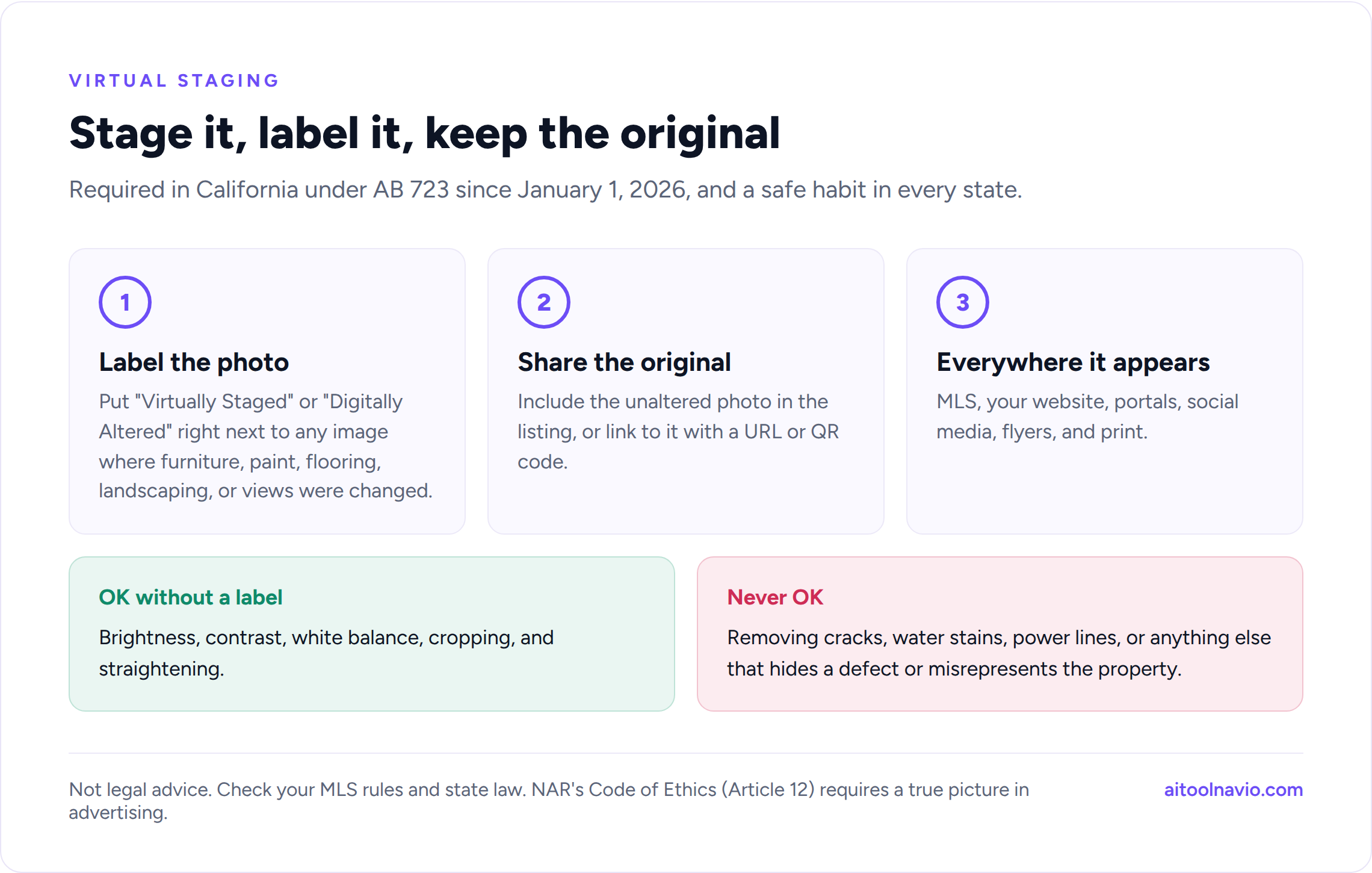
California went further. AB 723, in effect since January 1, 2026, requires anyone advertising a California listing to:
- Put a clear disclosure, such as “Virtually Staged” or “Digitally Altered,” next to any image where physical elements were added, removed, or changed (furniture, paint, flooring, landscaping, views).
- Give buyers access to the original, unaltered photo, either in the listing itself or through a link or QR code.
Basic edits like brightness, contrast, white balance, cropping, and straightening don’t count. The rule applies everywhere the photo appears: the MLS, your website, social media, and print.
Even outside California, follow the same two habits. Label every altered photo, and keep the original available. And never use AI to hide defects. Removing a water stain, a crack, or a power line from a photo is misrepresentation, not staging.
3. Listing videos and social media
Video gets listings seen, but most agents don’t have time to film and edit a walkthrough for every property. These tools build videos from the photos you already have.
AutoReel
AutoReel turns listing photos into cinematic videos with camera motion, music, and your branding, sized for Instagram Reels, TikTok, and YouTube. Upload the photos, pick a template, and post.
Best for: agents who want a video for every listing without filming. Free option: Freemium.
Also worth a look: Amplifiles and AbodeVid also make property videos from photos, with voiceover and captions. VideoGuru edits raw walkthrough footage into a finished video. Bounti.ai generates listing visuals and marketing collateral from photos, an address, or a walkthrough video.
Canva
Canva is where most agents make their “Just Listed” and “Open House” posts, flyers, and postcards. Its AI tools write captions, resize one design into every format, and remove backgrounds. Set up a Brand Kit with your brokerage’s colors and logo once, and every post stays on-brand.
Best for: social graphics, flyers, and print. Free option: Yes.
CapCut and HeyGen
CapCut is the easiest way to edit short-form video on your phone, with auto-captions and templates. If you’d rather not be on camera every week, HeyGen can create an AI avatar of you from a short recording and turn a script into a market-update video. Tell viewers when a video uses an avatar.
For a deeper look at AI video, see our guide to the best AI video generators in 2026.
4. CRM and lead follow-up
Most deals are lost to slow or forgotten follow-up, not to competition. This is where AI earns its keep: summarizing a lead’s history, drafting the next text, and flagging who’s ready to move.
Follow Up Boss
Follow Up Boss is one of the most widely used CRMs among US agents and teams. It pulls leads from Zillow, Realtor.com, your website, and dozens of other sources into one inbox and routes them automatically. Its AI features include Smart Summary, which recaps a lead’s full history in a few lines before you call, and Smart Messages, which drafts a personalized text or email based on that history. Follow Up Boss is owned by Zillow and connects closely with Zillow’s agent tools.
Best for: teams and solo agents with leads coming from several sources. Free option: Free trial.
All-in-one platforms: Lofty and BoldTrail
If you want your website, IDX search, CRM, and marketing in one system, look at Lofty (formerly Chime) and BoldTrail (formerly kvCORE). Lofty launched what it calls an agentic AI operating system in February 2026, with AI agents that engage new leads, schedule social posts, and run campaigns to past clients and homeowners. BoldTrail is common at larger brokerages, which often provide it to their agents. Ask your broker what’s already paid for before buying anything.
(Neither is listed on Aitoolnavio yet, so there’s no profile to link.)
Finding sellers before they list
Offrs and Top Producer’s Smart Targeting use predictive data to flag homeowners in your farm who are most likely to sell in the coming months, so your mail and ad budget goes to the right doors.
Never miss a call
SkipCalls is an AI receptionist that answers calls and texts when you’re in a showing, takes down what the caller needs, and responds in a cloned version of your voice.
Follow-up rules that still apply to AI
Two federal rules matter the moment AI starts contacting people for you:
- AI voices count as “artificial” voices. In February 2024 the FCC ruled that AI-generated voices fall under the Telephone Consumer Protection Act. An AI voice calling a consumer needs the same prior express consent a prerecorded message does.
- Automated texts need consent too. Get documented consent before adding a lead to automated text campaigns, honor opt-outs right away, and check the Do Not Call registry before cold outreach.
An AI receptionist answering calls someone made to you is different from an AI calling people who never contacted you. Keep the second kind off until you’ve checked with your broker.
5. Calls, meetings, and paperwork
Fathom and Otter AI
Fathom and Otter AI record and summarize Zoom, Google Meet, and Teams calls: buyer consultations, listing presentations over video, and team meetings. You get action items and a searchable transcript, so “what did they say their max was?” takes seconds to find.
Best for: agents who run consultations over video. Free option: Yes, both.
Tell clients when you’re recording, and check your state’s consent rules. Some states require everyone on the call to agree.
Document summaries
For contracts, HOA documents, inspection reports, and title commitments, a general assistant like Claude or ChatGPT is the fastest way to get a plain-English summary. Treat the summary as a starting point. You’re still responsible for what’s in the contract, and anything that looks like legal advice goes to an attorney.
6. Market data and pricing
HouseCanary, Homesage.ai, and Kurby
HouseCanary provides automated valuations and market forecasts used across the industry. Homesage.ai covers more than 140 million US properties with investment-focused analysis. Kurby AI pulls property, neighborhood, and nearby-amenity data together for any address.
Use these to prepare for a listing appointment or to answer a buyer’s “is this a good price?” question. They don’t replace your CMA or local knowledge, and AI valuations can miss what makes a specific house different from its neighbors.
7. Connecting it all
Zapier and Calendly
Zapier connects your tools so leads, forms, and calendar events move between them automatically. For example, a new web lead can go into your CRM, trigger a welcome text, and create a task for you. Calendly lets clients book consultations and showings without back-and-forth texts.
Comparison table
| Tool | Job | Best for | Free option |
|---|---|---|---|
| ChatGPT | Listings, email, everything | One all-purpose assistant | Yes |
| Claude | Listings, document summaries | Polished writing, long documents | Yes |
| ListingAI | Listing descriptions | Real estate-specific workflow | Yes |
| Write.homes | Real estate writing | Templates for agents | Yes |
| Epique AI | Real estate writing | Listings, blogs, social | Yes |
| Virtual Staging AI | Virtual staging | Fast, high-volume staging | Sample photos |
| REimagineHome | Staging, renovation previews | Flexible “what if” visuals | Freemium |
| Collov AI | Virtual staging | Design-forward staging | Paid |
| Styldod | Staging, enhancement, floor plans | Human-checked results | Paid |
| Fotello | Photo editing | HDR and color at volume | Freemium |
| AutoReel | Listing videos | Reels from photos | Freemium |
| Canva | Social and print | Branded graphics | Yes |
| HeyGen | Avatar video | Market updates without filming | Yes, limited |
| Follow Up Boss | CRM and follow-up | Multi-source leads | Trial |
| Offrs | Seller leads | Farming | Contact |
| SkipCalls | AI receptionist | Missed calls | Paid |
| Fathom | Meeting notes | Video consultations | Yes |
| HouseCanary | Valuations and data | Pricing prep | Paid |
| Zapier | Automation | Connecting tools | Yes |
“Free option” reflects each tool’s plans at the time of writing. Check the listing for current pricing.
A simple AI routine for a new listing
- Before the appointment: pull neighborhood and property data with Kurby or HouseCanary, and ask Claude or ChatGPT to turn your notes into a one-page listing presentation outline.
- After photos: edit with Fotello, virtually stage the vacant rooms, and label every staged image.
- Write the listing: generate the MLS description, a website version, and social captions, then fact-check and fair housing-check every line.
- Market it: build a Reel with AutoReel, a “Just Listed” post and flyer in Canva, and an email to your sphere.
- Follow up: let your CRM route every inquiry, use AI summaries before each call, and review AI-drafted texts before they send.
Frequently asked questions
What is the best AI tool for real estate agents? For most agents, the best first tool is a general assistant like ChatGPT or Claude, since listing descriptions, emails, and social posts are where agents use AI most. Add a virtual staging tool if you list vacant homes, and make sure your CRM’s AI features are turned on.
Can I use AI to write MLS listing descriptions? Yes, and 75% of agents who use AI already do, according to NAR’s 2026 technology report. Edit every draft, check every fact against the property, stay within your MLS’s character limits and rules, and describe the home rather than the buyer to stay on the right side of fair housing law.
Is virtual staging legal? Yes, when it’s disclosed. Most MLSs require virtually staged photos to be labeled. In California, AB 723 has required a clear disclosure next to altered images, plus access to the unaltered original, since January 1, 2026. Virtual staging should never hide defects or misrepresent the property.
Can AI text or call my leads automatically? It can, but consent rules apply. The FCC treats AI-generated voices as artificial voices under the TCPA, which require prior express consent. Get documented consent for automated texts and calls, honor opt-outs, and check with your broker before turning on any outbound AI calling.
Are there free AI tools for realtors? Yes. ChatGPT, Claude, ListingAI, Write.homes, Epique AI, Canva, Fathom, Otter AI, and Zapier all have free plans. Browse more on our free AI tools page.
Related reading
- The Best AI Video Generators in 2026
- 30 Best AI Tools for Small Business in 2026
- ChatGPT vs Claude vs Gemini
- AI Tool Pricing Explained
- Real Estate AI Tools
- Interior Design and Virtual Staging AI Tools
- Sales and CRM AI Tools
- Compare AI Tools Side by Side
Sources
National Association of Realtors, 2026 Realtors Technology Report (September 22, 2026) and Code of Ethics, Article 12. California Assembly Bill 723 and guidance from California Realtor associations and MLSs on digitally altered images. US Department of Housing and Urban Development, Notification of Withdrawal of Fair Housing and Equal Opportunity Guidance Documents (Federal Register, April 6, 2026). Federal Communications Commission, declaratory ruling on AI-generated voices under the TCPA (February 2024). Lofty launch announcement (February 2, 2026). Product information was drawn from each tool’s official website and documentation and from each tool’s Aitoolnavio listing.
Liked this? We do one every Friday.
The week's new AI tools, what each one actually does, and the ones worth your time — written the same way as this post.
One email a week · unsubscribe in one click