
Generate captions, optimize content, and enhance with custom images for maximum engagement.
46M visits/mo-10%#3 Image & Design
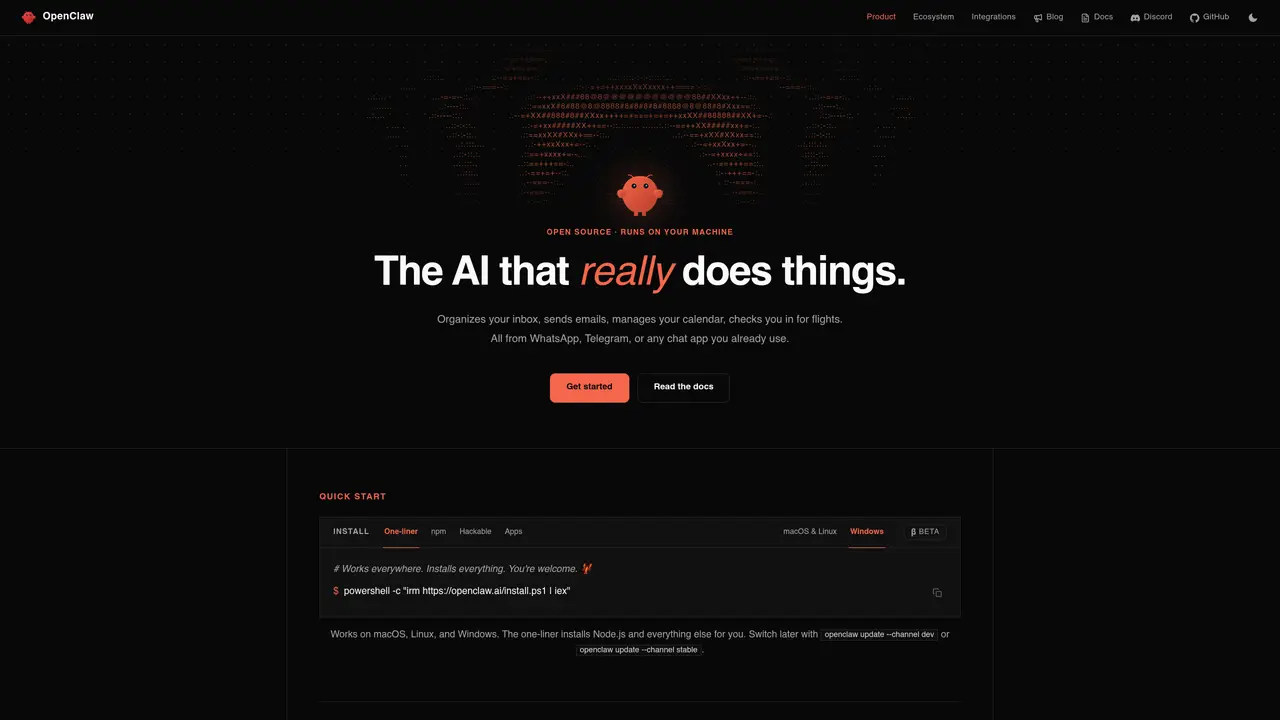
OpenClaw is an open source personal AI assistant that runs on the user’s own computer and connects chat apps to automation on that machine. Large language models from providers such as Anthropic and OpenAI, or local models, act as the brain while browser control, file access, and system commands give it hands. From WhatsApp or Telegram, users can clear inboxes, manage calendars, check in for flights, and trigger complex workflows. Key Features: On-device runtime and model choice: Runs on macOS, Windows, and Linux, connects to Anthropic, OpenAI, or local models, and gains direct access to files, shell, and apps. Multi-channel chat interface: Single assistant reachable from WhatsApp, Telegram, Discord, Slack, Signal, and iMessage across DMs and group chats. Persistent long-term memory: Stores memory about preferences, projects, and contacts so conversations feel continuous instead of stateless prompts. Browser and app control: Uses browser automation and integrations to browse sites, fill forms, scrape data, post content, and control services. Skills, plugins, and security: Supports community-built skills, virus-scanned extensions, and even auto-generated skills that OpenClaw can write for itself.
OpenClaw is an open-source personal AI assistant that runs on a user’s own computer, connecting chat apps like WhatsApp or Telegram to automation on that machine. It uses large language models as the brain while providing hands-on capabilities such as browser control, file access, and system commands to perform tasks like managing inboxes, calendars, or triggering workflows.
OpenClaw is designed for individuals who want a personal AI assistant that operates locally on their machine, offering privacy and customization. It suits users comfortable with self-hosting and those interested in automating tasks across multiple chat platforms.
OpenClaw supports large language models from providers like Anthropic and OpenAI, as well as local models. Users can choose the model that best fits their needs, and the assistant leverages these models to process commands and perform actions.
Yes, OpenClaw runs on macOS, Windows, and Linux. The one-liner installer automates the setup process, including installing Node.js and other dependencies, making it accessible across these platforms.
OpenClaw is accessible from multiple chat apps, including WhatsApp, Telegram, Discord, Slack, Signal, and iMessage, both in direct messages and group chats.
To get started, users can run a one-liner installer command that sets up OpenClaw and its dependencies. Alternatively, they can clone the source code and follow the setup instructions for a more customizable installation.
openclaw.ai · third-party estimates from Similarweb
Last 4 months · grows by one month every month
Share of visits · estimated visits
Other countries: 52.1%
How people reach this site from other AI tools
28K a month · 1.1% of all visits
Automation & Agents · Sep 2026
Traffic figures are third-party estimates, good for scale and trends; they can differ from a company's own numbers. Updated monthly.
We use essential cookies to run aitoolnavio™, and optional cookies to analyze traffic and measure our marketing. You choose what we use — optional cookies stay off unless you turn them on. See our Privacy Policy.
One short email a week: fresh tools worth trying, honest takes and the updates that actually matter. No spam, unsubscribe any time.
Generate captions, optimize content, and enhance with custom images for maximum engagement.
Build conversational forms, capture rich responses, and automate follow-ups with AI-powered surveys and workflows.
Automate code, research, and documents using agents.
AI-powered IDE for autonomous coding tasks and agentic development workflows
Source, match, and manage talent with predictive analytics for effortless recruiting.
Automate workflow, optimize operations, and detect potential issues with this efficient AI-driven solution.
Transforms thoughts into actions, enhancing productivity and efficiency.
AI Recruitment engine to hire top global talent
All-in-one team productivity platform combining chat, docs, video meetings, workflows, and AI tools in one place.
Personal assistant that coordinates tasks across apps and devices via text or call
AI automation and agent-building platform with 3,000+ app integrations
AI job search copilot that matches roles to skills, optimizes resumes for ATS, generates cover letters, and autofills applications with real-time insights.
Matched on what this tool does — grouped by the job you would be replacing.
matches On-device runtime and model choice · Multi-channel chat interface · Browser and app control
A user-friendly native app powered by OpenClaw (Clawdbot) for regular users.
Managed hosting service for OpenClaw AI agents with 24/7 uptime and no setup required
Run always-on multi-channel agents without managing servers.
Desktop AI agent that automates multi-step tasks across files, browsers and chat platforms
matches On-device runtime and model choice · Persistent long-term memory · Runs on macOS, Windows, and Linux
Chat, build, and explore with open AI models.
Run open-source chatbots locally on your PC without internet, keeping conversations private and offline.
Open-source desktop AI chat app that runs local LLMs offline or connects to cloud providers via API keys.
Unified local workspace for running AI models, automations and custom tools on a computer