
Generate captions, optimize content, and enhance with custom images for maximum engagement.
46M visits/mo-10%#3 Image & Design
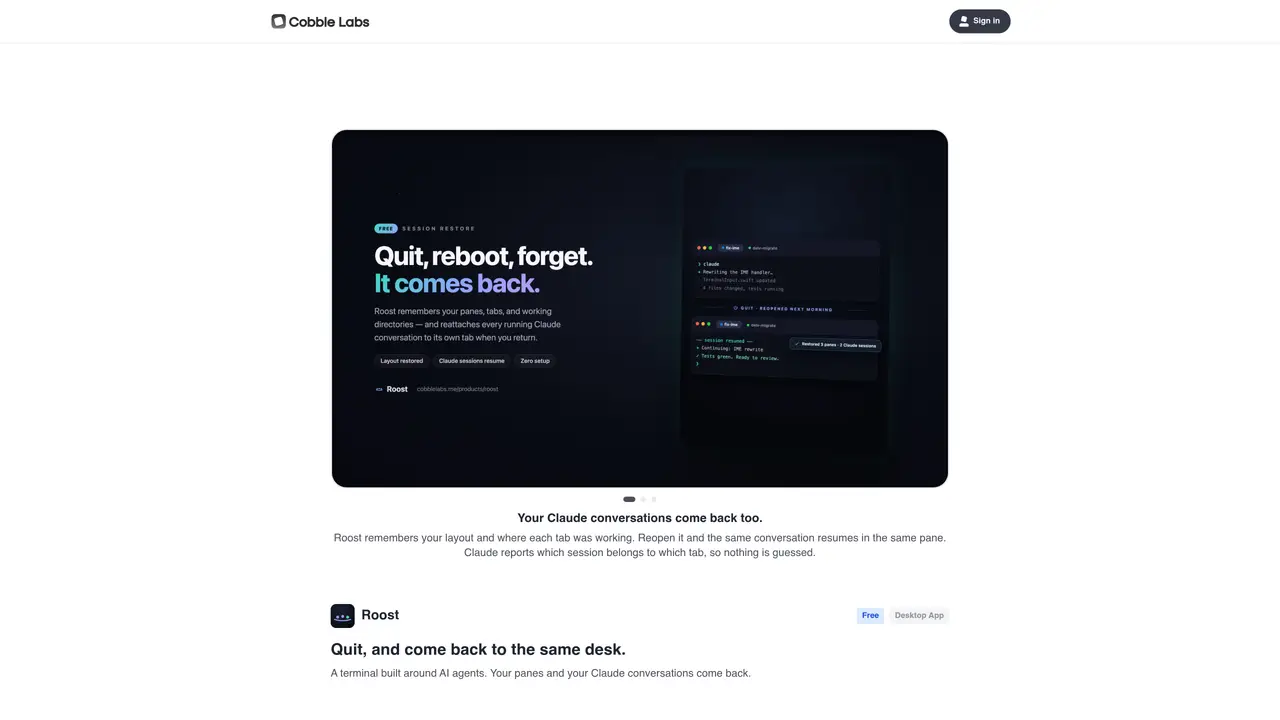
Roost is a desktop application designed to preserve the state of AI agent workspaces and conversations. When a user quits the application, Roost saves the layout of panes and the positions of tabs within each pane. Upon reopening, the same workspace is restored exactly as it was left, including active AI agent conversations. The tool tracks which session belongs to which tab, ensuring no ambiguity in workspace restoration. It is built as a terminal interface centered around AI agents, allowing users to manage multiple agent interactions simultaneously. Roost is currently available as a free desktop app for Mac.
Roost is a desktop application that preserves the state of AI agent workspaces and conversations, allowing users to quit and return to the exact same layout and active sessions upon reopening.
Roost is designed for users who manage multiple AI agent interactions simultaneously and want to maintain a consistent workspace without losing progress or session context.
Roost tracks the layout of panes and the positions of tabs, including active AI agent conversations, and restores them exactly as they were left when the application is reopened.
Roost is currently available as a free desktop app for Mac.
Users can send feedback directly to the Roost team through the application, which is designed to facilitate quick communication of bugs or ideas.
Roost is built to integrate with AI agents, particularly those that report session details, such as Claude, to ensure accurate workspace restoration.
We use essential cookies to run aitoolnavio™, and optional cookies to analyze traffic and measure our marketing. You choose what we use — optional cookies stay off unless you turn them on. See our Privacy Policy.
One short email a week: fresh tools worth trying, honest takes and the updates that actually matter. No spam, unsubscribe any time.
Generate captions, optimize content, and enhance with custom images for maximum engagement.
Build conversational forms, capture rich responses, and automate follow-ups with AI-powered surveys and workflows.
Automate code, research, and documents using agents.
AI-powered IDE for autonomous coding tasks and agentic development workflows
Source, match, and manage talent with predictive analytics for effortless recruiting.
Automate workflow, optimize operations, and detect potential issues with this efficient AI-driven solution.
Transforms thoughts into actions, enhancing productivity and efficiency.
AI Recruitment engine to hire top global talent
All-in-one team productivity platform combining chat, docs, video meetings, workflows, and AI tools in one place.
Personal assistant that coordinates tasks across apps and devices via text or call
AI automation and agent-building platform with 3,000+ app integrations
AI job search copilot that matches roles to skills, optimizes resumes for ATS, generates cover letters, and autofills applications with real-time insights.
Matched on what this tool does — grouped by the job you would be replacing.
matches Saves and restores pane layouts · Remembers tab positions within panes · Restores active AI agent conversations
Desktop application for running multiple AI agents locally on a computer
Desktop workspace for managing coding agents and their outputs
Native macOS application for managing and coordinating coding agents
Desktop workspace for coding agents like Codex and Claude Code