Automate job postings, track applicants, and streamline hiring with an intuitive HCM platform for talent acquisition.
32M visits/mo+3.9%#5 Business & Marketing

AI-driven QA tool that automatically clicks through preview deployments to catch UI regressions
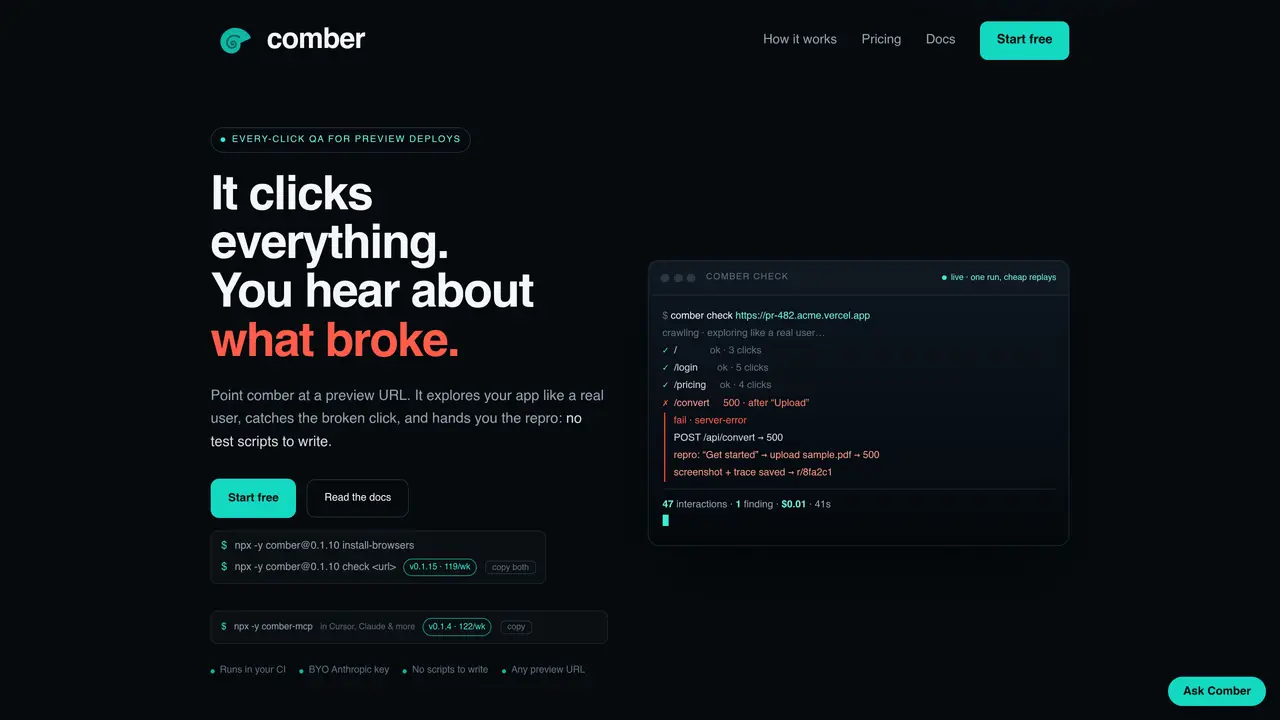
comber automates end-to-end quality assurance for web applications by simulating user interactions on preview deployments. It operates without requiring test scripts, instead exploring every reachable state of an application like a real user would. The tool runs in CI pipelines, executing on each preview deploy to identify broken clicks, server errors, failed requests, and accessibility issues before users encounter them. Findings are delivered with detailed repro steps, screenshots, and traces, enabling quick debugging. comber uses a DOM-first approach for efficiency, resorting to vision-based checks only when necessary, and provides deterministic replays for cost-effective validation. It supports both self-hosted CLI usage with a provided Anthropic or OpenAI key and a managed option where the service runs the crawl on its infrastructure.
comber automates end-to-end quality assurance for web applications by simulating user interactions on preview deployments. It explores every reachable state of an application like a real user would, identifying issues such as broken clicks, server errors, failed requests, and accessibility problems before users encounter them.
comber is designed for development teams that deploy preview environments, particularly those using CI pipelines. It suits teams looking to catch UI regressions and hidden bugs without writing or maintaining test scripts.
comber integrates into CI workflows with a single command or repository connection. It runs on every preview deploy, performing a crawl to explore the application and report findings with detailed repro steps, screenshots, and traces.
No, comber does not require test scripts. It automatically explores the application like a real user, clicking, typing, and navigating every reachable state without manual scripting.
comber detects broken clicks, server errors, failed requests, and accessibility issues. It also identifies problems beyond just dead buttons, providing comprehensive coverage of potential regressions.
To get started, install the comber CLI and run a check on a preview URL. It can be used in CI with your own Anthropic or OpenAI key, or via a managed option where the service runs the crawl on its infrastructure.
We use essential cookies to run aitoolnavio™, and optional cookies to analyze traffic and measure our marketing. You choose what we use — optional cookies stay off unless you turn them on. See our Privacy Policy.
One short email a week: fresh tools worth trying, honest takes and the updates that actually matter. No spam, unsubscribe any time.
Automate job postings, track applicants, and streamline hiring with an intuitive HCM platform for talent acquisition.
Automate workflow, optimize operations, and detect potential issues with this efficient AI-driven solution.
AI automation and agent-building platform with 3,000+ app integrations
Automate email sending, save leads to CRMs, and create complex workflows for customer support tickets.
Open-source workflow automation platform to build, run, and monitor agentic and traditional workflows with 500+ integrations and AI governance.
AI-powered platform streamlining workflows with no-code automation.
With Accio, manufactures/ products/ suppliers/ inspirations will come to you, any time, any where.
Create & deploy AI apps, access real-time insights, and easily build models with an intuitive user interface.
Automate outreach campaigns, create personalized emails with AI, and monitor results with detailed analytics.
AI-powered fleet management platform for trucking, delivery, and field service teams, combining GPS tracking, ELD compliance, dash cams, maintenance, and spend management.
Automate tasks, streamline workflows, and create powerful automation flows effortlessly.
Control your computer and apps from any chat.
Matched on what this tool does — grouped by the job you would be replacing.
Paid placement · similar tools from listings that support aitoolnavio™
Instant lead response for home-service pros: your phone rings on every new lead, plus 14 days of follow-up
matches Automated user simulation without test scripts · CI/CD integration via CLI commands · DOM-first exploration with vision fallback
matches Self-hosted CLI with hosted dashboard · Support for Anthropic or OpenAI API keys
AI-powered test automation that builds and maintains cross-platform test suites using computer vision, reducing setup and maintenance overhead.
AI test automation platform for Salesforce that lets teams write plain-English tests, run them via CI/CD, and get traceable reports.
AI-driven regression testing that writes, runs and auto-heals tests from plain-English specs
Zero-config AI browser testing platform
A platform to build, observe, test, and deploy multi-agent AI systems with deep observability and automated safety controls.
Traces and tests production AI agents.