
Automate job postings, track applicants, and streamline hiring with an intuitive HCM platform for talent acquisition.
32M visits/mo+3.9%#5 Business & Marketing

AI-powered document processing and workflow automation for finance and operations teams
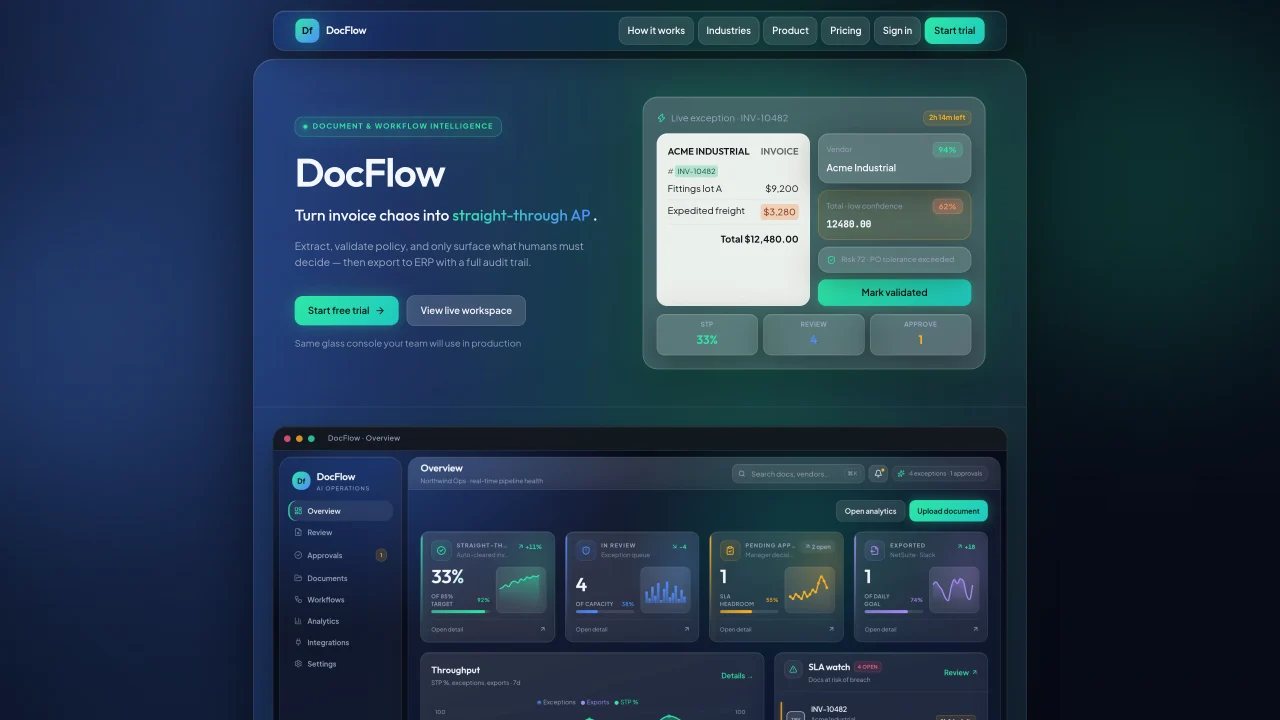
DocFlow automates the ingestion, validation, and routing of documents such as invoices, purchase orders, and compliance packs through a four-step loop: ingest, validate, decide, and export. It uses OCR to extract vendor, PO, and total data from PDFs or email attachments, then applies policy checks for PO matching, duplicate detection, and amount tolerances. Exceptions—including low-confidence fields, SLA breaches, and policy mismatches—are surfaced in a shared workspace where teams review, approve, or edit before pushing cleared documents to ERP systems like NetSuite with a full audit trail. The platform supports six industry-specific workflows—finance, procurement, compliance, legal, healthcare, and HR—while maintaining a single document engine that adapts to each use case. Teams only handle exceptions, reducing manual re-keying and approval delays. Every action—from extraction to export—is logged for compliance and analytics.
DocFlow automates the ingestion, validation, and routing of documents such as invoices, purchase orders, and compliance packs through a four-step loop: ingest, validate, decide, and export. It uses OCR to extract key data from PDFs or email attachments, applies policy checks, and surfaces exceptions for human review before exporting cleared documents to ERP systems with a full audit trail.
DocFlow is designed for operations teams in finance, procurement, compliance, legal, healthcare, and HR who need to reduce manual document processing. It suits teams looking to automate routine document handling while maintaining compliance and audit readiness.
DocFlow integrates with email for document ingestion, Slack for alerts, and ERP systems like NetSuite for exporting cleared documents. The platform supports automated workflows that connect these tools to streamline document processing and approvals.
Documents that don’t pass validation or policy checks are surfaced as exceptions in a shared workspace. Teams review, approve, or edit these exceptions before pushing them to ERP systems, ensuring only compliant documents proceed.
Yes, DocFlow supports six industry-specific workflows—finance, procurement, compliance, legal, healthcare, and HR—using a single document engine that adapts to each use case. This allows teams to apply tailored policies and validations to their documents.
You can start a free trial of DocFlow by signing up on their website. The trial provides access to the live workspace, allowing you to test the platform’s features, such as document ingestion, validation, and exception handling, before committing to a plan.
We use essential cookies to run aitoolnavio™, and optional cookies to analyze traffic and measure our marketing. You choose what we use — optional cookies stay off unless you turn them on. See our Privacy Policy.
One short email a week: fresh tools worth trying, honest takes and the updates that actually matter. No spam, unsubscribe any time.
Automate job postings, track applicants, and streamline hiring with an intuitive HCM platform for talent acquisition.
Automate workflow, optimize operations, and detect potential issues with this efficient AI-driven solution.
AI automation and agent-building platform with 3,000+ app integrations
Automate email sending, save leads to CRMs, and create complex workflows for customer support tickets.
Open-source workflow automation platform to build, run, and monitor agentic and traditional workflows with 500+ integrations and AI governance.
AI-powered platform streamlining workflows with no-code automation.
With Accio, manufactures/ products/ suppliers/ inspirations will come to you, any time, any where.
Create & deploy AI apps, access real-time insights, and easily build models with an intuitive user interface.
Automate outreach campaigns, create personalized emails with AI, and monitor results with detailed analytics.
AI-powered fleet management platform for trucking, delivery, and field service teams, combining GPS tracking, ELD compliance, dash cams, maintenance, and spend management.
Automate tasks, streamline workflows, and create powerful automation flows effortlessly.
Control your computer and apps from any chat.
Matched on what this tool does — grouped by the job you would be replacing.
Paid placement · similar tools from listings that support aitoolnavio™
Instant lead response for home-service pros: your phone rings on every new lead, plus 14 days of follow-up
matches OCR-based data extraction from PDFs and emails · PO matching and duplicate detection · Vendor master validation
matches Shared workspace for exception review and approval · SLA breach alerts and risk scoring · Multi-entity support in Scale plan
matches ERP export with audit trail · Multi-entity support in Scale plan
An AI bookkeeping assistant that extracts receipt, invoice, and bank statement data, categorizes expenses, detects duplicates, and exports to CSV/Excel for small businesses and finance teams.
AI document processing and workflow automation for invoice, contract, and form data extraction with ERP integrations.
AI-powered document scanning and OCR for finance and operations teams to extract, validate, and structure data from invoices and business documents.
AI-powered invoice and document processing with ERP-ready Excel export
Autonomous AI operators that run repeatable business workflows overnight with auditable, low-touch automation across finance, support, sales, and internal operations.
Automate document workflows with AI by extracting, validating, and routing data across teams.
No-code AI agent platform for operations, support, and compliance teams to automate inbox triage, document extraction, and ERP/helpdesk workflows.
Automates vendor follow-ups and extracts quotes from replies for procurement teams
AI-powered expense management platform that automates tracking, categorization, and reporting of business expenses with real-time credit card integration.
AI-native finance ERP for continuous reconciliation, daily close and audit-grade controls