Automate customer service, track interactions, gather insights for improving customer support performance.
5.2M visits/mo-12.1%#17 Chatbots & Assistants

An AI-driven support tool offering real-time screen sharing and secure data handling for efficient customer assistance.
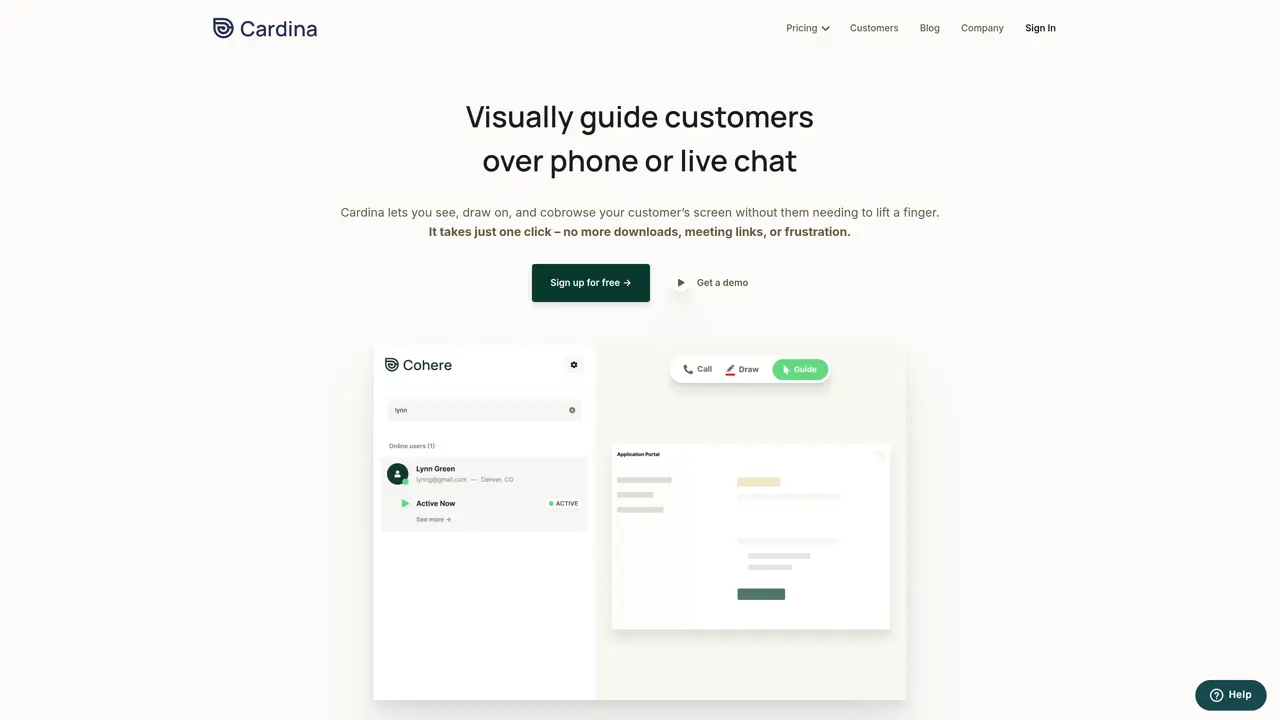
Cardina is an innovative AI-powered support assistance tool designed to revolutionize customer service interactions. Its primary purpose is to facilitate faster and more efficient resolution of customer issues by allowing support agents to view and interact with a customer’s screen in real-time. This capability mainly benefits businesses and customer support teams, enhancing the overall customer experience by reducing resolution times and improving satisfaction rates. Key Features: Real-Time Screen Sharing : Allows agents to view the customer’s screen live, aiding in quicker issue resolution. Screen Control : Enables agents to take over the customer’s screen to guide and troubleshoot directly. Increased First-Contact Resolutions : Boosts the rate of resolving issues during the first interaction, enhancing customer satisfaction. Data Protection : Ensures sensitive customer data is accessed only with explicit consent, improving compliance and reducing risk. Efficiency in Issue Resolution : Reduces the time taken to resolve customer issues by providing direct visual assistance. Cardina stands out in the AI space with its unique approach to customer support. Unlike traditional support tools that rely heavily on verbal or written communication, Cardina introduces a visual element that significantly enhances understanding and efficiency. This direct visual interaction speeds up the resolution process and adds a personal touch to customer support, making it more effective and user-friendly. The combination of real-time screen sharing, control capabilities, and stringent data protection measures makes Cardina a valuable asset for any customer-centric business. Cardina is a game-changer in customer support, offering a unique blend of real-time visual assistance and robust data protection. It caters to businesses and customer support teams looking to enhance efficiency and customer satisfaction. The tool’s ability to quickly resolve issues, user-friendly interface, and robust security measures make it a valuable asset for any customer-focused organization.
Cardina is an AI-powered cobrowsing tool that enables support agents to visually guide customers over phone or live chat by viewing, drawing on, or sharing screens in real time. It requires no downloads or meeting links, allowing agents to assist customers with a single click.
Cardina is designed for customer support teams, sales representatives, and businesses aiming to enhance customer engagement, resolve issues faster, and improve satisfaction rates through visual assistance and screen control.
Yes, Cardina integrates seamlessly with existing tools, providing a comprehensive view of the customer's digital experience across various platforms and devices without requiring additional setup.
Cardina includes granular data protection features such as automatic masking of sensitive fields, configurable permissions, audit logs, and compliance with global frameworks like GDPR, CCPA, and HIPAA to ensure customer privacy.
Yes, with the customer’s explicit permission, agents can take control of the customer’s screen to scroll, click, or type on their behalf, enabling direct troubleshooting and guidance.
Users can create an account instantly and start using Cardina on a free plan without requiring a credit card. The setup process takes as little as 5 minutes, with detailed documentation available for guidance.
cardina.com · third-party estimates from Similarweb
Last 4 months · grows by one month every month
Share of visits · estimated visits
Chatbots & Assistants · Sep 2026
Traffic figures are third-party estimates, good for scale and trends; they can differ from a company's own numbers. Updated monthly.
We use essential cookies to run aitoolnavio™, and optional cookies to analyze traffic and measure our marketing. You choose what we use — optional cookies stay off unless you turn them on. See our Privacy Policy.
One short email a week: fresh tools worth trying, honest takes and the updates that actually matter. No spam, unsubscribe any time.
Automate customer service, track interactions, gather insights for improving customer support performance.
Web-based CRM that unifies WhatsApp, Instagram, email, and calls into one inbox for sales teams to manage leads and automate conversations.
Automate support, target customers, gather insights – all with AI-powered tools.
Automate tailored conversations, analyze customer behavior, and automate lead gen, customer service, and sales.
Real-time customer support with personalized service, accessible through a mobile app.
Automate review requests, analyze sentiment, and monitor ratings with a streamlined dashboard for improved customer feedback.
AI-powered lead generation and customer communication platform for local businesses to capture, respond to, and convert leads across text, email, web chat, and calls.
Gorgias is an AI-driven Ecommerce customer experience enhancer that integrates major platforms.
Unify communication channels, automate customer service, track customer inquiries with advanced analytics.
Identify pain points, generate reports, and monitor customer sentiment in real-time.
Automate customer responses, personalize messages, and create an AI-powered chatbot for 24/7 customer service.
Automatically summarize chat transcripts, comprehend key components, and accelerate transcript analysis.
Matched on what this tool does — grouped by the job you would be replacing.
Paid placement · similar tools from listings that support aitoolnavio™
Instant lead response for home-service pros: your phone rings on every new lead, plus 14 days of follow-up
matches Real-Time Screen Sharing · Screen Control · Data Protection
matches AI-Powered Response Suggestions · Enhanced Chat-GPT Features · Automate customer service
matches Behavioral insights for product optimization · Advanced Data Analytics · Real-Time Insights
Integrates video clips and live calls into customer support to resolve issues faster with visual context and AI-powered analysis.
Monitor customer screens in real time to resolve issues instantly and optimize products with no setup required.
An AI customer service platform that drafts replies, powers self-service chat, and analyzes sentiment for support teams with hosted or self-hosted deployment.
HelpGent offers video and audio messaging, screen recording, and text messaging for asynchronous communication.
Automate customer service, track sentiment, and seamlessly integrate with existing operations for improved customer service.
Autonomously resolves customer inquiries with AI-driven precision.
Revolutionize customer support with AI-driven automation and personalization.
Automate customer service, create custom NLP-enabled bots, and integrate with existing systems for improved customer support.
Connect customer service teams, manage conversations, and monitor performance with powerful analytics.
Transform service operations with AI-driven, actionable insights.
AI-driven insights and automation for exceptional customer service.