
Automate customer service, track interactions, gather insights for improving customer support performance.
5.2M visits/mo-12.1%#17 Chatbots & Assistants

Automate customer engagement, track responses, and gain insights into customer behavior with powerful analytics.
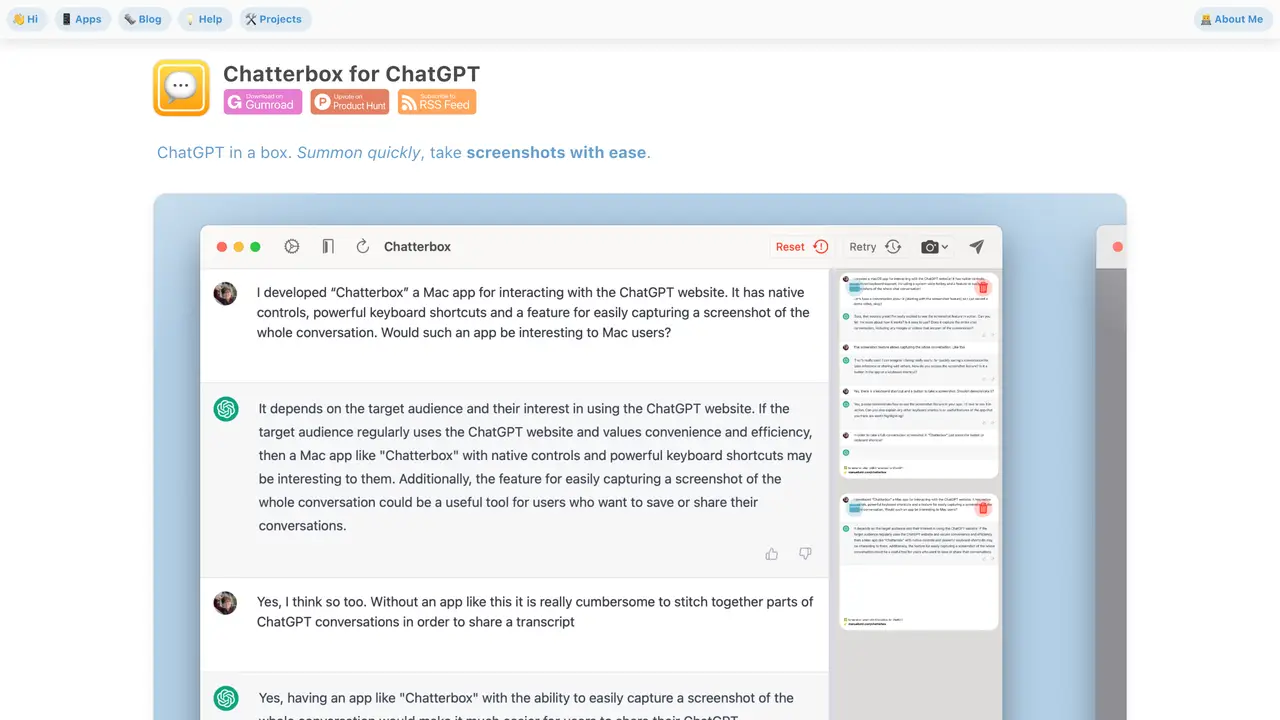
Chatterbox for ChatGPT is a browser-based application designed to enhance customer engagement by enabling businesses to create, manage, and automate conversations with their audience. The tool integrates directly with ChatGPT, allowing users to build custom conversation flows without requiring coding skills. It provides a visual interface for designing automated dialogues, including the ability to incorporate unique templates and predefined responses tailored to specific customer interactions. Users can deploy these conversations across various platforms and monitor responses in real time through a centralized dashboard. The platform also includes analytics features to track customer behavior, identify trends, and generate insights that inform marketing strategies. Chatterbox is particularly suited for small to medium-sized businesses seeking to streamline customer support, lead generation, or sales processes through automated yet personalized interactions. Its intuitive design and seamless integration with ChatGPT make it accessible to users without technical expertise.
Chatterbox for ChatGPT is a native macOS app designed to provide a more integrated and efficient way to interact with the ChatGPT website directly from a Mac. It offers features like quick summoning via a global hotkey, screenshot management, and keyboard shortcuts for streamlined use.
The tool is suitable for Mac users who frequently use ChatGPT and want a more seamless, native-like experience. It is particularly useful for those who need quick access to ChatGPT, efficient screenshot management, and convenient keyboard-driven workflows.
Chatterbox is available for free on Gumroad, where users can download it by entering $0. Optional tips are appreciated to support the developer. No subscription or recurring fees are required.
Chatterbox does not integrate with external tools or services beyond its native macOS functionality. It acts as a specialized browser for the ChatGPT website and relies on OpenAI’s infrastructure for its core features.
Chatterbox depends on the ChatGPT website’s functionality and may stop working if OpenAI makes significant changes to its interface. It also requires an OpenAI account to use ChatGPT, and all interactions are subject to OpenAI’s terms of use.
To get started, download Chatterbox from Gumroad by entering $0 (or a tip if desired). Once installed, use the global hotkey (e.g., ⌥ Space) to summon ChatGPT quickly, or utilize keyboard shortcuts for actions like taking screenshots or starting new chats.
We use essential cookies to run aitoolnavio™, and optional cookies to analyze traffic and measure our marketing. You choose what we use — optional cookies stay off unless you turn them on. See our Privacy Policy.
One short email a week: fresh tools worth trying, honest takes and the updates that actually matter. No spam, unsubscribe any time.
Automate customer service, track interactions, gather insights for improving customer support performance.
Web-based CRM that unifies WhatsApp, Instagram, email, and calls into one inbox for sales teams to manage leads and automate conversations.
Automate support, target customers, gather insights – all with AI-powered tools.
Automate tailored conversations, analyze customer behavior, and automate lead gen, customer service, and sales.
Real-time customer support with personalized service, accessible through a mobile app.
Automate review requests, analyze sentiment, and monitor ratings with a streamlined dashboard for improved customer feedback.
AI-powered lead generation and customer communication platform for local businesses to capture, respond to, and convert leads across text, email, web chat, and calls.
Gorgias is an AI-driven Ecommerce customer experience enhancer that integrates major platforms.
Unify communication channels, automate customer service, track customer inquiries with advanced analytics.
Identify pain points, generate reports, and monitor customer sentiment in real-time.
Automate customer responses, personalize messages, and create an AI-powered chatbot for 24/7 customer service.
Automatically summarize chat transcripts, comprehend key components, and accelerate transcript analysis.
Matched on what this tool does — grouped by the job you would be replacing.
Paid placement · similar tools from listings that support aitoolnavio™
Instant lead response for home-service pros: your phone rings on every new lead, plus 14 days of follow-up
matches Automate customer engagement with easy-to-use templates · Track and monitor customer responses in real-time · Gain insights into customer behavior with powerful analytics
Automate content posting, track performance, schedule content in advance, and automate responses with powerful analytics tools.
Automate customer conversations, integrate with customer service tools, and track satisfaction with advanced analytics.
Automate conversations, uncover insights, and improve engagement with personalized, analytics-driven customer interactions.
Automate customer service, intelligent search, and automated data entry with PaletteBrain.