AI-powered video messaging tool that records, shares, and manages video messages with AI-generated titles, summaries, and tasks.
16M visits/mo-3.4%#5 Chatbots & Assistants

AI agent that joins Microsoft Teams calls as a live participant with voice, vision, and avatar
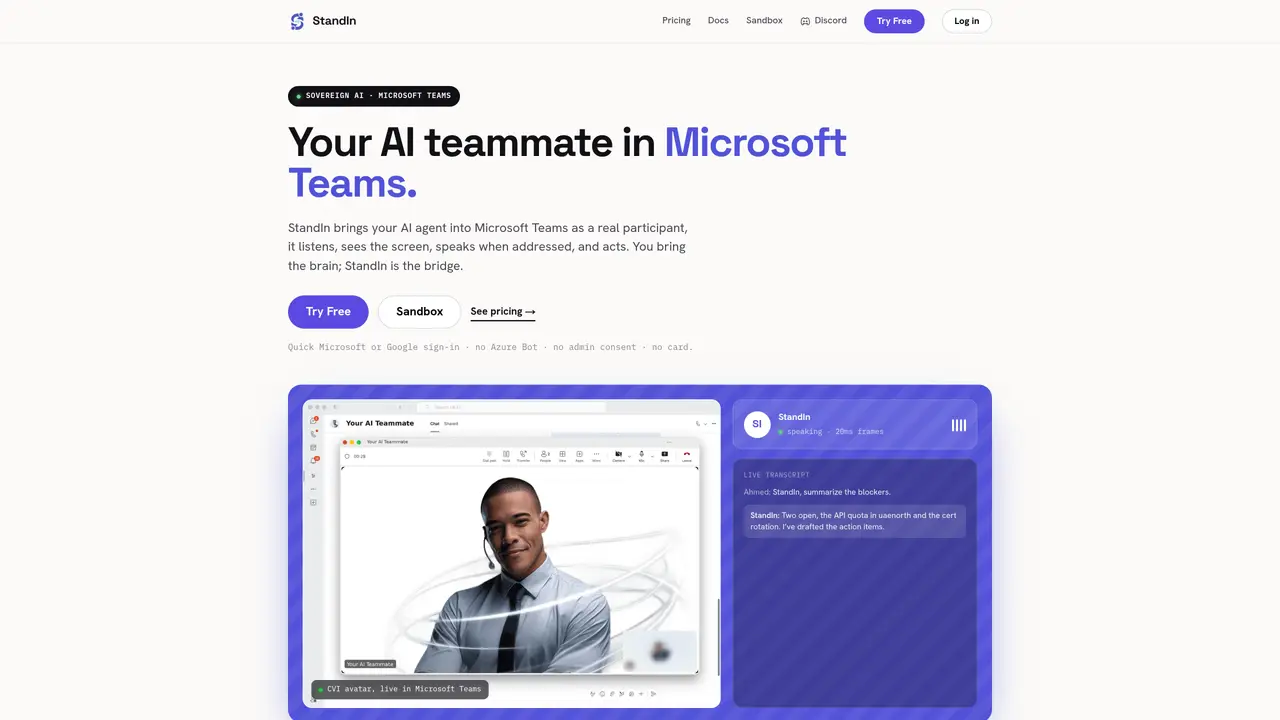
StandIn integrates an AI agent into Microsoft Teams as a real participant that listens, sees the screen, speaks when addressed, and performs actions. Users connect their own AI agent via a WebSocket, while StandIn provides the media bridge to handle live voice, screen-sharing vision, and a lip-synced avatar tile within Teams. The setup requires no Azure Bot or admin consent, and the bot identity and meeting content remain within the user’s Microsoft tenant. StandIn supports multiple open-source agent backends such as OpenClaw, Hermes, LiveKit, ElevenLabs, OpenAI, Deepgram, and Cartesia. The tool is designed for teams that want to deploy AI assistants in meetings without relinquishing control of the agent’s logic or data. Typical use cases include summarizing blockers during calls, drafting action items, or providing real-time insights based on meeting content.
StandIn integrates an AI agent into Microsoft Teams as a real participant that listens, sees the screen, speaks when addressed, and performs actions. Users connect their own AI agent via a WebSocket, while StandIn provides the media bridge to handle live voice, screen-sharing vision, and a lip-synced avatar tile within Teams.
No, StandIn does not require Azure Bot or admin consent. Users can deploy the tool using their own Microsoft Entra (Azure AD) app and generate a Teams app package through a BYO-AAD (Bring Your Own Azure Active Directory) wizard.
StandIn supports multiple open-source agent backends, including OpenClaw, Hermes, LiveKit, ElevenLabs, OpenAI, Deepgram, and Cartesia. Users can connect their preferred AI model via a WebSocket.
StandIn ensures data sovereignty by keeping the bot identity and all meeting content within the user’s Microsoft tenant. The media worker only carries real-time media and stores none of it, adhering to a zero-content retention policy.
Yes, StandIn offers a free sandbox for users to test the tool before making a purchase. The sandbox allows users to connect their AI agent and experience the features without any setup.
No, StandIn is an independent product of Komaa DigiTech and is not affiliated with, endorsed by, or sponsored by Microsoft. Microsoft trademarks are used only to describe compatibility.
We use essential cookies to run aitoolnavio™, and optional cookies to analyze traffic and measure our marketing. You choose what we use — optional cookies stay off unless you turn them on. See our Privacy Policy.
One short email a week: fresh tools worth trying, honest takes and the updates that actually matter. No spam, unsubscribe any time.
AI-powered video messaging tool that records, shares, and manages video messages with AI-generated titles, summaries, and tasks.
Hardware device that records conversations and converts them into searchable transcripts, summaries, and notes.
Automate transcription, generate summaries, identify speakers, and timestamps for video-conferencing conversations.
AI-powered meeting recorder and summarizer that captures, transcribes, and generates actionable insights from conversations.
Automatically record, transcribe, take notes, and create summaries with key insights during meetings.
Transforms audio/video to summarized text, instantly, across platforms.
Automatically transcribe meetings, create summaries, and securely store audio files in a searchable format.
Automatically turn meetings into searchable notes and tasks.
Wearable AI device that captures conversations and meetings, then auto-generates transcripts, summaries, action items, mind maps, and searchable notes.
Record, transcribe, and share key insights from virtual trainings, online meetings, and content creation.
Record, transcribe, and summarize online meetings from Google Meet and Zoom with AI, then share insights across collaboration tools.
Transform audio/video to text with precision, supporting 1500+ platforms, enriched by AI features.
Matched on what this tool does — grouped by the job you would be replacing.
matches Live voice participation in Teams calls · Screen-sharing vision for real-time content analysis · Lip-synced avatar tile within Teams
AI meeting assistant that captures real-time transcription, notes, and summaries in Zoom, Google Meet, and Microsoft Teams without adding a bot.
AI meeting bot that joins calls, takes notes, transcribes conversations, and answers questions aloud without app installation.
AI agent that joins live screen-sharing calls to onboard users 24/7
matches Real-time transcription and response
matches BYOD agent integration via WebSocket · BYO-AAD identity management
AI meeting note-taker and screen recorder that auto-joins calls, transcribes conversations, and generates searchable summaries and action items.
Streamline meeting bots across Zoom, Google Meet, Teams with Recall.ai's universal API.
API to programmatically join, record, stream, and transcribe Zoom, Google Meet, and Microsoft Teams calls with real-time transcripts and per-participant speaker labels.
Real-time voice, video, and AI infrastructure platform with WebRTC SDKs and Pipecat for developers building conversational agents.
Open-source framework for building real-time multimodal conversational AI agents with voice, vision, and animated avatars.
Visually build conversational AI agents with text, voice, avatar, and scoring