

AI-powered website builder that generates a professional site in under a minute and includes tools for content, SEO, and analytics.
52M visits/mo+0.7%#4 Coding & Development
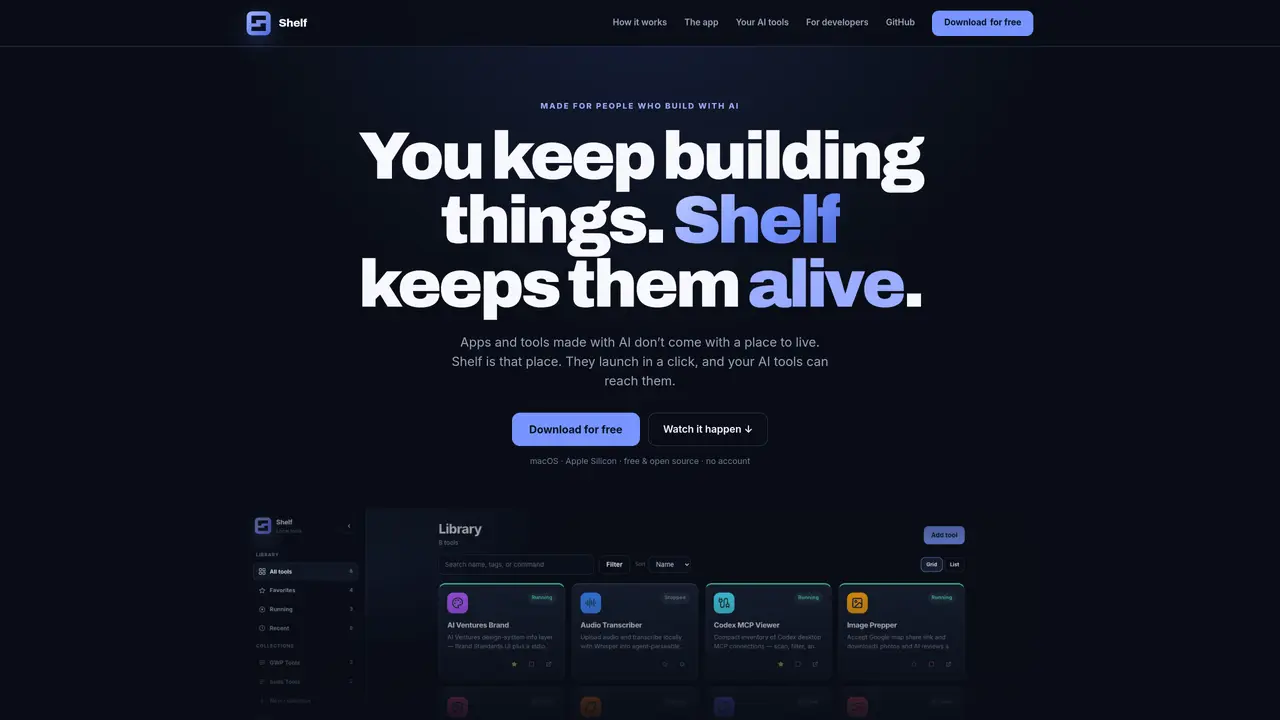
Shelf is a macOS application that launches, runs and manages AI-built tools directly from project folders without requiring terminal commands or configuration files. Users can drop a project folder onto Shelf, which automatically detects setup and launch commands, installs dependencies, and starts the tool. The application remembers ports and launch details so tools can be restarted with a single click at any time. Shelf provides a unified library view of all tools, showing their status and agent accessibility. It supports one-click connections to AI agents like Claude Code, Cursor, and Codex, allowing them to discover and launch tools directly from the same library. The tool also includes features for managing design profiles, sharing tools with team members via shareable links, and toggling between simple and developer views. Shelf is designed for developers who build with AI and need a reliable way to keep their tools alive and accessible.
Shelf is a macOS application designed to launch, run, and manage AI-built tools directly from project folders without requiring terminal commands or configuration files. It automatically detects setup and launch commands, installs dependencies, and starts tools with a single click. Shelf remembers ports and launch details, allowing tools to be restarted easily at any time.
Shelf is designed for developers who build with AI and need a reliable way to keep their tools alive and accessible. It is particularly useful for those who want to avoid manual terminal commands and configuration file management.
Shelf provides a unified library view of all tools, which AI agents like Claude Code, Cursor, and Codex can access. Agents can discover, launch, and interact with tools directly from Shelf’s library, enabling seamless collaboration between developers and AI assistants.
Yes, Shelf allows users to share tools with team members via shareable links. The tool packs all necessary setup details, including launch commands and ports, into a shareable file that team members can approve and run with minimal effort.
Yes, Shelf includes features for managing design profiles, which store colors, typography, and brand guidelines in a local file. These profiles can be accessed by connected AI agents to ensure consistency in the tools they build.
Shelf is free and open-source, and it does not require an account to use. It is available for macOS on Apple Silicon and can be downloaded directly from the website.
We use essential cookies to run aitoolnavio™, and optional cookies to analyze traffic and measure our marketing. You choose what we use — optional cookies stay off unless you turn them on. See our Privacy Policy.
One short email a week: fresh tools worth trying, honest takes and the updates that actually matter. No spam, unsubscribe any time.
AI-powered website builder that generates a professional site in under a minute and includes tools for content, SEO, and analytics.
AI-powered coding platform that uses agents to plan, write, and test software with real-time feedback and verifiable artifacts.
Automate code, research, and documents using agents.
AI-powered code assistant that generates, reviews, optimizes, and debugs code with natural language prompts and editor integrations.
AI assistant for safe, reliable productivity with code, collaboration, and integrations.
AI-powered IDE for autonomous coding tasks and agentic development workflows
Privacy-focused AI chatbot that generates uncensored text, code, images, and translations without storing conversations or requiring an account.
A free web-based AI chatbot and agent for writing, coding, research, and content creation with multilingual support.
Write & run code in 50+ languages, auto-complete with AI, and code faster with an intuitive interface.
An IDE that automates legacy-to-modern code migration using autonomous coding agents.
AI models that return typed decisions with calibrated confidence for software automation
Practice coding challenges, improve technical skills, get detailed explanations, compare performance with peers.
Matched on what this tool does — grouped by the job you would be replacing.
matches Drop project folders to auto-detect setup and launch commands · One-click tool launching and restarting · Agent connections for Claude Code, Cursor, Codex, and others
Parallel AI coding agent IDE that runs multiple agents side by side in isolated git worktrees for faster, comparative development.
Run and manage remote AI coding agents from any device with real-time sync and a clean UI.
Shared workspace for teams of AI coding agents
matches Design profile management from CSS variables and Tailwind config
Connects AI agents to a design system and design skills for consistent UI
Extracts a website’s design system into a downloadable Markdown file