
xAI builds Grok frontier AI models for reasoning, coding, voice, images, video, enterprise workflows, and developer APIs.
34M visits/mo+16.2%#6 Coding & Development
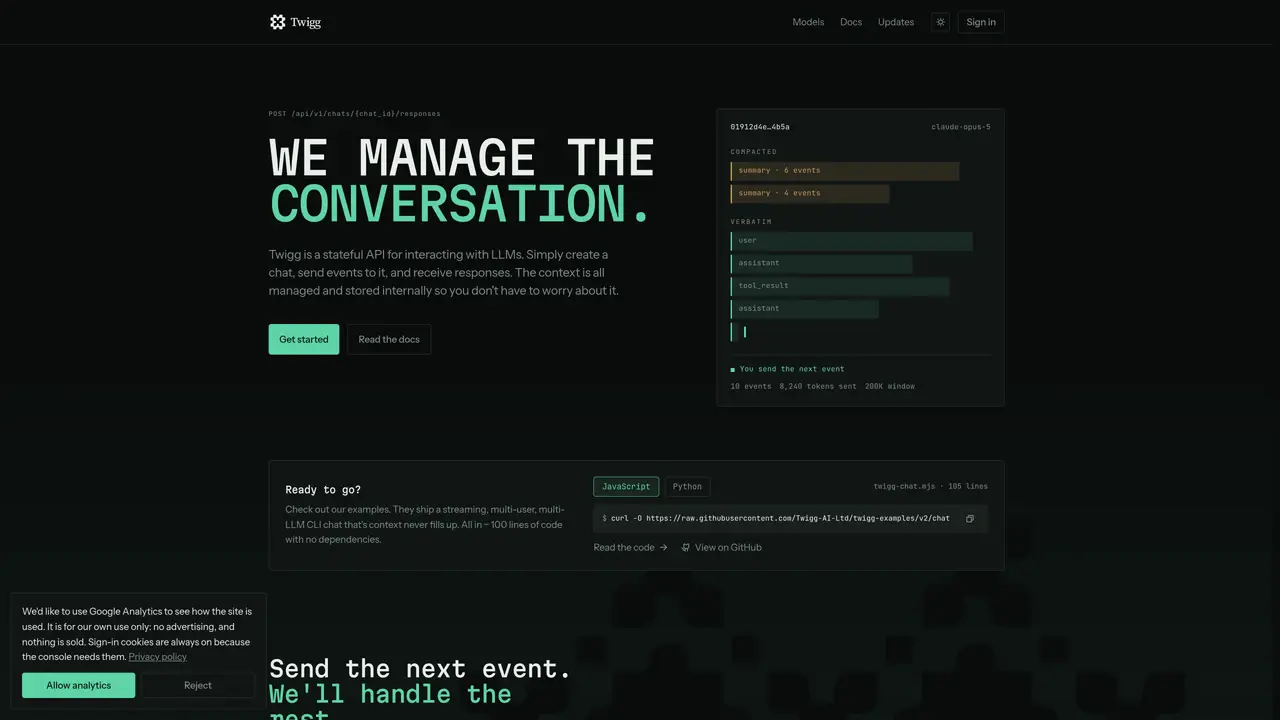
Twigg provides a stateful API for interacting with large language models. Users create a chat session and send events to it, receiving responses while the system manages the conversation context internally. The tool stores conversations outside LLM providers, allowing context to persist across model switches. It includes a hosted context store, an assembler to fit conversations to model context windows, and a model router that directs requests to providers such as Anthropic, OpenAI, Google, xAI, Fireworks, or OpenRouter. Twigg also reports the cost of each request. The API is designed for developers who need consistent, managed conversations without handling context themselves.
Twigg is a stateful API for interacting with large language models. It manages conversation context internally, stores conversations outside LLM providers, and allows users to create a chat session, send events to it, and receive responses without handling context themselves.
Twigg is designed for developers who need consistent, managed conversations with LLMs without managing context themselves. It suits applications requiring model switching, cost tracking, and external context storage.
Twigg allows users to create a chat once and switch models mid-conversation. The system fits the conversation to each model's context window and routes requests to providers like Anthropic, OpenAI, Google, xAI, Fireworks, or OpenRouter.
Yes, Twigg reports the cost of each request made through its API, providing transparency on expenses associated with LLM usage.
To get started, visit the Twigg documentation at https://twigg.ai/llms.txt or the quickstart guide at https://twigg.ai/docs/quickstart.md. The API base URL is https://api.twigg.ai, and authentication is done using an API key as a bearer token.
The API documentation is available at https://twigg.ai/llms.txt, with a full reference at https://twigg.ai/llms-full.txt. The OpenAPI spec can be found at https://api.twigg.ai/openapi.json.
twigg.ai · third-party estimates from Similarweb
Last 4 months · grows by one month every month
Share of visits by channel
No measurable traffic from Social, Paid Referrals or Search.
Coding & Development · Sep 2026
Traffic figures are third-party estimates, good for scale and trends; they can differ from a company's own numbers. Updated monthly.
We use essential cookies to run Aitoolnavio, and optional cookies to analyze traffic and measure our marketing. You choose what we use — optional cookies stay off unless you turn them on. See our Privacy Policy.
One short email a week: fresh tools worth trying, honest takes and the updates that actually matter. No spam, unsubscribe any time.
xAI builds Grok frontier AI models for reasoning, coding, voice, images, video, enterprise workflows, and developer APIs.
Open-source backend platform providing Postgres, authentication, APIs, and real-time features to build scalable apps quickly.
Unified platform to access and switch between hundreds of AI models like ChatGPT, Claude, and Gemini via a single API.
Meta AI enhances machine learning, NLP, and computer vision capabilities.
A cloud platform for deploying, scaling, and managing web apps and AI workloads with Git-based CI/CD and edge functions.
AI-powered coding platform that uses agents to plan, write, and test software with real-time feedback and verifiable artifacts.
Chat, build, and explore with open AI models.
Standardize application packaging and execution with portable containers for consistent local and cloud workflows.
Cloud communications platform that lets developers embed SMS, voice, WhatsApp, email, video, verification, and conversational AI via APIs.
Accelerates AI inference, optimizes speed, scalability, cloud-ready.
Open-source platform combining product analytics, session replay, A/B testing, and feature flags in one toolkit for product engineers.
AI-native builder that turns prompts into full-stack web apps, syncs to GitHub, and deploys to Vercel in seconds with visual editing.
Matched on what this tool does — grouped by the job you would be replacing.
matches Stateful chat sessions · Context window management · Conversation persistence
A platform for building stateful AI agents with persistent memory and transparent reasoning.
Unified infrastructure for managing AI sessions, costs and routing
Open-source agent harness infrastructure for running AI agents locally or in production
matches Model routing across providers · Cost tracking per request · Mid-conversation model switching
Unified API gateway for routing and managing AI model requests
Unified API gateway for accessing multiple AI models through a single interface
OpenAI-compatible API for server-side multi-agent orchestration, LLM routing, and centralized observability.
Unified API for routing AI models with spend control and usage tracking